Test Customer Demand for Crypto Payments
The Crypto Interest & Engagement Button allows you to measure customer interest in paying with cryptocurrency before launch. By integrating this button, you can collect customer interactions, emails, and waitlist sign-ups—all without processing any payments immediately.
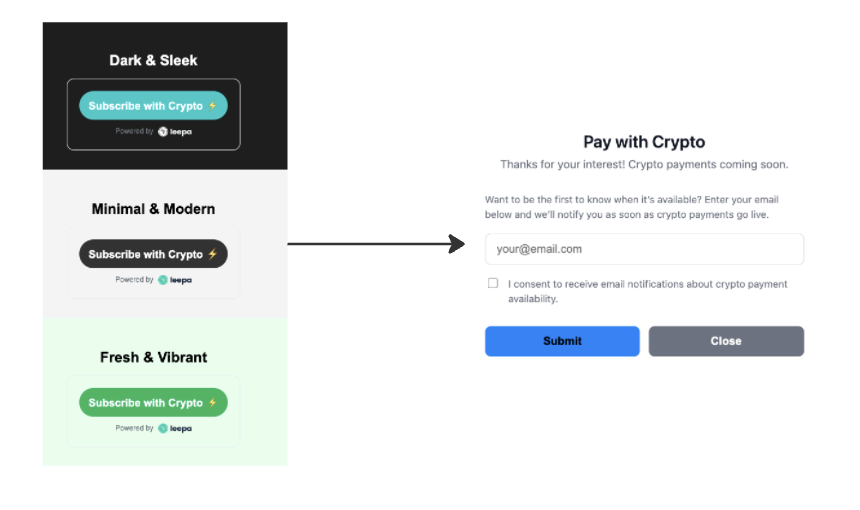
How It Works
- Customer clicks “Pay with Crypto” The button records the interaction in our database.
- Modal opens A pop-up asks the customer if they want to receive updates via email.
- Customer enters email They are added to your “waitlist” for crypto payments.
- You get data Track interest, cart sizes, and popular products.
Step 1 – Get Your Merchant ID
- Log in to your Leepa Africa Dashboard.
- Go to Settings → API Keys.
- Copy your Merchant ID.
Step 2 – Add the Script to Your Website
Place the following script anywhere in your HTML:
Step 3 – Customize Button (Optional)
The button can be fully customized using the data-* attributes. Here’s what each field does. You can customize the look of your buttons to match your website’s style. You can find real code examples here.
Attribute | Required | Description | Example |
| ✅ Yes | Your unique Merchant ID. |
|
| ⚙️ Optional | Text displayed on the button. |
|
| ⚙️ Optional | Background color of the button block. Accepts HEX or RGB. |
|
| ⚙️ Optional | Button color. |
|
| ⚙️ Optional | Color of the text on the button. |
|
| ⚙️ Optional | Logo style ( |
|
| ⚙️ Optional | The total cart value associated with this product. |
|
| ⚙️ Optional | Your business category. |
|
| ⚙️ Optional | Product details in JSON format. |
|
Step 4 – Collect Data & Analyze
For the APIs you can use to collect data about user engagement/interest use the following set of APIs. This feature is currently restricted to the test environment.
What made this section helpful for you?
What made this section unhelpful for you?


On this page
- Test Customer Demand for Crypto Payments