

Leepa Developer Docs
Leepa gives your platform crypto payment acceptance and digital wallet capabilities — from a hosted checkout page you can link to in minutes, all the way to a fully headless API where you control every pixel. Pick the integration depth that fits your timeline and your users.
What you can build
| Product | What it does | Time to live |
|---|---|---|
| Checkout | Accept crypto payments and settle in stablecoins. Customers pay by connecting a wallet, transferring from any exchange, or buying crypto with a card, bank transfer, Apple Pay or Google Pay. | Same day to days |
| Wallet | Give your users a self-custodial wallet without building custody infrastructure. Deposits, transfers, withdrawals. | Days to weeks |
| Payouts | Send stablecoin payouts to merchants, contractors or users from your merchant wallet. | Same day |
| Platform | Onboard sub-merchants under your own platform, set fees per account, consolidate reporting. | Days |
Three levels of integration
Every product above is available at whichever depth suits your team. You can start shallow and move deeper without re-integrating.
- No-code — share a hosted checkout link, or point users at a wallet. Nothing to build or deploy.
- Low-code — drop a single
<script>tag into your site for checkout or a wallet modal. - API — build fully custom flows against the REST API. You own the entire experience.
Start here
Create a test account, take one payment end to end without writing code, then pick your integration. Start by creating a test merchant account, make a test payment, then explore the Use Cases below to find the right integration for you.
Next step: Which integration is right for you? → — match your timeline and control needs to a no-code, low-code, or API path.
Products at a Glance
Leepa is one platform with two integrable products.
| Checkout | Wallet | |
|---|---|---|
| What it does | Accept crypto payments, settle in stablecoins | Branded wallet experience for your users |
| Who uses it | Merchants and platforms selling products | Platforms offering wallet functionality |
| Integration paths | Checkout links (no-code) · Purchase Sessions API · Embedded · WooCommerce | Wallet Web App · Hosted Branded Wallet · Embedded Wallet Button · Headless (Wallet API) |
| Typical time to live | Same day to days | Days (embed) · Weeks (headless) |
Next step: Which Integration Is Right for Me? → — match your situation to the exact guide.
Which Integration Is Right for Me?
Start with what you are trying to do. Pick a card for the fast path, or read the tables below to match your exact situation to a guide.
Accept crypto payments
Take stablecoin payments at checkout — hosted, in your own flow, or embedded on your site.
Give users a wallet
Issue branded, self-custodial wallets — hosted on a subdomain, an embedded button, or fully headless.
Send payouts
Send crypto out to customers, contractors, or merchants — from the dashboard or the API.
Run a platform
Onboard sub-merchants, set per-account fees, and consolidate reporting under your platform.
Or match your exact situation to a guide below. Each row names the exact guide and the API reference it maps to.
Accepting payments? → Checkout
| Your situation | Use this guide | Effort |
|---|---|---|
| No dev resources, just sell | Checkout Links | None — dashboard only |
| Checkout in my own flow | Purchase Sessions API | One backend call + redirect |
| Customer stays on my site | Embedded Checkout | One backend call + embed |
| WooCommerce store | WooCommerce Plugin | Plugin install |
Embedding a wallet? → Wallet
| Your situation | Use this guide | Effort |
|---|---|---|
| Fully branded wallet, zero frontend | Hosted Wallet | One DNS record + assets |
| Wallet button inside my site | Embedded Wallet Button | One script tag + one call |
| Strict UX, own frontend | Headless Wallet | Full build, weeks |
Something else?
| Your situation | Use this guide |
|---|---|
| Onboarding sub-merchants of your own | Run a Merchant Platform |
| Sending crypto out, not accepting it | Send Funds / Payouts |
Next step: Quickstart → — pick a product and run your first call against test mode.
Quickstart
One opinionated path per product, each ending in a working call against test mode. Pick yours:
- Quickstart: Hosted Checkout — create a purchase session and take a test payment.
- Quickstart: Wallet — create a user, provision a wallet, run a transfer in sandbox.
Both assume you have credentials. See Environments & Test Mode to get set up.
Next step: Quickstart: Hosted Checkout → — create a purchase session and take your first test payment.
Authentication
Leepa has implemented a secure, API key–based authentication system for API access. Here’s an overview:
API Access
- The API key must be included in the HTTP headers of each request to authenticate.
- All API interactions require HTTPS to ensure the security of data in transit.
Security
- All API requests require HTTPS.
- Rate limiting is enforced per API key to prevent abuse.
This authentication system is designed to ensure secure and controlled access to the Leepa API, giving users the ability to manage their API keys directly for increased security and flexibility.
All API requests must include the following headers for authentication:
- Merchant-ID: The unique identifier assigned to each merchant.
- API-Key: The API key generated through the merchant dashboard.
Merchant-ID: <your-merchant-id>
API-Key: <your-api-key>
When it fails
- 401 Unauthorized. The
Merchant-IDorAPI-Keyheader is missing or incorrect — copy both values again from Generating API keys. - 401 with valid-looking credentials. A test key is being sent to the production host, or a production key to the test host — keys are environment-specific. See Environments & Test Mode.
- Request rejected before it reaches the API. The call was made over plain HTTP — all API requests require HTTPS.
Generating API keys
To generate and manage your API keys:
For Production
- Log into https://app.leepa.africa with your wallet.
- Navigate to Settings.
- Click on Click here to manage API Keys.
For Test
- Log into https://test.leepa.africa with your wallet.
- Navigate to Settings.
- Click on Click here to manage API Keys.
Note: API keys can be disabled but not re-enabled. To disable an API key, go to the Your API Keys page, locate the key you wish to disable, and click Disable. You cannot use the same API key on both test and production environments.
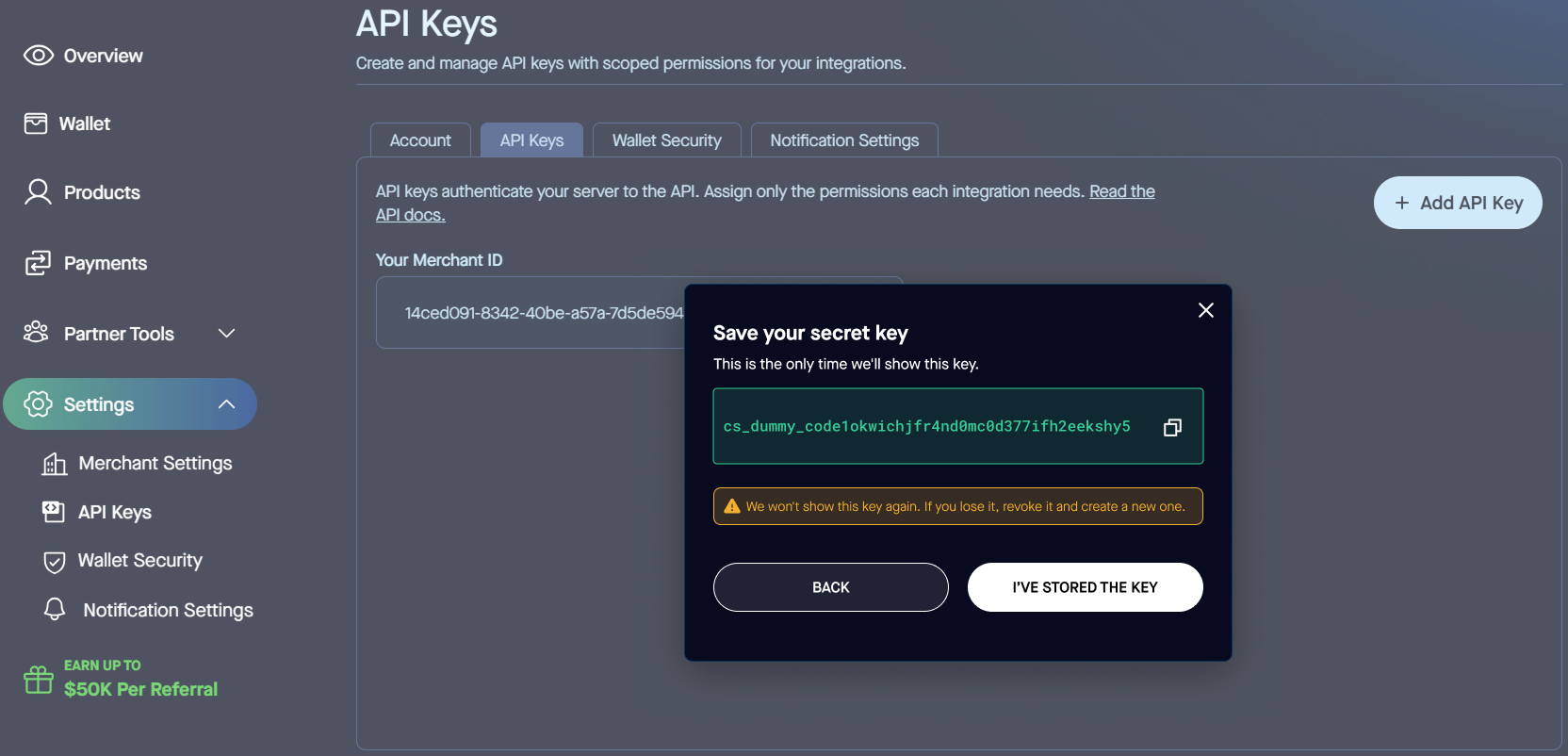
Next step: Environments & Test Mode → — see which host and credentials to use for test versus production.
Environments & Test Mode
| Aspect | Test | Production |
|---|---|---|
| Dashboard | https://test.leepa.africa |
https://app.leepa.africa |
| API (Checkout & Wallet) | https://test-api.leepa.africa |
https://api.leepa.africa |
| Buy / Checkout UI | https://test-buy.leepa.africa |
https://buy.leepa.africa |
Test environment behavior
- Test credentials never work against production, and vice versa.
- The test environment runs on testnet blockchain networks — no real funds are used.
- Recurring payments: production enforces a minimum scheduling frequency of once per day; test allows once per minute.
- Test merchant credentials are provided during onboarding alongside production credentials.
Getting test tokens
To make test payments you need testnet USDC. Use the Circle faucet to mint free USDC on supported testnets:
- faucet.circle.com — supports Ethereum Sepolia, Avalanche Fuji, Polygon Amoy, Base Sepolia, Solana Devnet, and more. Connect your wallet and request tokens — they arrive within seconds. Polygon Amoy is the fastest and cheapest default.
Chain IDs
| Network | Test | Production |
|---|---|---|
| Polygon | 80002 (Amoy) |
137 |
| Base | 84532 (Sepolia) |
8453 |
| Ethereum | 11155111 (Sepolia) |
1 |
When it fails
- Credentials rejected. Test credentials never authenticate against production, and production credentials never against test — check you are using the host that matches your key. See Authentication.
- 404 on a resource you just created. The resource exists only in the mode it was created in — a test-mode id returns 404 against the production host, and vice versa.
- Test payment stalls on empty balance. Your wallet was never funded — mint testnet USDC from the Circle faucet on the same network you are paying on before checkout.
Next step: Making a Test Payment → — run the full payment flow end to end before writing any code.
Making a Test Payment
A concrete, no-code walkthrough for seeing the full payment flow end to end before writing any code.
- Create or log into your test account at https://test.leepa.africa. This is the account you use to accept and make test purchases.
- Find your wallet address in your test account settings.
- Fund your wallet with test USDC before starting checkout: go to
faucet.circle.com, select Polygon PoS Amoy, paste your wallet address, and request test USDC. Tokens arrive within seconds. - Make a test purchase. Create a product in the dashboard (Products → + Add Product), copy the checkout link it generates, open it, and sign in using the same email as your merchant account to pay.
⚠️ Always fund your wallet before starting checkout. Do not attempt to add tokens during the checkout process.
Verify it worked
- The payment shows as confirmed in your test dashboard.
- If you have a webhook configured, a Payment event fires for the completed purchase.
When it fails
- Checkout stuck on insufficient balance. The wallet was not funded before checkout, or the faucet minted USDC on the wrong network — fund it first on the same network you are paying on. See Environments & Test Mode.
- Can't complete the purchase after signing in. The sign-in email must match your merchant account email — use the same address you registered the test account with.
Next step: Quickstart: Hosted Checkout → — take the same payment programmatically with a purchase session.
How Checkout Works
Checkout is a hosted payment experience. You create a purchase session (via dashboard or API), your customer completes payment on the checkout page, and you receive a webhook when it settles. You never handle wallet logic, conversion, or settlement yourself.
flowchart LR
  BE["Your Backend"]
  subgraph OURS["Leepa handles everything in between"]
    direction LR
    PG["Hosted checkout page"]
    PAY["Customer pays"]
    SET["Convert and settle in stablecoins"]
    PG --> PAY --> SET
  end
  BE -- "1. Create purchase session (one API call)" --> PG
  SET -- "2. Payment finalized webhook (one call back)" --> BE

  style BE fill:#e9eef6,stroke:#9aa7bd,color:#1f2a3a
  style PG fill:#0484fc,stroke:#0366c9,color:#ffffff
  style SET fill:#0484fc,stroke:#0366c9,color:#ffffff
  style PAY fill:#fde9c8,stroke:#e0b063,color:#6b4b12
The customer sees three steps
1. Info
The customer enters their name and email. A returning customer is detected by email and verified with a one-time code (valid for 20 minutes). If they hold a balance covering the purchase, they pay in a single step and skip payment selection entirely — this shortcut is called Fast Track and can be toggled per merchant.
Skip this step for known customers: pass the buyer's email, firstName, and lastName in the purchase session metadata. The customer is pre-registered and the Info step is skipped entirely. A missing or invalid field simply keeps the step in the flow.
2. Options
The customer picks an enabled payment option: Connect Wallet, Direct Transfer, or Buy Crypto. See Payment Options. If only one option is enabled, this step is skipped.
3. Pay
The order summary shows your platform fee and applicable fees before the customer commits.
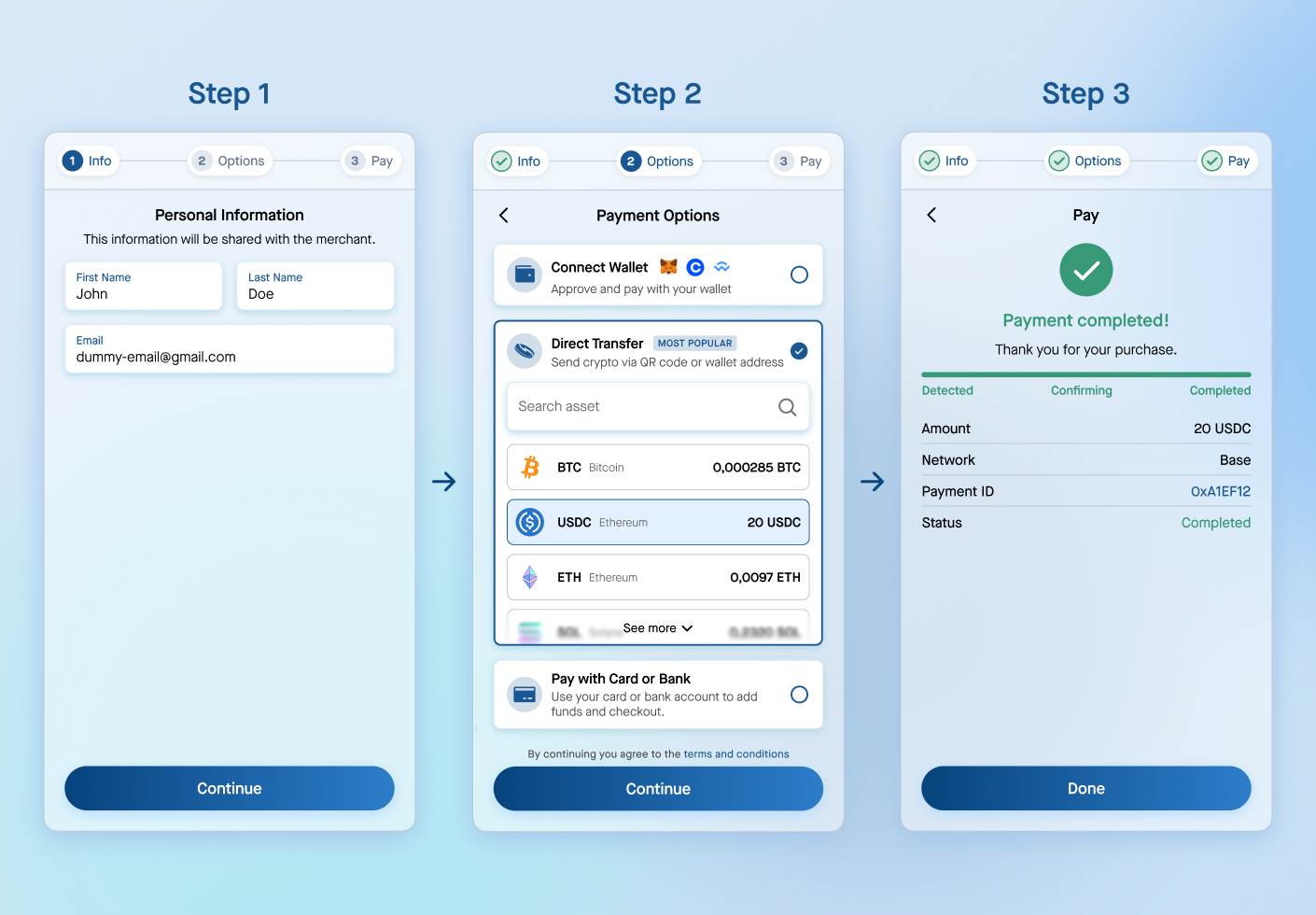
What you get: payment confirmation by webhook, settlement in stablecoins, full reporting in the dashboard.
When it fails
- The Info step still shows for a known customer. The
email,firstName, orlastNamemetadata was missing or invalid on the purchase session — set all three in the purchase session metadata to pre-register the buyer and skip the step. - No webhook arrives on settlement. The endpoint is not registered, returns a non-2xx, or its signature check rejects the event — see Webhooks.
Next step: Payment Options → — the three paths a customer can choose on the Options step.
Payment Options
Three independent payment paths. Which ones customers see, and in what order, is configured per merchant. See Per-Merchant Configuration.
Connect Wallet
- The customer pays from a wallet they control — either the Leepa platform wallet or a third-party wallet (MetaMask, Coinbase Wallet, WalletConnect; configurable per merchant)
- Available for one-time and subscription products
Direct Transfer
- The customer sends crypto to a platform deposit address from any source — a personal wallet, an exchange, or anywhere else
- Unique one-time deposit address per purchase, retired after use
- Deposit window 30 minutes by default, configurable
- One-time products only — not available for subscriptions
| Type | Assets |
|---|---|
| Stablecoins | USDC, USDT, USDG, PYUSD |
| Native | BTC, ETH, SOL, POL, TRX |
Networks: Bitcoin, Ethereum, Base, Polygon, Solana, Tron, Ink
The exact assets and networks available depend on your environment and per-merchant configuration — some tokens (e.g. USDG, PYUSD) are enabled in production but not in test.
Buy Crypto
- The customer pays with fiat — credit/debit card, bank transfer, Apple Pay, or Google Pay — which is converted to crypto
- Multiple liquidity providers; identity verification happens inside the onramp flow
- The purchased crypto lands in a wallet created in-flow; whitelabel partners run it branded on their own subdomain (see Hosted Wallet)
- Available for one-time and subscription products
When it fails
- A payment option the customer expected is missing. It is disabled in your per-merchant configuration — which options appear, and in what order, is set there.
- Direct Transfer is absent on a subscription product. Direct Transfer is one-time only; recurring products fall back to Connect Wallet or Buy Crypto — see One-Time & Subscription Products.
- A token like USDG or PYUSD is missing in test. Those assets are enabled in production only — switch to your production environment to see them.
Next step: Per-Merchant Configuration → — control which options appear and in what order.
One-Time & Subscription Products
| One-time | Subscription | |
|---|---|---|
| Connect Wallet | Yes | Yes |
| Direct Transfer | Yes | No |
| Buy Crypto | Yes | Yes |
- A recurring session creates an agreement; renewals process automatically, or a unique payment URL is generated if a renewal cannot be processed automatically.
- Minimum billing frequency: once per day in production, once per minute in test.
- Cancel via the dashboard or the Cancel an Agreement endpoint.
Terminology: a "recurring product" is billed via a Subscription, tracked by an Agreement object.
When it fails
- Direct Transfer is not offered on a recurring product. Subscriptions do not support Direct Transfer — use Connect Wallet or Buy Crypto for recurring billing.
- A renewal did not auto-process. When a renewal cannot be charged automatically a unique payment URL is generated instead; note the minimum billing frequency differs by environment (once per day in production, once per minute in test).
Next step: Checkout Quickstart → — create your first purchase session and take a test payment.
Per-Merchant Configuration
Every behavior below is configured per merchant — no deploy or SDK change required on your end. Request changes through your Leepa contact.
| Configurable | Options | Default |
|---|---|---|
| Enabled payment options | Any combination | All three |
| Payment option display order | Any order | Direct Transfer, Connect Wallet, Buy Crypto |
| Single-option behavior | Options step skipped automatically | Automatic |
| Connect Wallet list | MetaMask, Coinbase Wallet, WalletConnect | All |
| Direct Transfer assets + networks | Any subset / order | Full list |
| Direct Transfer deposit window | Minutes | 30 |
| Fast Track (returning customer shortcut) | On / off | On |
| Settlement | Stablecoin preference | USDC (others on request) |
| Fees | Platform fee % and network fees | Set per agreement — see Fees & Earnings |
Fast Track is the returning-customer shortcut. Once a customer is recognised by email and verified with a one-time code, if they already hold enough balance to cover the purchase they pay in a single step — skipping payment-option selection. Turn it off to always show the full options flow.
When it fails
- A configuration change is not reflected. Changes are requested through your Leepa contact and apply per environment — confirm you are viewing the right test or production dashboard.
- Only one option shows. Single-option behavior skips the Options step automatically; enable a second payment option to bring the step back.
Next step: Checkout Quickstart → — put your configuration to work with a live test payment.
Quickstart: Hosted Checkout
From zero to a test payment in four steps.
Prerequisites
- A test Leepa merchant account.
- Your test
API-KeyandMerchant-IDfrom Settings → API Keys in the test dashboard. - An endpoint to receive the Payment Webhook (optional — needed only to confirm payments server-side).
- Get your test
API-KeyandMerchant-IDfrom Settings → API Keys in the test dashboard. See Environments & Test Mode. - Create a purchase session from your backend:
curl -X POST https://test-api.leepa.africa/v1/purchase/session/start \
  -H "API-Key: $API_KEY" \
  -H "Merchant-ID: $MERCHANT_ID" \
  -H "Content-Type: application/json" \
-d '{ "name": "Test product", "details": "A test product", "amount": 9.99, "currency": "USDC" }'- Open the
urlfrom the response (new tab, modal, or embed) and complete a test payment. - Receive the Payment Webhook at your endpoint. Done.
Full field reference: Commerce / Checkout API Reference.
Verify it worked
- The
POSTreturns a sessionurl— open it and complete a test payment. - After paying, a Payment Webhook fires at your endpoint and the payment appears in the dashboard.
When it fails
- 401 Unauthorized. The
API-KeyorMerchant-IDis wrong or missing, or a test key is being used against the production host — see Environments & Test Mode. - No webhook arrives. The endpoint is not registered or returned a non-2xx response — see Payment Webhook.
Next step: Embedded Checkout → — keep the customer on your own site instead of redirecting out.
Checkout Links (No-Code)
The simplest way to accept a payment: create a product in the dashboard and share the generated checkout link. No code required.
Prerequisites
- A test or production Leepa merchant account.
- A product created in the dashboard under Products.
How it works
- Go to Products → + Add Product in the dashboard.
- Set the product name, price, and whether it is one-time or recurring.
- Copy the generated checkout link (e.g.
buy.leepa.africa/abc123). - Share the link via email, social media, or embed it in a button on your site.
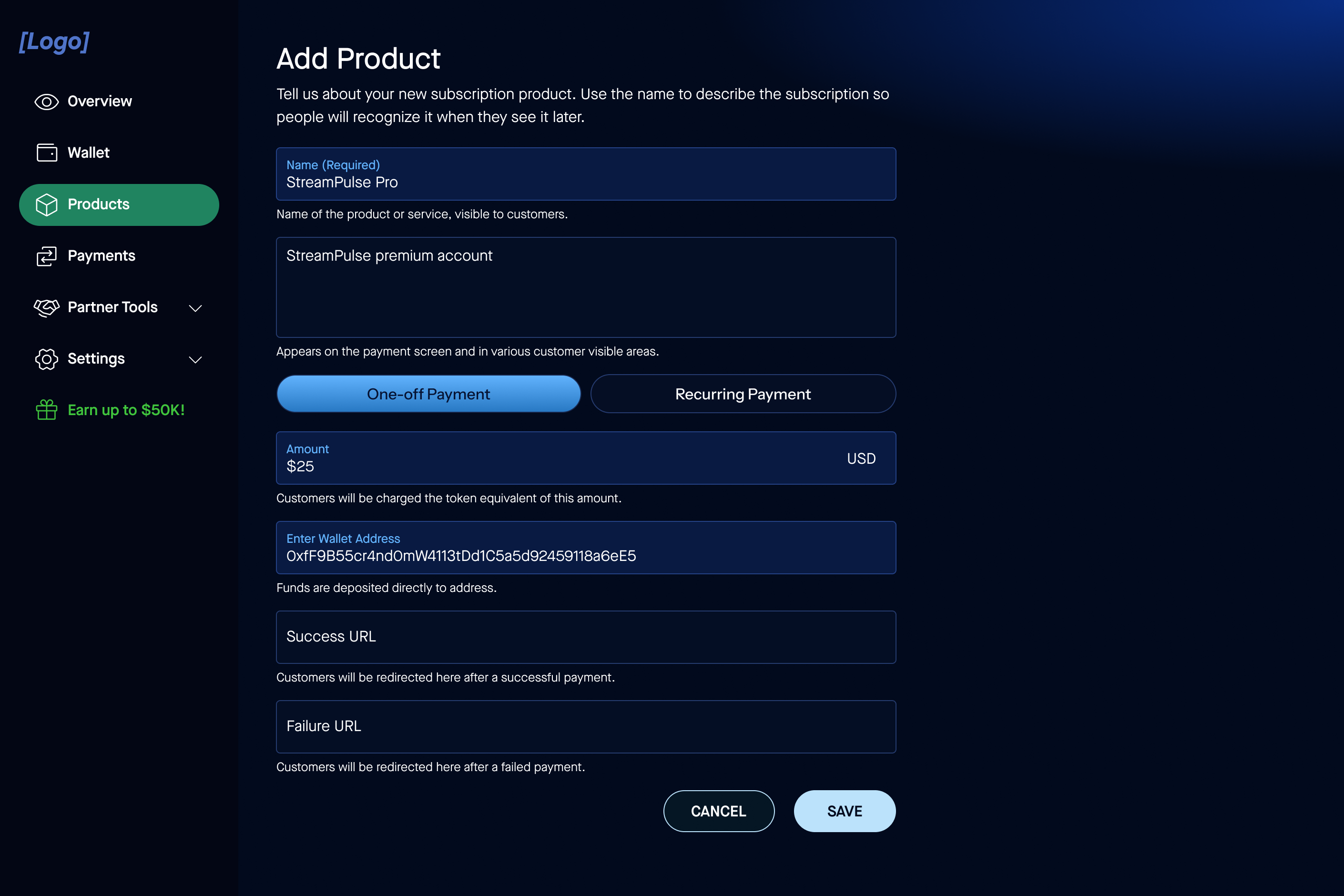
When a customer visits the link, they go directly to the hosted checkout page. Payments are confirmed via webhook and tracked in the dashboard.
Verify it worked
- Opening the link loads the hosted checkout page for the product.
- A test payment appears in the dashboard shortly after it completes.
When it fails
- The link returns a 404. The product is unpublished, or the link belongs to the other environment — confirm the product is active and you are using the matching test or production link.
- The payment is not tracked. You are viewing the other environment's dashboard — switch between test and production to match where the payment was made.
Next step: Purchase Sessions API → — for more control over the checkout flow with dynamic amounts.
Integrate: Purchase Sessions API
Create checkout sessions programmatically; the hosted page does the rest. One backend call, one redirect, one webhook.
This is the integration guide. The canonical field-level endpoint reference is in the Commerce / Checkout API Reference — build against that for request/response schemas.
Prerequisites
- An
API-KeyandMerchant-IDfrom Settings → API Keys. See Generating API keys. - A webhook endpoint to receive the Payment Webhook.
1. Create a purchase session
https://api.leepa.africa/v1/purchase/session/start
| Header | Value |
|---|---|
API-Key |
Your API key |
Merchant-ID |
Your merchant ID |
Content-Type |
application/json |
Full body fields: Create a Purchase Session.
2. Send the customer to checkout
The response includes a url field. Open it in a tab, modal, or embed.
3. Listen for webhooks
Payment Webhook on success, Failed Payment Webhook on failure. See Webhooks & Events for signing and retries.
4. Recurring payments
A recurring session creates an agreement that renews automatically. Cancel via the dashboard or Cancel an Agreement.
Verify it worked
- The create call returns a
urlfield — open it to reach the hosted checkout. - A successful payment delivers a Payment Webhook to your endpoint.
When it fails
- 401 Unauthorized. The
API-KeyorMerchant-IDis wrong or missing, or a test key is being used against the production host — see Generating API keys. - No webhook arrives. The endpoint is not registered, returns a non-2xx, or its signature check rejects the event — see Webhooks & Events.
- Opening the
urlfails. The session has expired, or it belongs to the other environment — create a fresh session against the host that matches your keys.
Next step: Embedded Checkout → — embed the returned url so customers stay on your site.
Integrate: Embedded Checkout
Keep the customer on your site. Two embed shapes: a button that opens a hosted checkout in a new context, and a full iframe that never leaves your page. Both start from a product created in the dashboard, or a purchase session for dynamic amounts.
Two different buttons. The checkout button (https://buy.leepa.africa/djs/button.js, data-id, data-color) opens a payment for one product. The wallet button (https://wallet.leepa.africa/embed/button/, data-embed-key, data-button-bg) opens a wallet modal. Same look, different products — don't mix the snippets.
Prerequisites
- A product created in the dashboard (its ID becomes
data-idor the checkout link), or a purchase session for dynamic amounts. - A page on your site where you can add the script tag or iframe.
- An endpoint to receive the Payment Webhook that confirms completion.
Button Embed
Best for low-code teams: a single script tag renders a payment button.
<script
  class="crypto-button-script"
  data-id="YOUR_PRODUCT_ID"
  data-color="#0484fc"
  src="https://buy.leepa.africa/djs/button.js"
></script>data-id is the product ID from the dashboard; data-color sets the button background — its label colour is computed automatically for contrast, so light and dark brand colours both stay readable.
Two optional attributes tailor the button:
data-mode—light(default) ordark, controlling the button's branding row.data-customer— a JSON object of customer details, passed through to checkout to prefill the form (submitted as a hiddencustomerDatafield). Supplyingemail,firstNameandlastNameskips the personal-information step for known customers.
<script
  class="crypto-button-script"
  data-id="YOUR_PRODUCT_ID"
  data-color="#0484fc"
  data-mode="dark"
  data-customer='{"email":"jane@example.com","firstName":"Jane","lastName":"Doe"}'
  src="https://buy.leepa.africa/djs/button.js"
></script>iFrame Embed
Best for keeping the customer fully inside your UI. Point the iframe at your checkout link.
<iframe
  src="https://buy.leepa.africa/YOUR_PRODUCT_ID"
  allow="clipboard-read *; publickey-credentials-create *; publickey-credentials-get *"
></iframe>The allow attributes are required for wallet-connect and passkey flows inside the frame. No sensitive payment data touches your page, and no postMessage bridge is needed on your side.
Completion: both shapes confirm via the same Payment Webhook, not a postMessage event. For dynamic amounts, embed the url returned from a Purchase Session the same way.
Verify it worked
- The button or iframe renders on your page and opens the hosted checkout.
- Completing a test payment delivers a Payment Webhook to your endpoint.
When it fails
- The button or frame never renders. The
srcscript failed to load ordata-idis missing or invalid — confirm the script tag is intact and the product ID exists. - Dynamic amounts fail to open. The backend purchase session call was rejected — check the
API-KeyandMerchant-IDon that request. - No completion webhook. The endpoint is not registered or returns a non-2xx — see Payment Webhook.
Next step: Test customer demand → — gauge interest in crypto payments before you go live.
WooCommerce Plugin
Leepa provides a WooCommerce plugin that adds crypto payment acceptance to any WooCommerce store. No custom code required.
Prerequisites
- A WordPress site with WooCommerce installed and active.
- A Leepa merchant account and an API key from Settings → API Keys.
Installation
- Download the Leepa WooCommerce plugin from the dashboard under Settings → Integrations.
- Install the plugin in your WordPress admin under Plugins → Add New → Upload Plugin.
- Activate the plugin and go to WooCommerce → Settings → Payments.
- Enable Leepa and enter your API key.
Once configured, customers see Leepa as a payment option at checkout. Payments are confirmed via webhook and tracked in the Leepa dashboard.
Verify it worked
- Leepa appears as a payment method on the WooCommerce checkout page.
- A test order confirms via webhook and appears in the Leepa dashboard.
When it fails
- Leepa does not appear at checkout. The plugin is not enabled under WooCommerce → Settings → Payments, or the API key was left blank — enable it and re-enter the key.
- Payments are not confirming. The API key belongs to the wrong environment — use a key that matches the environment you are testing in.
Next step: Test customer demand → — measure interest in crypto payments before enabling it store-wide.
Test Customer Demand for Crypto Payments
The Crypto Interest & Engagement Button allows you to measure customer interest in paying with cryptocurrency before launch. By integrating this button, you can collect customer interactions, emails, and waitlist sign-ups — all without processing any payments immediately.
How It Works
1. Customer clicks "Pay with Crypto"
The button records the interaction in our database.
2. Modal opens
A pop-up asks the customer if they want to receive updates via email.
3. Customer enters email
They are added to your "waitlist" for crypto payments.
4. You get data
Track interest, cart sizes, and popular products.
Step 1 — Get Your Merchant ID
- Log in to your Leepa Dashboard.
- Go to Settings → API Keys.
- Copy your Merchant ID.
Step 2 — Add the Script to Your Website
Place the following script anywhere in your HTML:
<script
  src="https://test.leepa.africa/djs/crypto-interest-button.js"
  data-merchant-id="YOUR_MERCHANT_ID_HERE"
  data-button-text="Subscribe with Crypto ⚡"
  data-background-color="rgb(30,30,30)"
  data-button-color="rgb(0, 200, 200)"
  data-button-text-color="rgb(255, 255, 255)"
  data-logo-mode="dark"
  data-cart-size="100"
  data-merchant-industry="Fashion"
  data-product-metadata='{"product_name": "Skirt", "price": 99.99, "category": "clothing"}'
></script>Step 3 — Customize Button (Optional)
The button can be fully customized using the data-* attributes. You can customize the look of your buttons to match your website's style.
| Attribute | Required | Description | Example |
|---|---|---|---|
| data-merchant-id | Required | Your unique Merchant ID from Leepa. | "b8690aab-2202-4ed5-abf7-02f4661e0925" |
| data-button-text | Optional | Text displayed on the button. | "Subscribe with Crypto ⚡" |
| data-background-color | Optional | Background color of the button block. Accepts HEX or RGB. | "rgb(30,30,30)" |
| data-button-color | Optional | Button color. | "rgb(0,200,200)" |
| data-button-text-color | Optional | Color of the text on the button. | "rgb(255,255,255)" |
| data-logo-mode | Optional | Logo style (dark or white). |
"dark" |
| data-cart-size | Optional | The total cart value associated with this product. | 99.99 |
| data-merchant-industry | Optional | Your business category. | "Fashion" |
| data-product-metadata | Optional | Product details in JSON format. | '{"product_name": "Skirt", "price": 99.99}' |
Step 4 — Collect Data & Analyze
Use the APIs below to collect data about user engagement and interest. This feature is currently restricted to the test environment.
Get Click Count
Gets the total interest button click count.
Endpoint
https://test-api.leepa.africa/v1/engagement/analytics/clicks
Header Parameters
| Name | Type | Description |
|---|---|---|
| Content-Type | string |
Optional |
| API-Key | string |
Required |
| Merchant-ID | string |
Required |
Error codes
Every error response carries a stable code and the request_id of the request. Quote both to support — the pair resolves to a single log line. The full list is in the Error Code Reference.
| Status | Code | What it means |
|---|---|---|
400 |
VALIDATION_INVALID_REQUEST |
The body or query could not be parsed or bound.
Fix the request; details carry the parser reason when safe.
|
401 |
AUTH_UNAUTHENTICATED |
No usable identity on the request.
Sign in again / supply credentials.
|
500 |
INTERNAL |
An error nobody has labelled reached the handler, or a genuine server fault. Alertable: every INTERNAL is either an outage or a missing catalog entry.
Look up the request id. If the cause is a known failure mode, give it a code.
|
Response
{
  "data": {
    "total_clicks": 0
  },
  "status": 200
}
{
  "error": "Unauthorized — invalid or missing API key.",
  "status": 401
}
{
  "error": "Bad request — invalid or missing required fields.",
  "status": 400
}
{
  "error": "An unexpected error occurred. Please try again later.",
  "status": 500
}
Get Click Count With Interval
Gets the total interest button click count with interval (in days).
Endpoint
https://test-api.leepa.africa/v1/engagement/analytics/clicks/{days}
Header Parameters
| Name | Type | Description |
|---|---|---|
| Content-Type | string |
Optional |
| API-Key | string |
Required |
| Merchant-ID | string |
Required |
Path Parameters
| Name | Type | Description |
|---|---|---|
| days | integer |
Required
Number of days to include in the interval (e.g. 8).
|
Error codes
Every error response carries a stable code and the request_id of the request. Quote both to support — the pair resolves to a single log line. The full list is in the Error Code Reference.
| Status | Code | What it means |
|---|---|---|
400 |
VALIDATION_INVALID_REQUEST |
The body or query could not be parsed or bound.
Fix the request; details carry the parser reason when safe.
|
401 |
AUTH_UNAUTHENTICATED |
No usable identity on the request.
Sign in again / supply credentials.
|
500 |
INTERNAL |
An error nobody has labelled reached the handler, or a genuine server fault. Alertable: every INTERNAL is either an outage or a missing catalog entry.
Look up the request id. If the cause is a known failure mode, give it a code.
|
Response
{
  "data": {
    "total_clicks": 1,
    "interval": "1 days",
    "from_utc": "2025-09-30T00:00:00Z",
    "to_utc": "2025-10-01T00:00:00Z"
  },
  "status": 200
}
{
  "error": "Unauthorized — invalid or missing API key.",
  "status": 401
}
{
  "error": "Bad request — invalid or missing required fields.",
  "status": 400
}
{
  "error": "An unexpected error occurred. Please try again later.",
  "status": 500
}
Get Click Count & Details
Gets the total interest button click count with details about collected emails, consent, and user location breakdown.
Endpoint
https://test-api.leepa.africa/v1/engagement/analytics/detailed
Header Parameters
| Name | Type | Description |
|---|---|---|
| Content-Type | string |
Optional |
| API-Key | string |
Required |
| Merchant-ID | string |
Required |
Error codes
Every error response carries a stable code and the request_id of the request. Quote both to support — the pair resolves to a single log line. The full list is in the Error Code Reference.
| Status | Code | What it means |
|---|---|---|
400 |
VALIDATION_INVALID_REQUEST |
The body or query could not be parsed or bound.
Fix the request; details carry the parser reason when safe.
|
401 |
AUTH_UNAUTHENTICATED |
No usable identity on the request.
Sign in again / supply credentials.
|
500 |
INTERNAL |
An error nobody has labelled reached the handler, or a genuine server fault. Alertable: every INTERNAL is either an outage or a missing catalog entry.
Look up the request id. If the cause is a known failure mode, give it a code.
|
Response
{
  "data": {
    "total_clicks": 27,
    "email_count": 7,
    "consent_count": 7,
    "average_cart_size": 1436.2962962962963,
    "user_countries": {
      "Germany": 1
    },
    "user_continents": {
      "Europe": 1
    }
  },
  "status": 200
}
{
  "error": "Unauthorized — invalid or missing API key.",
  "status": 401
}
{
  "error": "Bad request — invalid or missing required fields.",
  "status": 400
}
{
  "error": "An unexpected error occurred. Please try again later.",
  "status": 500
}
Get All Emails
Get all emails collected from the interest button.
Endpoint
https://test-api.leepa.africa/v1/engagement/analytics/emails
Header Parameters
| Name | Type | Description |
|---|---|---|
| Content-Type | string |
Optional |
| API-Key | string |
Required |
| Merchant-ID | string |
Required |
Query Parameters
| Name | Type | Description |
|---|---|---|
| page | string |
Optional
Page number.
|
| per_page | string |
Optional
Results per page.
|
Error codes
Every error response carries a stable code and the request_id of the request. Quote both to support — the pair resolves to a single log line. The full list is in the Error Code Reference.
| Status | Code | What it means |
|---|---|---|
400 |
VALIDATION_INVALID_REQUEST |
The body or query could not be parsed or bound.
Fix the request; details carry the parser reason when safe.
|
401 |
AUTH_UNAUTHENTICATED |
No usable identity on the request.
Sign in again / supply credentials.
|
500 |
INTERNAL |
An error nobody has labelled reached the handler, or a genuine server fault. Alertable: every INTERNAL is either an outage or a missing catalog entry.
Look up the request id. If the cause is a known failure mode, give it a code.
|
Response
{
  "data": {
    "emails": [
      "test@platform.io"
    ],
    "total_count": 1,
    "page": 1,
    "per_page": 5,
    "total_pages": 1,
    "has_next": false,
    "has_previous": false
  },
  "status": 200
}
{
  "error": "Unauthorized — invalid or missing API key.",
  "status": 401
}
{
  "error": "Bad request — invalid or missing required fields.",
  "status": 400
}
{
  "error": "An unexpected error occurred. Please try again later.",
  "status": 500
}
Get All Data
Get all user collected data (regionality, cart size, products metadata, etc.).
Endpoint
https://test-api.leepa.africa/v1/engagement/analytics/data
Header Parameters
| Name | Type | Description |
|---|---|---|
| Content-Type | string |
Optional |
| API-Key | string |
Required |
| Merchant-ID | string |
Required |
Query Parameters
| Name | Type | Description |
|---|---|---|
| page | string |
Optional
Page number.
|
| per_page | string |
Optional
Results per page.
|
Error codes
Every error response carries a stable code and the request_id of the request. Quote both to support — the pair resolves to a single log line. The full list is in the Error Code Reference.
| Status | Code | What it means |
|---|---|---|
400 |
VALIDATION_INVALID_REQUEST |
The body or query could not be parsed or bound.
Fix the request; details carry the parser reason when safe.
|
401 |
AUTH_UNAUTHENTICATED |
No usable identity on the request.
Sign in again / supply credentials.
|
500 |
INTERNAL |
An error nobody has labelled reached the handler, or a genuine server fault. Alertable: every INTERNAL is either an outage or a missing catalog entry.
Look up the request id. If the cause is a known failure mode, give it a code.
|
Response
{
  "data": {
    "results": [],
    "total_count": 0,
    "page": 1,
    "per_page": 10,
    "total_pages": 0,
    "has_next": false,
    "has_previous": false
  },
  "status": 200
}
{
  "error": "Unauthorized — invalid or missing API key.",
  "status": 401
}
{
  "error": "Bad request — invalid or missing required fields.",
  "status": 400
}
{
  "error": "An unexpected error occurred. Please try again later.",
  "status": 500
}
Verify it worked
- The button renders on your page with your configured text and colors.
- Clicking it records the interaction and opens the email-capture modal; sign-ups then show up through the engagement APIs above.
When it fails
- The button does not appear. The script
srcfailed to load ordata-merchant-idis missing — confirm the script tag is placed in your HTML and the Merchant ID is filled in. - No engagement data is recorded. This feature runs in the test environment only, and
data-merchant-idmust be your real Merchant ID from Settings → API Keys — a placeholder value records nothing.
Next step: Wallet overview → — once demand is proven, set up wallets to start accepting real crypto payments.
Wallet: Overview & Integration Modes
Leepa Wallet gives your users a complete branded wallet — deposits, transfers, and withdrawals — with no wallet infrastructure to build. Same rails across modes; you choose how much frontend you own.
flowchart TB
  subgraph HOSTED["Hosted Wallet"]
    direction LR
    H1["Frontend UI"]:::ours
    H2["Wallet infrastructure"]:::ours
    H3["Chain and gas"]:::ours
    H1 ~~~ H2 ~~~ H3
  end
  subgraph EMBED["Embedded Button"]
    direction LR
    E1["Frontend UI (your page, our modal)"]:::shared
    E2["Wallet infrastructure"]:::ours
    E3["Chain and gas"]:::ours
    E1 ~~~ E2 ~~~ E3
  end
  subgraph HEADLESS["Headless (Wallet API)"]
    direction LR
    F1["Frontend UI"]:::yours
    F2["Wallet infrastructure"]:::ours
    F3["Chain and gas"]:::ours
    F1 ~~~ F2 ~~~ F3
  end

  classDef ours fill:#0484fc,stroke:#0366c9,color:#ffffff;
  classDef yours fill:#e9eef6,stroke:#9aa7bd,color:#1f2a3a;
  classDef shared fill:#bfe0ff,stroke:#0484fc,color:#0b3b66;
| Hosted Wallet | Embedded Wallet Button | Headless (Wallet API) | |
|---|---|---|---|
| What it is | Full wallet on your subdomain | Drop-in button opens a wallet modal | Build your own frontend |
| Your effort | One DNS record + assets | One script tag + one call | Full frontend + API + webhooks |
| Time to market | Days | Days | Weeks |
The same init → complete → permit call covers P2P, checkout (c2b), payout (b2c), cashout, and treasury offramp — distinguished by a single type field with one signing model throughout. Gas is sponsored and balances read in fiat; end users never see chains or tokens.
Start hosted or embedded. Headless is for strict-UX teams with dedicated engineering. See Headless Wallet: When to Use the API.
Next step: Embedded Wallet Button → — add a wallet to your own site with one script tag and a single call.
Hosted Wallet (Branded Subdomain)
Run the full wallet on your own subdomain, themed to your brand. Deepest whitelabel. Zero frontend build.
- Choose a subdomain (e.g.
wallet.yourdomain.com). - Point a CNAME at the Leepa-hosted wallet (target provided during onboarding; SSL handled by us).
- Send branding assets: your onboarding contact provides the required asset list.
- We configure infrastructure and apply branding.
- The wallet goes live on your subdomain.
Using Checkout Buy Crypto as a whitelabel partner? The same branded wallet covers both. One setup, two products.
Verify it worked
- Your subdomain (e.g.
wallet.yourdomain.com) loads the wallet over HTTPS, themed with your brand assets. - A user can register with email and a passkey and see a wallet address on your branded domain.
When it fails
- The subdomain doesn't resolve or shows an SSL warning. DNS and certificate issuance take time to propagate after the CNAME is added — confirm the CNAME target provided during onboarding and allow propagation before retrying.
- The wallet loads unbranded. Branding assets weren't received or applied — send the full asset list to your onboarding contact.
Next step: Embedded Wallet Button → — add a wallet modal inside your own site with one script tag.
Wallet Integration Options
Hosted Wallet, above, runs the whole wallet on your subdomain. These are the other three ways to integrate — same rails, you choose how much frontend you own.
Wallet Web App
Direct users to https://wallet.leepa.africa — a fully functional wallet they can use immediately. No integration required.
Embedded Wallet
Drop a hosted Leepa wallet modal into your site with a single script tag. For known users, pre-fill the send screen from your server.
Headless Wallet
Programmatically create and manage self-custodial wallets for your users. You control the WebAuthn / passkey onboarding and signing flow end-to-end.
Embedded Wallet
The Embedded Wallet is a Leepa-hosted wallet that opens in a modal on your own site. You add one <script> tag; a wallet button appears; when a visitor clicks it, a secure modal opens in-place — no redirect, no new tab, no app to download. Inside that modal the visitor authenticates with a passkey and moves stablecoins.
You build no wallet UI and hold no keys. Leepa hosts the wallet, runs the signing infrastructure, and secures the passkey. Your job is two calls: render the script tag, and (optionally) create a prefill session from your server first.
The modal runs in one of two modes:
- Anonymous — no prefill. The visitor enters everything themselves: who to pay and how much. Use this when you just want to drop a working wallet onto a page.
- Prefilled — your server set the destination (and optionally the amount) in advance. The modal opens straight to the send screen with those values locked in; the visitor only authenticates and confirms.
This page covers money coming in: a visitor authenticates in the modal and sends funds to a destination your server chose. Paying money out from your merchant wallet to a user is a different integration — a server-side call with no modal and no user interaction. See Disbursements: Paying Your Users.
The recipient is the prefill email/destination; the sender is whoever authenticates in the modal. The email you pass when creating a prefill session is the wallet that receives the funds; the person who completes passkey authentication in the modal is the one sending them. Nobody types the sender anywhere — it is established by whoever logs in. To collect into your own wallet, pass your merchant wallet's email as the prefill email.
sequenceDiagram
  autonumber
  box rgba(4, 132, 252, 0.07) Your side
    participant BE as Your Backend<br/>(holds the API key)
    participant WEB as Your Web Page
  end
  participant WP as Leepa Wallet Platform
  participant CUST as Your Customer

  BE->>WP: Create prefill session (API key, email, amount)
  WP-->>BE: Returns embed_code — the API key never reaches the browser
  BE->>WEB: Render the page with embed_code
  WEB->>WP: Open the wallet modal (prefill sets destination + amount)
  CUST->>WP: Authenticate with a passkey
  WP-->>BE: Transfer webhook when the transfer completes
embed_code reaches the browser. The prefill session sets the modal's destination and amount, the customer authenticates directly with Leepa using a passkey, and your backend is notified by the transfer webhook when the transfer completes.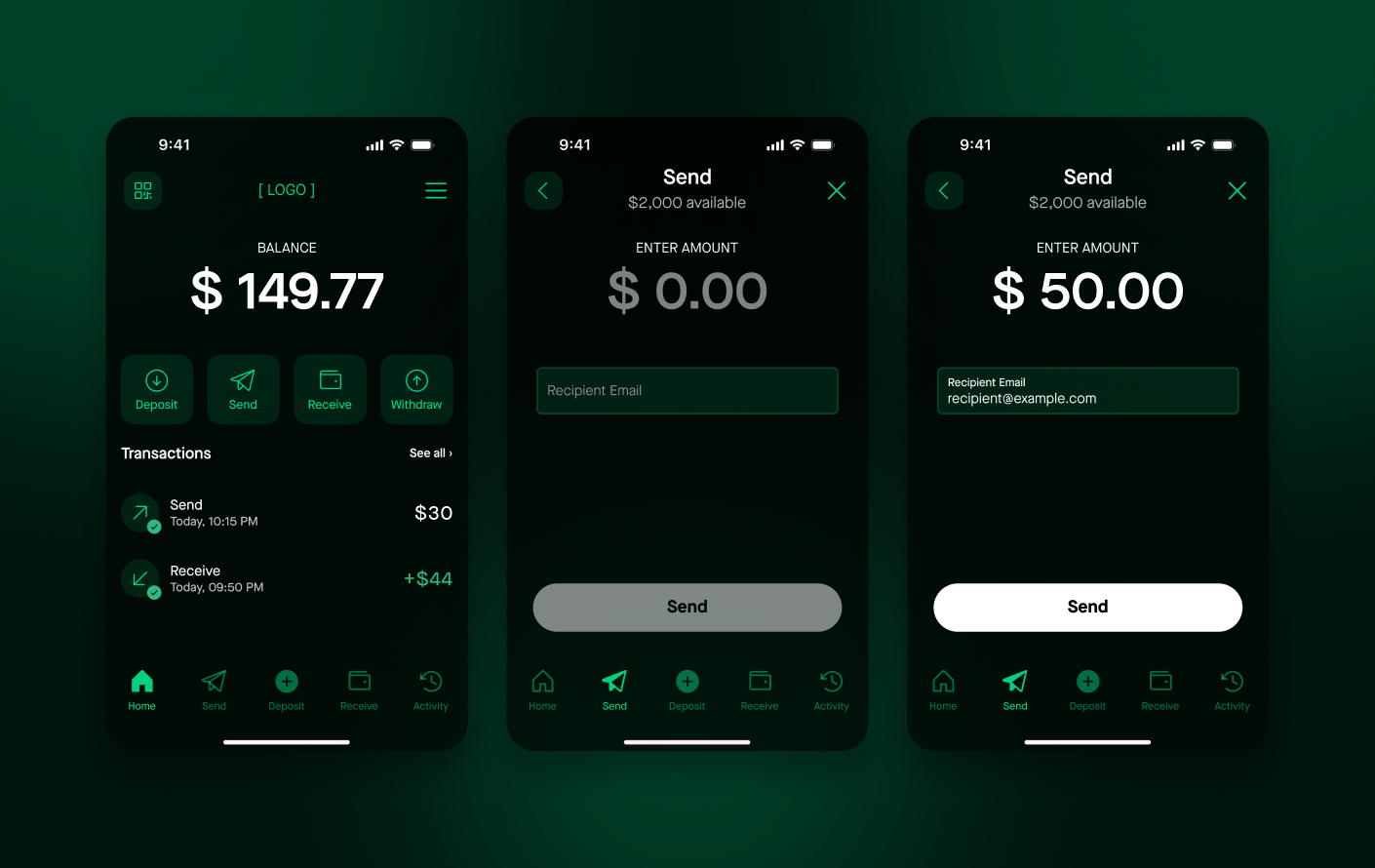
Prerequisites
- A Leepa merchant account with an API key that has the wallet_embed permission — write to create prefill sessions, read to fetch balance tokens.
- Server-side code to call the prefill endpoint. Never call it from the browser.
wallet_embed credentialsCreate the key from the dashboard — see Generating API keys and Create API Key, and grant it the wallet_embed resource at the level you need. The secret is shown once, at creation; copy it then. Store it as a server-side secret (environment variable or secret manager) — never commit it to source control, ship it in client-side code, or paste it into the embed script. To rotate, create a new key, deploy it, then revoke the old one from the dashboard.
How prefill works
Anonymous mode is enough for a general-purpose wallet, but most integrations know exactly where the money should go — a specific invoice, a specific payout. Prefill solves that: it turns a multi-step payment into a single click and guarantees the destination is the one you chose, not something the visitor typed. The visitor never picks the recipient or the amount; they only authenticate and confirm.
The full sequence is six steps:
- Your server calls POST Create Prefill Session with the recipient
email(plus optionalmemoandamount), authenticated with yourwallet_embedkey. - Leepa creates a short-lived prefill session and returns an
embed_codeUUID. - Your server renders the page, injecting that
embed_codeas thedata-embed-keyon the embed script tag. - The visitor clicks the wallet button; the modal opens on the send screen, pre-loaded with the recipient (and amount, if you set one).
- The visitor authenticates with a passkey — becoming the sender — and confirms the transfer.
- Leepa settles the transfer and delivers an
embed_transferwebhook to your endpoint, which you reconcile against your own record.
Creating a prefill session authenticates with your merchant API key (wallet_embed write). That key is your merchant identity — anyone holding it can create sessions as you. If the call ran in the browser, the key would be visible in page source and network traffic, so any visitor could lift it and mint prefill sessions against your account. Keeping the call on your server is the only place the key stays private. The browser only ever sees the opaque embed_code, which carries no privileges beyond opening its one modal.
Session lifecycle. An embed_code points at a single short-lived prefill session. Treat it as single-use: mint a fresh embed_code per authenticated page load rather than caching one and reusing it across visitors or page views. Don't embed a long-lived code in a static page.
| Anonymous | Prefilled | |
|---|---|---|
| Server call first | None | Create Prefill Session (server-side) |
data-embed-key |
Omitted | The embed_code from the session |
| Who picks the recipient | The visitor, in the modal | You, in advance (fixed) |
| Amount | Entered by the visitor | Optional pre-fill; visitor confirms |
| Best for | A general wallet on your page | Invoices, checkout, a fixed amount due |
Integration: step by step
1. Create a prefill session from your server If prefilling
Call POST Create Prefill Session from your server — never from the browser — using your API key. Pass the recipient's email (the wallet that will receive the funds) and optionally a memo and amount. The response contains an embed_code UUID. Skip this step for an anonymous session.
curl -X POST https://api.leepa.africa/v1/merchants/embed/prefill \
  -H "API-Key: $API_KEY" \
  -H "Merchant-ID: $MERCHANT_ID" \
  -H "Content-Type: application/json" \
-d '{ "email": "recipient@example.com", "memo": "Invoice #1042", "amount": 25.00 }'{
"embed_code": "ca678360-5ae6-4f6b-be1d-8583c02447cb",
"status": "created"
}Full reference: Embedded Wallet API.
2. Embed the script tag in your page
Add the wallet embed script wherever you want the button to appear. Set data-embed-key to the embed_code from step 1; omit it for an anonymous session. The script renders the button and modal in-place.
<script
src="https://wallet.leepa.africa/embed/button/"
data-embed-key="EMBED_CODE_FROM_STEP_1"
data-button-bg="#0484fc"
data-button-text="white"
></script>Full embed attributes and security notes: Embedded Wallet API.
3. Handle the completion webhook
When a transfer completes, Leepa sends an embed_transfer webhook to your registered endpoint. Use it to update your own records — mark the invoice paid, or the payout delivered. See Embedded Wallet Transfer for the payload and the four rules integrators get wrong (act only on status: "success", verify merchant_id, treat amount as a string, and store transfer_id to de-duplicate).
4. Show a balance in your own UI Optional
To display a user's wallet balance in your own UI without opening the modal, call GET Get Balance Access Token from your server, then use that token with GET Get Wallet Balance by Token.
Don't reach for the modal to send money out. Sending from your merchant wallet to a user is a server-to-server call to POST /v1/merchants/disbursements — no modal, no prefill session, no action from the recipient, and it emits a different webhook. It is documented on its own page: Disbursements: Paying Your Users.
Verify it worked
- The wallet button renders on your page, and clicking it opens the Leepa wallet modal — the person authenticates with a passkey and sees their balance.
- If you created a prefill session, the modal opens on the send screen, pre-loaded with the recipient's email (and the amount, if you passed one).
- After a transfer completes, your endpoint receives an
embed_transferwebhook withstatus: "success".
When it fails
- No wallet button appears. The
<script>tag didn't load — confirmsrcpoints athttps://wallet.leepa.africa/embed/button/and that no content-security-policy blocks it. - The prefill call returns 401. The API key is wrong, missing, or lacks the wallet_embed write permission — see Generating API keys.
- The prefill call returns 400. The
emailis missing or invalid, thememoexceeds 200 characters, oramountis not greater than 0. - The modal opens anonymous when you expected a prefill. The
data-embed-keywas empty or stale — regenerate a freshembed_codefor the page load. - No completion webhook arrives. Your webhook endpoint isn't registered, returns a non-2xx, or fails signature verification — see Webhooks.
Next step: Headless Wallet → — build a fully custom wallet UI against the API when the embedded modal isn't enough.
Disbursements: Paying Your Users
A disbursement sends funds from your wallet to one of your users. It is a single server-to-server call — no modal, no wallet UI, and nothing for the recipient to do. You name the recipient by email (or by your own user id) and the USD amount; Leepa signs and settles it on your behalf using the signing key you granted.
This is the opposite direction from the Embedded Wallet, and a different integration entirely — that one is an in-browser modal where a visitor authenticates to send you money. Do not use a prefill session to pay a user.
Typical uses (name them however fits your product):
- Marketplace seller payouts
- Contractor and freelancer payments
- Refunds
- Rewards and loyalty credits
- Affiliate commissions
- Prizes and winnings
You supply only the USD amount — Leepa picks the settlement chain and token automatically from your wallet's USD-stable balance, so there is no chainId or token field. The call is asynchronous: it returns initiated as soon as the request validates, the recipient resolves, the allowance checks out, and the funds are held. Settlement then runs in the background. If your wallet hasn't approved the token, Leepa signs the approval for you — you never pre-approve. Disbursements are fee-less by design: the recipient receives the full amount and your wallet is debited exactly what you sent.
sequenceDiagram
autonumber
participant BE as Your Backend<br/>(holds the API key)
participant WP as Leepa Platform
participant USER as Your User's Wallet
BE->>WP: POST /v1/merchants/disbursements (amount, recipient, idempotency_key)
WP-->>BE: 200 { status: "initiated" } — funds held, returns immediately
WP->>WP: Sign with your granted key, settle on-chain
WP->>USER: Credit the recipient
WP-->>BE: wallet_transfer webhook (or failed_wallet_transfer)
GET /v1/merchants/disbursements/:id.Prerequisites
- A Leepa merchant account with an API key holding the merchant_wallet_transfers permission — write to create disbursements, read to query them. See Generating API keys.
- A granted Leepa signing key whose allowance covers the amounts you intend to send. Without it every call fails with
no_signing_key. - A funded wallet.
- The recipient must have completed wallet signup.
Integration: step by step
1. Grant a signing key One-time setup
From the dashboard, grant Leepa a signing key and set its allowance. This is what lets a disbursement settle without a human signing each transfer. Amounts above the allowance are rejected with amount_over_allowance — raise the allowance rather than splitting the payment.
2. Create the disbursement from your server
Call POST Create Disbursement — never from the browser. Address the recipient by recipient_email or partner_user_id, exactly one of the two. Generate a fresh idempotency_key UUID per payout and store it alongside your own payout row before you send.
curl -X POST https://api.leepa.africa/v1/merchants/disbursements \
-H "API-Key: $API_KEY" \
-H "Merchant-ID: $MERCHANT_ID" \
-H "Content-Type: application/json" \
-d '{
"recipient_email": "player@example.com",
"amount": 25.00,
"idempotency_key": "0f9a5b2c-1d3e-4a6b-8c7d-9e0f1a2b3c4d",
"reference": "payout-1042"
}'{
"data": {
"id": "3f2504e0-4f89-41d3-9a0c-0305e82c3301",
"status": "initiated",
"replayed": false
},
"status": 200
}3. Wait for the terminal state
The lifecycle is initiated → completed | failed. Prefer the webhook; poll only if you need a synchronous answer. When the transfer settles, Leepa sends a wallet_transfer webhook carrying "type": "transfer", the transaction hash, your reference, and the recipient's identity. A failure arrives as failed_wallet_transfer with the same payload shape. Full payload: Wallet Transfer.
To check on demand, call GET Get Disbursement with the id from step 2.
4. Retry safely with the same key
If a request times out or your job retries, send the same idempotency_key. You get the original disbursement back with "replayed": true — same id, no second debit, no second webhook. Never generate a new key for a retry; that is how you pay twice.
What the recipient experiences
Nothing is required of them for the money to arrive — the funds land in a Leepa wallet tied to their email. When they next open the wallet, they can hold the balance, send it onward, or cash out. Telling them it arrived is your job: send your own notification.
They must have completed wallet signup first. Unlike a prefill — where a first-time visitor provisions a wallet by authenticating in the modal — a disbursement has no interactive step in which that can happen, so an unregistered recipient is rejected up front with recipient_not_registered (or recipient_not_found if no account exists at all). Onboard the user before paying them.
Verify it worked
- The POST returns
200withstatus: "initiated"in well under a second. GET /v1/merchants/disbursements/:idreportscompletedshortly after.- Your endpoint receives one
wallet_transferwebhook with"type": "transfer", yourreference, and a transaction hash. - The recipient's wallet shows the full amount received; your wallet is debited exactly that amount and no more.
- Re-sending the same
idempotency_keyreturns the originalidwith"replayed": trueand moves nothing.
When it fails
These are returned inline on the POST, because they are yours to fix. Anything that fails after acceptance does not appear here — it surfaces as failed on the status endpoint plus a failed_wallet_transfer webhook.
| Status | Code | What to do |
|---|---|---|
400 |
invalid_request |
A field is missing or invalid, or you sent neither/both of recipient_email and partner_user_id. |
400 |
self_send |
The recipient resolves to your own merchant account. Check the address you're paying. |
402 |
insufficient_balance |
Fund your wallet. Funds already held by in-flight disbursements are not available. |
404 |
recipient_not_found |
No account for that email, or no mapping for that partner_user_id. |
409 |
recipient_not_registered |
The recipient exists but hasn't finished wallet signup. Onboard them first. |
409 |
no_signing_key |
Grant Leepa a signing key from the dashboard. |
409 |
amount_over_allowance |
Raise the granted allowance, or lower the amount. |
409 |
idempotency_conflict |
That idempotency_key is already bound to a different account. Generate a fresh UUID per payout. |
Next step: Disbursements API reference → — every field, response, and error payload.
Headless Wallet: When to Use the API
This page assumes you used Which Integration Is Right for Me? and chose wallet + headless. You build your own frontend against the Wallet API. Maximum control, more engineering effort.
Headless is the right call if you are:
- A consumer wallet with a mature design system
- Extending an existing card-on-file UX you own
- Required to place custom compliance disclosures inside the flow
- A brand that demands a fully native experience
- Able to dedicate engineering for weeks, not days
If none apply, use a hosted or embedded mode. Before you start, read Signing & Recovery — the hardest integration step. Contact us before committing.
Next step: Wallet Quickstart → — provision a wallet and run your first transfer against the API.
Leepa Wallet Web App
https://wallet.leepa.africa is a fully featured, self-custodial digital wallet your users can access from any device — no app download, no seed phrase, no integration work on your side. A user visits the URL, registers with their email and a passkey, and gets a wallet with full money-movement capabilities in under a minute.
This is the fastest path to giving users a production-ready wallet. Share the link in an onboarding email, embed it as a button in your app, or print it as a QR code — there is nothing to build or deploy.
What users can do
- Create a wallet — sign up with email. No seed phrase, no browser extension, no mobile app required. Add a passkey or PIN later to secure the account.
- Deposit funds — receive crypto directly to their wallet address, or fund via credit/debit card, bank transfer, Apple Pay, or Google Pay.
- Send funds — send to any email address or wallet address. Leepa account holders receive instantly; anyone else gets an email to claim.
- Withdraw — withdraw to a linked bank account or external crypto address.
- View history — full transaction history with status, source/destination, amounts, and on-chain confirmation links.
- Secure their account — passkey authentication for every transaction, optional PIN protection, and a built-in account recovery flow. No seed phrase required.
1. Direct users to the wallet
Share https://wallet.leepa.africa wherever your users will find it — a button in your app, a link in an onboarding email, or a QR code on a physical receipt.
2. User creates an account with their email
The user signs up with their email address. Their wallet address is created instantly — no seed phrase required. They can optionally add a passkey (Face ID, Touch ID, Windows Hello) or a PIN to secure the account later.
3. Fund and use the wallet
The user's wallet address is shown immediately. They can receive stablecoins from any external address, then send to an email or wallet address. Transactions are broadcast on-chain and confirmed in seconds.
Want deeper integration?
If you need the wallet to live inside your product rather than as a separate site, see:
- Embedded Wallet — add a wallet modal to your site with one script tag.
- Headless Wallet — build a fully custom wallet UI using the API.
Verify it worked
- The user reaches https://wallet.leepa.africa, registers with their email and a passkey, and sees a wallet address.
- A deposit to that address appears in the wallet balance and transaction history within seconds of on-chain confirmation.
When it fails
- Registration is blocked. The browser doesn't support passkeys (WebAuthn) — have the user try a current version of Safari, Chrome, or Edge on a device with a screen lock.
- Deposited funds never arrive. The crypto was sent on an unsupported network — deposit stablecoins on a supported chain and double-check the sending network.
Next step: Wallet Quickstart → — provision wallets and move funds programmatically through the Wallet API.
Quickstart: Wallet
Provision a user wallet and run a peer-to-peer transfer in sandbox.
Prerequisites
- An API key and Merchant-ID with Wallet API access — see Generating API keys.
- The DFNS WebAuthn client SDK wired into your frontend for the passkey signing steps — see Signing & Recovery.
- Create your operator — set default chain, default token, and whitelisted addresses.
- Create a user: call
POST /v1/wallet/users/init→ sign the passkey challenge on the client →POST /v1/wallet/users/complete. Store the returnedrecoveryCode. - Provision a wallet:
POST /v1/wallet/with{ "user_id": "…", "type": "user" }. - Run a transfer:
POST /v1/wallet/transactions/init→ sign →/complete→ sign →/permit. Payment processes.
Step 1 is a single server-side call. Create your operator:
curl -X POST https://api.leepa.africa/v1/wallet/operator \
-H "API-Key: $API_KEY" \
-H "Merchant-ID: $MERCHANT_ID" \
-H "Content-Type: application/json" \
-d '{
"name": "My App Operator",
"preferred_chain": 2,
"preferred_token": 2,
"whitelisted_addresses": ["0x215e3953a1bcb368dF42a23eb62cd4A72bf66181"]
}'{
"data": {
"id": "ed8c502f-5575-46c5-9a3f-22b278638aa7",
"merchant_id": "959ee38b-2d68-4717-9144-71afa5dbb8f2",
"name": "My App Operator",
"network_id": 2,
"token_id": 2,
"whitelisted_addresses": ["0x215e3953a1bcb368dF42a23eb62cd4A72bf66181"]
},
"status": 200
}The passkey signing steps require the DFNS WebAuthn SDK on the client side. See Signing & Recovery for the full init → sign → complete → sign → permit pattern.
Verify it worked
- The operator create call returns
200with anidin the response body. - The transfer completes and a wallet-transfer webhook fires to your registered endpoint.
When it fails
- 401 unauthorized. The API key or Merchant-ID is wrong, missing, or from the other environment — see Generating API keys.
- Passkey signing fails. The DFNS WebAuthn SDK isn't wired into your client, so the challenge can't be signed — see Signing & Recovery.
- Transfer rejected. The recipient isn't in the operator's whitelisted addresses, or the amount exceeds the gasless allowance.
Next step: Signing & Recovery → — the passkey init → sign → complete pattern is the hardest part of the integration.
Signing & Recovery
Wallet users are non-custodial and secured by a passkey (WebAuthn / FIDO2). Sensitive actions — user creation, transfers, recovery — are authorized by signing a challenge with the user's passkey on their device.
The init → sign → complete pattern
- init: you call the endpoint; the API returns a challenge plus a
challengeIdentifier/temporaryAuthenticationToken. - sign: your client signs the challenge with the user's passkey using the wallet client SDK (DFNS WebAuthn SDK).
- complete: you submit the signed challenge to the matching
/completeendpoint.
Transfers add a second signature (an ERC-2612 token permit): init → sign → complete → sign → permit. See Transactions.
Recovery
At user creation Leepa returns a one-time recoveryCode — surface it to the user for safekeeping. If they lose their device, the recovery flow restores access with that code and registers a new passkey credential.
What your frontend owns
- Collecting passkey credentials at wallet creation and at every transaction signature
- Running the WebAuthn ceremony (
navigator.credentials.create()/.get()) via the DFNS SDK - Handling EIP-712 typed data for on-chain transfers
- Implementing the recovery flow for users who lose their passkey device
Leepa runs on DFNS delegated-custody infrastructure. Your frontend is responsible for the WebAuthn ceremony and the EIP-712 typed data for on-chain transfers. There is no Leepa-hosted UI for any of this — integrating teams need WebAuthn/passkey familiarity going in.
When it fails
- The WebAuthn ceremony fails. No passkey is registered on this device, or the browser doesn't support WebAuthn — register a credential on a supported browser first.
- Transfer rejected at the permit step. The second signature (the ERC-2612 token permit) was skipped — a transfer needs
init → sign → complete → sign → permit. See Transactions. - User locked out of their wallet. They lost their passkey device — run the recovery flow with their one-time
recoveryCodeto register a new credential.
Next step: Payouts Quickstart → — put signing to work sending funds out to your users.
Quickstart: Send funds / payouts
Send crypto from your merchant wallet to a customer or external address. Payouts can be initiated from the merchant dashboard (no code required) or via the Create Transfer Request API. Transfers within your configured daily allowance execute without an additional signature; larger amounts trigger an on-chain signing step.
Transfers are gasless. The platform or the merchant signs on your behalf up to the configured allowance; recipients never pay network fees. Gasless transfers only work between wallets registered on the platform.
Prerequisites
- A funded Leepa merchant wallet.
- Wallet credentials configured for your merchant account — see Wallet Credentials.
- No API key needed for dashboard-initiated payouts.
- API key required if calling Create Transfer Request directly via the API (e.g. to automate payouts). See Generating API keys.
1. Configure wallet credentials One-time setup
Ensure your merchant wallet credentials are set up. See Wallet Credentials for the required fields and configuration steps.
2. Create a Transfer Request
Call POST Create Transfer Request with the recipient address or email, the token, and the amount. For amounts within your configured allowance the transfer executes immediately — no further action needed.
Full parameter reference: Merchant Wallet Transfers.
3. Sign if required Large transfers only
If the transfer amount exceeds your allowance, the response indicates a signature is needed. See When a Signature is Required for the signing flow and the conditions that trigger it.
4. Handle the Wallet Transfer webhook
Configure a webhook endpoint (see Create Webhook). After the transfer confirms on-chain, your endpoint receives a Wallet Transfer webhook with the transaction hash and final status.
Chain IDs
| Environment | chain_id values |
|---|---|
| Test | 80002 (Polygon Amoy), 84532 (Base Sepolia), 11155111 (Ethereum Sepolia) |
| Production | 137 (Polygon), 8453 (Base), 1 (Ethereum) |
Verify it worked
- The Create Transfer Request call returns a success response, or a signature-required response for amounts above your allowance.
- Once the transfer confirms on-chain, your endpoint receives a Wallet Transfer webhook carrying the transaction hash and final status.
When it fails
- The transfer needs a signature. The amount exceeds your configured gasless allowance — complete the on-chain signing step. See When a Signature is Required.
- The recipient never receives the funds. Gasless transfers only work between wallets registered on the platform — confirm the recipient is a platform-registered wallet.
- 401 on the API call. The request used a wrong or missing API key. See Authentication.
Next step: Run a merchant platform → — onboard sub-merchants and route payouts across accounts.
Quickstart: Run a merchant platform
A Leepa merchant platform lets you onboard sub-merchants, configure per-account fee structures, and view consolidated earnings — all from the dashboard, no API key required to get started. Each step also links to its API equivalent for programmatic automation.
Prerequisites
- A Leepa merchant account with platform permissions enabled.
- Access to the Partner Tools dashboard.
1. Create a sub-merchant
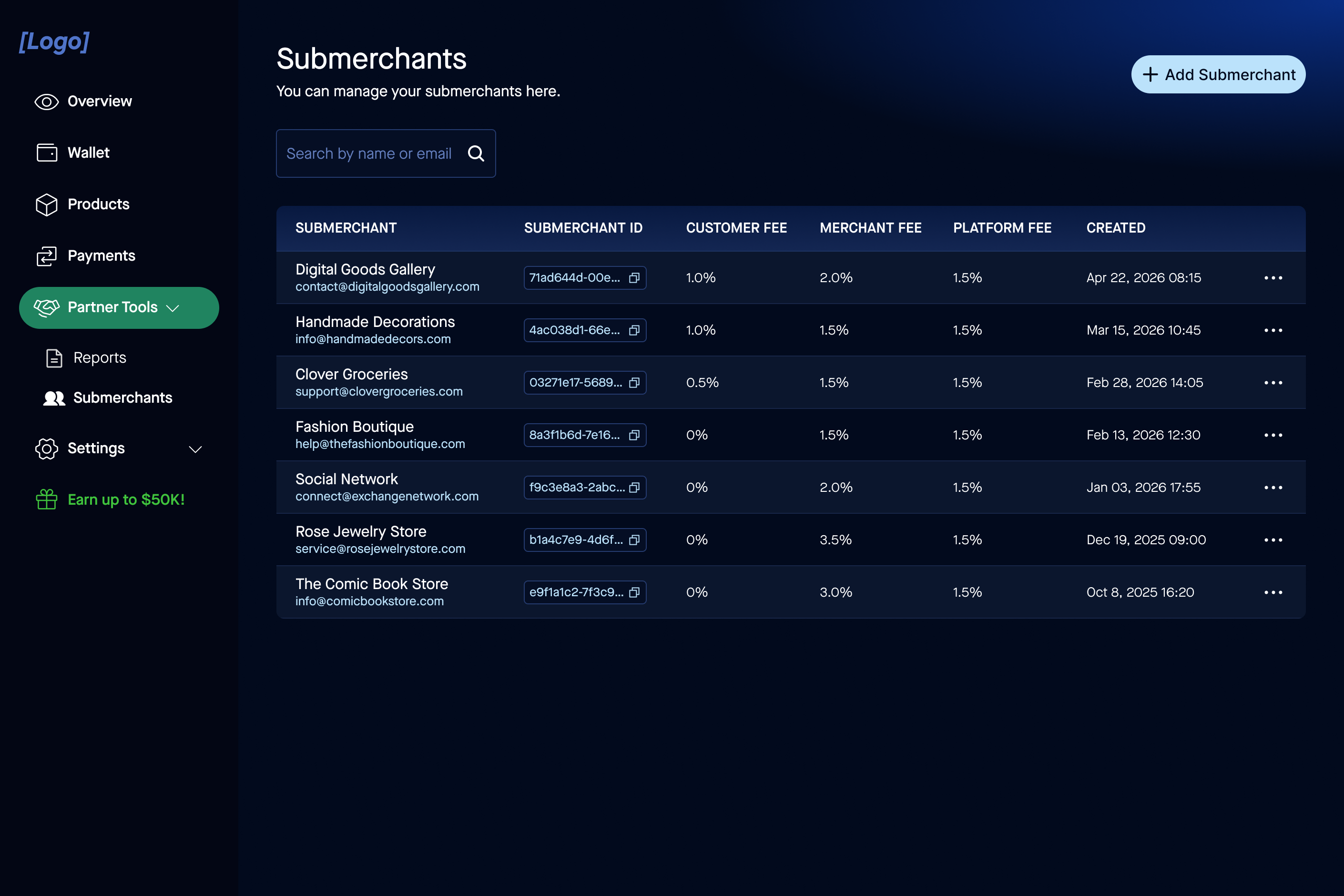
Go to Partner Tools → Sub-merchants and click + Add Sub-merchant. Fill in the sub-merchant's details. Each sub-merchant gets their own isolated account with separate API keys, webhooks, and transaction history.
API alternative: POST Create an account — create sub-merchant accounts programmatically as part of your own onboarding flow.
2. Set up sub-merchant API keys If needed
API keys are only required if the sub-merchant will be calling the Leepa API directly. Sub-merchants can sign in to https://test.leepa.africa and generate their own key from the dashboard — no action needed from you as the platform operator.
API alternative: POST Create API Key — provision keys on behalf of sub-merchants if you manage their integration centrally.
3. Configure webhooks If needed
Webhooks are only needed if the sub-merchant's backend requires real-time payment notifications. Sub-merchants can configure their own webhook endpoint by signing in to the dashboard themselves.
API alternative: POST Create Webhook — register endpoints programmatically for sub-merchants you manage. Each sub-merchant account can have independent endpoints for payment, agreement, and wallet transfer events.
4. Configure the fee structure
Set platform fees per sub-merchant via Partner Tools → Sub-merchants — select a sub-merchant and update their fee configuration. Fees are automatically deducted from each payment.
API alternative: PUT Update Fee Structure — configure percentage-based or flat fees per account. See Fees & Earnings for the full parameter reference.
5. View earnings and reports
View aggregated earnings and transaction reports at Partner Tools → Reports. Filter by date range or sub-merchant directly in the dashboard.
When are earnings paid out? Each account is paid at a fixed time, by default 5:00 PM New York time (ET, following daylight saving), either every day or on the 1st of each month. That time is also the cutoff: earnings received before it are included in that payout, and anything received after it goes into the next one. Sub-merchants inherit their parent's payout time. The Next Payout card in Partner Tools → Reports shows your next payout in your own time zone, with the payout time alongside.
API alternative: GET Get Earnings — retrieve earnings across all sub-merchants programmatically. See Fees & Earnings for filtering and pagination options.
Verify it worked
- The new sub-merchant appears under Partner Tools → Sub-merchants with its own isolated account and API keys.
- Once the sub-merchant starts transacting, their earnings show up in Partner Tools → Reports.
When it fails
- Sub-merchant can't sign in. The verification email was never completed — the sub-merchant must confirm their account before signing in. Re-create or re-invite via Create an account.
- Fees aren't being deducted. The fee structure wasn't saved for that specific sub-merchant — open the sub-merchant in Partner Tools and confirm their fee configuration is set.
- 401 on the API path. The request used a wrong or missing API key — check the key belongs to the account you're calling on behalf of. See Generating API keys.
Next step: API reference → — automate sub-merchant onboarding, fees, and reporting end to end.
API Reference
Two product APIs share one host and auth model, separated by path:
- Wallet API — the wallet API (
/v1/wallet/*): operator, users, wallets, transactions, recovery. - Commerce / Checkout API — checkout/commerce (
/v1/purchase/*): purchase sessions, agreements, payments, subscriptions, fees.
Start with Core Concepts for cross-cutting behavior (errors, rate limits, pagination, versioning, webhooks) that applies to both.
Base URLs
| Environment | Base URL |
|---|---|
| Production | https://api.leepa.africa |
| Test | https://test-api.leepa.africa |
All requests must be made over HTTPS. See Authentication to authorize requests.
Core Concepts
Cross-cutting behavior that applies to both the Commerce / Checkout API and the Wallet API.
Errors
The API uses standard HTTP status codes. Every error response also carries a stable code you can branch on and the request_id of the request — quote both to support, since the pair identifies one event in our logs. The Error Code Reference lists every code with its cause and remediation, and each endpoint below lists the ones it can answer.
A code is never renamed or reused once it has shipped. Treat one you do not recognise as its prefix (PAYMENT_, AUTH_, VALIDATION_, …), and an unrecognised prefix as an internal error.
| Status | Meaning |
|---|---|
400 | Bad request — invalid parameters |
401 | Unauthorized — missing or invalid API key |
403 | Forbidden — valid credentials, insufficient permissions |
404 | Not found — resource does not exist |
429 | Rate limit exceeded |
500 | Internal server error |
Rate Limits
Each API key is rate-limited to 100 requests per minute by default, measured over a rolling 60-second window. Every response carries the current window state in its headers:
x-ratelimit-remaining— requests left in the current windowx-ratelimit-reset— seconds until the window resetsx-ratelimit-window— window length in seconds (60)
Exceeding the limit returns 429 with body { "error": "Rate limit exceeded" }. Back off until the window resets. If you need a higher limit, contact the Leepa support team.
Pagination
List endpoints return a pagination object alongside the results. Request a page with query parameters; read the totals from the response.
GET /v1/wallet/users/{user_id}/transactions?page=1&page_size=20Response
{
"data": {
"pagination": { "page": 1, "page_size": 20, "total_count": 2, "total_pages": 1 },
"transactions": [ "…" ]
}
}| Field | Meaning |
|---|---|
page | Current page (1-based) |
page_size | Items per page |
total_count | Total items across all pages |
total_pages | Total number of pages |
Versioning
The API is versioned via the URL path (/v1/). Breaking changes are introduced in new versions. The current version is v1.
Webhooks & Events
Asynchronous outcomes (payment settled, payment failed, wallet transfer completed) are delivered to your registered webhook endpoint. Handle them idempotently — events may be retried or arrive out of order.
Event catalog
| Event | Product | Notes |
|---|---|---|
| Recurrence signup | Checkout | Fires when a customer subscribes to a recurring product |
| Payment settled | Checkout | See Payment Webhook |
| Payment failed | Checkout | See Failed Payment Webhook |
| Subscription cancellation | Checkout | Fires when an agreement is cancelled |
| Wallet transfer | Wallet / Payouts | See Wallet Transfer Webhook |
embed_transfer |
Wallet (Embedded Button) | Fires when the embedded wallet prefill flow completes |
| Headless wallet transfer | Wallet (Headless API) | See Headless Wallet Transfer Webhook |
Configuring your webhook URL
Dashboard: Settings → Merchant Settings, enter your webhook URL. As a platform managing sub-merchants, configure a connected account's endpoint via Create Webhook instead of asking them to self-serve.
Signature verification (HMAC-SHA256)
When signing is enabled, every delivery includes three headers:
X-Webhook-Timestamp— Unix secondsX-Webhook-Signature— base64 HMACX-Webhook-Signature-Version—v1
signature = base64( HMAC_SHA256( signing_secret, timestamp + "." + raw_body ) )- Read the raw request body bytes exactly as received — do not parse and re-serialize first.
- Build
timestamp + "." + raw_bodyand compute the HMAC. - Compare to
X-Webhook-Signatureusing constant-time comparison. - Reject stale timestamps outside your replay window (5 minutes recommended); allow limited clock skew.
Verify against the exact raw body bytes. Any change in whitespace, key order, or encoding after JSON re-serialization breaks the signature.
Deduplication
Every delivery includes an X-Event-Id header uniquely identifying that trigger. Multiple active webhooks on the same merchant each get an independent delivery; multiple active webhooks pointed at the same URL can produce duplicate deliveries at that URL — dedup on X-Event-Id. Failed-payment retries share a payment_id but each attempt gets its own X-Event-Id.
Error Code Reference
Every error response carries a stable code. A code is never renamed or reused once it has shipped, so you can branch on it. Alongside it is the request_id of the request — the two together identify one event in our logs, so quote both when you contact support.
Endpoints answer one of two shapes. Migrated endpoints answer the unified envelope:
{
"error": {
"code": "PAYMENT_INSUFFICIENT_BALANCE",
"message": "You don't have enough funds to complete this payment.",
"details": { "amount": "4.20 USDC" },
"request_id": "0f9d…"
}
}The rest keep the shape they have always had and carry the same two fields at the top level, so an existing integration keeps working:
{
"error": "You don't have enough funds to complete this payment.",
"status": 402,
"code": "PAYMENT_INSUFFICIENT_BALANCE",
"request_id": "0f9d…"
}Read code and request_id from whichever shape you get; details is only ever present on the envelope, and is always an object when it is.
The prefix tells you where the failure was. PAYMENT_* is the payment itself, SIGNER_* is our custody provider, RPC_* is a blockchain node, UPSTREAM_* is another third party we call, AUTH_* is your credentials, VALIDATION_* is your payload, REQUEST_* is how you are calling us, RESOURCE_* is the thing you addressed, and INTERNAL is us. Treat an unrecognised code as its prefix, and an unrecognised prefix as INTERNAL.
PAYMENT
| Code | Status | Description, cause and what to do |
|---|---|---|
| PAYMENT_ALREADY_COMPLETED | 409 |
The session or order has already been paid; the request would pay twice.
Shown to the user: This payment has already been completed.
Typical cause: A back button, a refreshed page, or a duplicated client request.
What to do: None — point the customer at their receipt.
|
| PAYMENT_BALANCE_UNAVAILABLE | 503 |
A balance lookup failed; this is not a statement about the customer's funds.
Shown to the user: We couldn't check your balance. Try again in a moment.
Typical cause: RPC or wallet-provider failure during the balance read.
What to do: Retry. Never tell the customer they are short on this code.
|
| PAYMENT_CHECKOUT_UNAVAILABLE | 404 |
The checkout code or product cannot be resolved.
Shown to the user: This payment isn't available.
Typical cause: Wrong link, a deleted or disabled product, or a merchant that is not live.
What to do: The customer contacts the merchant for a new link.
|
| PAYMENT_DECLINED_IN_WALLET | 402 |
The customer rejected the transaction or signature in their external wallet.
Shown to the user: Payment cancelled in your wallet. No funds were taken.
Typical cause: User action in MetaMask / WalletConnect / Coinbase Wallet.
What to do: None — the customer may retry.
|
| PAYMENT_DEPOSIT_ADDRESS_EXPIRED | 410 |
The ephemeral deposit address is no longer monitored.
Shown to the user: This deposit address has expired.
Typical cause: The deposit window closed.
What to do: Start over to get a fresh address. Funds sent to an expired address need manual reconciliation.
|
| PAYMENT_DEPOSIT_SETUP_FAILED | 503 |
The deposit address or watcher could not be provisioned.
Shown to the user: We couldn't set up your transfer. Try again in a moment.
Typical cause: DFNS wallet creation or webhook registration failure.
What to do: Retry. Repeated failures go to engineering with the request id.
|
| PAYMENT_DEPOSIT_SHORT | 402 |
A direct deposit arrived below the required amount. details.received / details.required carry the amounts when known.
Shown to the user: We received less than expected.
Typical cause: The customer sent less, or a fee was deducted in transit.
What to do: The customer sends the difference to the same address, or the merchant refunds.
|
| PAYMENT_FAILED | 402 |
The payment could not be completed and no funds moved.
Shown to the user: Your payment didn't go through. No funds have been taken.
Typical cause: A broadcast, signing or provider step failed after the customer confirmed; the underlying cause is in the server log under the request id.
What to do: Ask the customer to try again or choose another payment method. Look the request id up in the logs before escalating.
|
| PAYMENT_IDEMPOTENCY_CONFLICT | 409 |
The ledger rejected a duplicate idempotency key. Maps ledger:idempotency_conflict at the handler boundary.
Shown to the user: This payment request was already processed. Don't pay again.
Typical cause: A retried request re-used a key whose original is already recorded.
What to do: Treat the original as authoritative; verify its outcome rather than retrying.
|
| PAYMENT_INSUFFICIENT_BALANCE | 402 |
The paying wallet or ledger balance is below the amount required, including fees.
Shown to the user: You don't have enough funds to complete this payment.
Typical cause: The customer's balance is short, or a price move since quoting made it short.
What to do: The customer adds funds or picks another payment method. details.amount, when present, is the shortfall.
|
| PAYMENT_INVALID_AMOUNT | 400 |
The amount is missing, not a number, non-positive, or outside the allowed range.
Shown to the user: The payment amount is invalid.
Typical cause: Client-side validation bypassed or a malformed request.
What to do: Correct the amount. If a UI produced it, that is a frontend bug.
|
| PAYMENT_LINK_EXPIRED | 410 |
The payment link or purchase session is past its validity window.
Shown to the user: This payment link has expired.
Typical cause: Time-limited links expire by design.
What to do: The merchant issues a new link.
|
| PAYMENT_METHOD_UNAVAILABLE | 503 |
The selected rail, network or provider is disabled or degraded.
Shown to the user: This payment method isn't available right now.
Typical cause: Provider outage, a paused network, or a merchant configuration change.
What to do: Choose another method or retry later; check provider status.
|
| PAYMENT_NETWORK_SWITCH_REQUIRED | 400 |
The connected wallet is on a different chain than the payment requires.
Shown to the user: Switch your wallet to the required network and try again.
Typical cause: The customer's wallet is set to another network.
What to do: Approve the network switch in the wallet and retry.
|
| PAYMENT_NETWORK_UNAVAILABLE | 503 |
The whole payment pipeline for one blockchain network is degraded past the point where a payment can be accepted on it: its RPC pool has no healthy endpoint, or its signer pool has nothing that can sign. Scoped to the named network — every other network keeps taking payments (docs/degradation-contracts.md).
Shown to the user: We're having trouble processing payments on this network right now.
Typical cause: The network's RPC circuit is open with no usable fallback, or zero signers on it are active and funded above the gas floor.
What to do: details.network names the network and details.alternative_network the one to offer instead when there is one. The customer pays on another network or retries after details.retry_after_seconds; the P1 that fired for the subsystem is what an operator acts on.
|
| PAYMENT_NOT_FOUND | 404 |
No payment, purchase session or related row exists for the identifier given. Maps the repository rows-not-found sentinel at the handler boundary.
Shown to the user: We couldn't find this payment.
Typical cause: A stale or mistyped id, or a record that was never created.
What to do: Verify the id. If the customer was mid-checkout, they start over.
|
| PAYMENT_NOT_PERMITTED | 403 |
The account may not move funds. Deliberately generic: this is the only text a restricted account is told.
Shown to the user: Your account is temporarily restricted. Please contact support.
Typical cause: A compliance or account-level restriction. Do not disclose the reason to the customer.
What to do: Route to compliance. Never explain the restriction to the customer (tipping-off).
|
| PAYMENT_PENDING | 409 |
The payment or deposit is in flight and not yet final.
Shown to the user: Your payment is still being confirmed.
Typical cause: Normal chain confirmation latency.
What to do: Wait and refresh. Escalate only if it stays pending beyond the chain's usual finality.
|
| PAYMENT_PRICING_UNAVAILABLE | 503 |
Fees or a quote could not be computed.
Shown to the user: Pricing isn't available right now. Try again in a moment.
Typical cause: Price feed or fee estimation failure.
What to do: Retry. Persistent failures indicate a price-source outage.
|
| PAYMENT_REVERTED_ON_CHAIN | 402 |
The blockchain reverted the transaction (or a gas estimate predicted it would). Legacy chain strings such as Hedera's CONTRACT_REVERT_EXECUTED roll up here with the raw reason in details.cause.
Shown to the user: The network rejected this payment. No funds have been taken.
Typical cause: Insufficient token balance or allowance, an already-processed agreement, a stale nonce, or a contract-side check that failed.
What to do: Check details.cause. Balance/allowance reverts resolve by funding or re-approving; anything else needs engineering.
|
| PAYMENT_STATUS_UNCONFIRMED | 409 |
The payment may have gone through but its final state could not be read. Money may be at risk of a duplicate.
Shown to the user: We couldn't confirm the status of your payment. Don't pay again.
Typical cause: Lost connection, provider timeout, or an unmatched deposit.
What to do: Do not retry. Look the payment up by request id / tx hash and confirm before the customer pays again.
|
| PAYMENT_UNSUPPORTED_NETWORK | 400 |
The requested chain is not enabled for the merchant, token or flow.
Shown to the user: This network isn't supported for this payment.
Typical cause: A wallet on an unsupported chain, or a chain id the merchant has not enabled.
What to do: Switch to a supported network. Merchants enable networks in the dashboard.
|
| PAYMENT_VERIFICATION_REQUIRED | 403 |
A merchant payout was attempted before KYB approval.
Shown to the user: Business verification must be approved before you can send payouts.
Typical cause: Verification not started, pending or rejected.
What to do: Complete verification under Profile → Verification. details.status carries the current state.
|
| PAYMENT_WALLET_CONNECT_CANCELLED | 400 |
The customer dismissed the wallet connection prompt.
Shown to the user: Wallet connection cancelled.
Typical cause: User action.
What to do: None — the customer may retry.
|
| PAYMENT_WALLET_CONNECT_FAILED | 502 |
The external wallet connection did not complete.
Shown to the user: We couldn't connect your wallet.
Typical cause: Wallet extension/app error, WalletConnect relay failure, or an unsupported wallet.
What to do: Retry, or choose another payment method. Persistent failures for one wallet type go to engineering.
|
SIGNER
| Code | Status | Description, cause and what to do |
|---|---|---|
| SIGNER_CHALLENGE_EXPIRED | 410 |
The passkey / signing challenge was not completed within its validity window.
Shown to the user: Time to confirm expired. Refresh to continue.
Typical cause: The customer was inactive.
What to do: Refresh to get a new challenge.
|
| SIGNER_CHALLENGE_INVALID | 400 |
The challenge or assertion sent back does not match what was issued.
Shown to the user: The signing challenge is invalid.
Typical cause: A replayed or tampered challenge, or a client bug.
What to do: Start the signing step over.
|
| SIGNER_NONCE_CONFLICT | 503 |
The chain rejected the transaction nonce (nonce too low / too high, replacement underpriced). Retried automatically after the signer's nonce is reset (RetryAfterReset).
Shown to the user: The payment could not be submitted. Try again in a moment.
Typical cause: Nonce drift between the signer's counter and the chain: a pending transaction from a prior attempt, or another process using the same key.
What to do: Automatic. Repeated conflicts for one signer mean its needs_nonce_reset repair is not converging — check the signer's pending transactions.
|
| SIGNER_OUT_OF_GAS | 402 |
The transaction ran out of gas, or the node predicted it would. A first attempt priced from the EstimateGas cache is re-signed once with a fresh estimate (RetryImmediate); a fresh estimate that still runs out of gas is terminal.
Shown to the user: The network rejected this payment. No funds have been taken.
Typical cause: An under-provisioned gas limit from a cached estimate, or a contract path that genuinely exceeds the limit.
What to do: One automatic retry. If it repeats for one contract path, the EstimateGas cache headroom or the selector allow-list needs revisiting.
|
| SIGNER_REJECTED | 422 |
The signer refused or failed to sign; nothing was broadcast.
Shown to the user: We couldn't authorize your payment. No funds have been taken.
Typical cause: A rejected passkey assertion, a policy refusal, or a malformed signing request.
What to do: The customer retries. Repeated refusals for one account go to engineering.
|
| SIGNER_TIMEOUT | 504 |
The signer did not answer within the deadline.
Shown to the user: Payment signing timed out. Try again in a moment.
Typical cause: Signer backlog or a slow provider.
What to do: Retry. Sustained timeouts are a signer capacity problem.
|
| SIGNER_UNAVAILABLE | 503 |
The signing service (DFNS / KMS / internal signer) could not be reached.
Shown to the user: Payment signing is temporarily unavailable. Try again in a moment.
Typical cause: Signer outage, LISTEN/NOTIFY channel failure, or a provider incident.
What to do: Retry. Check signer health and provider status pages.
|
| SIGNER_UNDERPRICED | 503 |
The node refused the transaction's fee (transaction underpriced, fee cap below base fee). Retried with fresh gas quotes after backoff (RetryBackoff).
Shown to the user: The network is busy. Try again in a moment.
Typical cause: A fee spike between quoting and submission, or a stale gas-cache entry.
What to do: Automatic. Sustained underpricing on one chain means the fee-cap multiplier or the gas-cache TTL needs tuning.
|
| SIGNER_WALLET_SETUP_FAILED | 503 |
Wallet or credential provisioning with the custody provider failed.
Shown to the user: We couldn't set up your payment wallet. Try again in a moment.
Typical cause: DFNS registration or wallet-creation failure.
What to do: Retry. Persistent failures go to engineering with the request id.
|
RPC
| Code | Status | Description, cause and what to do |
|---|---|---|
| RPC_INVALID_RESPONSE | 502 |
A node answered with something we could not parse or trust.
Shown to the user: The blockchain network returned an unexpected response.
Typical cause: Provider bug or a malformed payload.
What to do: Retry; escalate to engineering if it repeats for one provider.
|
| RPC_RATE_LIMITED | 503 |
The node provider throttled us.
Shown to the user: The blockchain network is busy. Try again in a moment.
Typical cause: Provider quota exhausted.
What to do: Retry. Sustained throttling means the plan or key rotation needs attention.
|
| RPC_TIMEOUT | 504 |
A node call exceeded its deadline.
Shown to the user: The blockchain network took too long to respond. Try again in a moment.
Typical cause: Slow provider or congested chain.
What to do: Retry.
|
| RPC_UNAVAILABLE | 503 |
Every configured node provider for the chain failed.
Shown to the user: The blockchain network is temporarily unavailable. Try again in a moment.
Typical cause: Provider outage or network partition.
What to do: Retry. Check the RPC failover dashboard.
|
UPSTREAM
| Code | Status | Description, cause and what to do |
|---|---|---|
| UPSTREAM_INVALID_RESPONSE | 502 |
A third party answered, but not with something we can use — a malformed body, an undocumented status, a contract change.
Shown to the user: We got an unexpected response. Try again in a moment.
Typical cause: A provider-side change or bug; occasionally a proxy or WAF answering in their place.
What to do: The raw response is in the log under the request id. A repeated occurrence is a provider integration change and needs engineering.
|
| UPSTREAM_TIMEOUT | 504 |
A third-party call exceeded its deadline. Whether the operation completed on their side is unknown.
Shown to the user: This took too long. Try again in a moment.
Typical cause: Provider latency or a network fault between us and them.
What to do: Retry idempotently. For anything that moves money, reconcile with the provider before retrying — the first call may have landed.
|
| UPSTREAM_UNAVAILABLE | 503 |
A third party we depend on — a KYC/KYB provider, an on-ramp or off-ramp, a banking rail, a card processor — did not answer or refused the call. Signer and blockchain-node failures have their own domains.
Shown to the user: This service is temporarily unavailable. Try again in a moment.
Typical cause: A provider outage, a maintenance window, or a credential or quota problem on our account with them.
What to do: Check the provider's status page and the request id in the logs. If the provider is healthy, the credentials or quota are ours to fix.
|
AUTH
| Code | Status | Description, cause and what to do |
|---|---|---|
| AUTH_ACCOUNT_UNAVAILABLE | 403 |
The account exists but is in a state that blocks the action (for example a broken passkey credential).
Shown to the user: We need to fix something with your account before you can continue. Please contact support.
Typical cause: Credential or account data inconsistency.
What to do: Support repairs the account; details carry the specific state when safe to expose.
|
| AUTH_API_KEY_BANNED | 403 |
The API key is on the banned-key list; it is rejected before any other auth work.
Shown to the user: This API key has been banned.
Typical cause: An operator banned the key from the admin panel.
What to do: Use a different key; contact support if the ban is unexpected.
|
| AUTH_EMAIL_NOT_RECOGNIZED | 404 |
No account matches the supplied email.
Shown to the user: We don't recognize this email address.
Typical cause: Typo, or the customer never registered.
What to do: Check for typos or register.
|
| AUTH_FORBIDDEN | 403 |
The identity is valid but lacks the role or scope.
Shown to the user: You don't have permission to do this.
Typical cause: Role or API-key permission missing.
What to do: Request the permission from the account owner.
|
| AUTH_INVALID_TOKEN | 401 |
The bearer token or API key failed validation.
Shown to the user: Your access token is invalid or has expired.
Typical cause: Expired JWT, revoked key, or a token for another environment.
What to do: Obtain a fresh token / check the key belongs to this environment.
|
| AUTH_OTP_EXPIRED | 410 |
The one-time code is past its validity window.
Shown to the user: That code expired. Request a new one.
Typical cause: Codes are short-lived by design.
What to do: Request a new code.
|
| AUTH_OTP_INVALID | 400 |
The one-time code does not match. details.attempts_left is present when the lockout is near.
Shown to the user: That code isn't right. Try again.
Typical cause: Mistyped or stale code.
What to do: Retry; request a new code if it keeps failing.
|
| AUTH_OTP_LOCKED | 429 |
Verification is locked after repeated failures.
Shown to the user: Too many attempts. Request a new code to try again.
Typical cause: Brute-force protection.
What to do: Request a new code.
|
| AUTH_OTP_RATE_LIMITED | 429 |
No new code was sent: this email has had too many codes in a short window.
Shown to the user: Too many codes requested. Try again in a few minutes.
Typical cause: The per-recipient OTP send cap.
What to do: Use a code already sent, or wait a few minutes and request a new one.
|
| AUTH_OTP_SEND_FAILED | 502 |
The email provider did not accept the message.
Shown to the user: We couldn't send your code. Check your email address and try again.
Typical cause: Provider outage or an undeliverable address.
What to do: Retry; check the email provider's status.
|
| AUTH_PASSKEY_CANCELLED | 400 |
The customer dismissed the passkey prompt.
Shown to the user: Passkey cancelled.
Typical cause: User action.
What to do: None — the customer may retry.
|
| AUTH_SESSION_EXPIRED | 401 |
The checkout or dashboard session is gone.
Shown to the user: Your session expired. Start again to continue.
Typical cause: Timeout, or a session id that no longer resolves.
What to do: Start over.
|
| AUTH_UNAUTHENTICATED | 401 |
No usable identity on the request.
Shown to the user: You need to sign in to continue.
Typical cause: Missing or expired dashboard session, or no API key.
What to do: Sign in again / supply credentials.
|
VALIDATION
| Code | Status | Description, cause and what to do |
|---|---|---|
| VALIDATION_INVALID_EMAIL | 400 |
The email address is syntactically invalid.
Shown to the user: Enter a valid email address.
Typical cause: Typo.
What to do: Correct the address.
|
| VALIDATION_INVALID_FIELD | 400 |
A field failed validation. details.field names it; details.reason explains when safe.
Shown to the user: A field has an invalid value.
Typical cause: Client-side validation bypassed.
What to do: Correct the field.
|
| VALIDATION_INVALID_REQUEST | 400 |
The body or query could not be parsed or bound.
Shown to the user: The request is malformed.
Typical cause: Invalid JSON, wrong content type, or a client bug.
What to do: Fix the request; details carry the parser reason when safe.
|
| VALIDATION_REQUIRED_FIELD | 400 |
A mandatory field was empty. details.field names it.
Shown to the user: A required field is missing.
Typical cause: Client-side validation bypassed.
What to do: Supply the field.
|
REQUEST
| Code | Status | Description, cause and what to do |
|---|---|---|
| REQUEST_RATE_LIMITED | 429 |
Our own rate limiter refused the call. An upstream rate-limiting us is RPC_RATE_LIMITED or UPSTREAM_UNAVAILABLE instead.
Shown to the user: Too many requests. Wait a moment and try again.
Typical cause: A client exceeding its quota, a retry loop with no backoff, or a burst from one IP or key.
What to do: Back off and retry. A legitimate integration hitting this repeatedly needs its quota reviewed, not a code change.
|
RESOURCE
| Code | Status | Description, cause and what to do |
|---|---|---|
| RESOURCE_CONFLICT | 409 |
The request is well-formed but cannot apply to the resource as it stands — a duplicate name, a state transition that is no longer legal, a concurrent edit. A repeated payment is PAYMENT_IDEMPOTENCY_CONFLICT instead.
Shown to the user: This conflicts with the current state. Reload and try again.
Typical cause: Two writers, a stale form, or a retry of a request that already took effect.
What to do: Reload the current state and re-apply. Never retry blindly.
|
| RESOURCE_NOT_FOUND | 404 |
The thing the request addressed does not exist, or is not visible to the caller. Payments have their own PAYMENT_NOT_FOUND.
Shown to the user: We couldn't find what you asked for.
Typical cause: A stale id, a typo in the path, a record deleted since the caller last saw it, or an id belonging to another account.
What to do: Check the id. Do not distinguish 'missing' from 'not yours' in the response — both answer this code.
|
INTERNAL
| Code | Status | Description, cause and what to do |
|---|---|---|
| INTERNAL | 500 |
An error nobody has labelled reached the handler, or a genuine server fault. Alertable: every INTERNAL is either an outage or a missing catalog entry.
Shown to the user: Something went wrong on our side. Try again in a moment.
Typical cause: See the server log for the request id; the wrapped cause is never sent to the client.
What to do: Look up the request id. If the cause is a known failure mode, give it a code.
|
Wallet API: Overview & Authentication
The API for the Wallet product: end-user wallets, balances, P2P transfers, recovery. Separate from the Commerce / Checkout API. All endpoints under /v1/wallet/*.
Base URL
| Environment | Base URL |
|---|---|
| Production | https://api.leepa.africa |
| Test | https://test-api.leepa.africa |
Authentication
| Header | Value |
|---|---|
API-Key |
Your merchant API key |
Merchant-ID |
Your merchant UUID |
Content-Type |
application/json |
Response envelope
{ "data": { ... }, "status": 200 }The model
- Operator — merchant config: default chain, default token, whitelisted addresses. See Operator.
- User — an end user, secured by a passkey. See Users.
- Wallet — the on-chain wallet provisioned for a user. See Wallets.
Sensitive actions use the init → sign → complete passkey pattern. See Signing & Recovery.
Wallet API: Operator
Merchant-level wallet config: default chain, default token, whitelisted addresses. One per merchant.
/v1/wallet/operator/
Create your operator.
{
"name": "TestOperator1",
"preferred_chain": 80002,
"preferred_token": "USDC",
"whitelisted_addresses": ["0x215e3953…"]
}preferred_chain is the numeric EVM chain ID (e.g. 80002 = Polygon Amoy). Response 201: { data: { id, merchant_id, name, network_id, token_id, whitelisted_addresses }, status }.
/v1/wallet/operator/
Retrieve your operator. No body. Returns the same shape as create.
/v1/wallet/operator/
Update your operator. Send only the fields to change; preferred_chain may be null. Returns 200 with the updated object.
Wallet API: Users
End users. Creation is a two-step passkey flow (init then complete). See Signing & Recovery for how the challenge is signed on the client.
/v1/wallet/users/init
Begin user creation, or resume it idempotently.
Body: username (required), external_id (optional — your own reference UUID; if a user with this external_id already exists the existing record is returned), email, country_code (ISD code without +, e.g. 1), phone (all optional).
If the user's registration_status is already Complete, the challenge step is skipped and the existing record returns immediately. Returns a passkey registration challenge (challenge, temporaryAuthenticationToken, pubKeyCredParams, …) at status 200.
/v1/wallet/users/complete
Finish user creation with the signed challenge.
{
"user_id": "…",
"challenge": "…",
"temporaryAuthenticationToken": "…",
"signedChallenge": {
"firstFactorCredential": {
"credentialKind": "Fido2",
"credentialInfo": { "…" }
}
}
}Response 201: { data: { recoveryCode, user: { id, username, kyc_status, operator, wallet_provider, registration_status } } }. The recoveryCode is returned once — surface it to the user immediately.
/v1/wallet/users/{user_id}
Retrieve a user. Returns id, username, email, kyc_status, operator, wallet_provider, registration_status.
/v1/wallet/users/{user_id}
Update mutable fields. Body { "email": "…" }. Returns 200 with the updated user.
/v1/wallet/users/{user_id}/balance
Get balance. Response: { data: { balance: 19.99, userId: "…" }, status: 200 }.
/v1/wallet/users/{user_id}/transactions
List a user's transactions, paginated (see Pagination). Each transaction: id, hash, from, to, operator, amount, fee, direction, type, status, created_at, updated_at.
Wallet API: Wallets
The on-chain wallet provisioned for a user: address, network, managed signing key.
/v1/wallet/
Provision a wallet.
{ "user_id": "…", "type": "user" }Response 200:
{
"data": [{
"id": 11,
"wallet_user": "…",
"operator": "…",
"address": "0xef7325bc…",
"network": 2,
"type": "user",
"dfns_wallet_id": "wa-…",
"dfns_signing_key_id": "key-…",
"status": "initialized"
}],
"status": 200
}/v1/wallet/{id}
Retrieve a wallet by numeric id. Same shape as create; status progresses to delegated once ready to sign.
Wallet API: Transactions
Peer-to-peer transfers. Three-call signed flow: init → complete → permit. See Signing & Recovery for the passkey signing steps.
/v1/wallet/transactions/init
Start a transfer.
| Field | Required | Description |
|---|---|---|
amount |
Yes | Transfer amount |
type |
Yes | p2p / c2b / b2c / cashout / treasury_offramp |
from |
No | Inferred from operator context if omitted |
to |
No | For treasury_offramp: pass an external wallet address string instead of a user ID |
chain_id |
No | Overrides the operator's preferred chain; required if none is configured |
token_symbol |
No | Optional override for the token |
reference |
No | Your own ID, stored as-is |
Returns { data: { agreement, challenge } }.
/v1/wallet/transactions/complete
Submit the signed payment-message challenge.
{ "agreement": "…", "challengeIdentifier": "…", "signedChallenge": "…" }Returns 202 with the permit challenge.
/v1/wallet/transactions/permit
Submit the signed token-permit challenge (same body shape as complete). Response 200: { data: { message: "Permit signed successfully. We are processing the payment." } }.
/v1/wallet/transactions/{id}
Retrieve one transaction: id, hash, from, to, operator, amount, fee, type, status.
Wallet API: Recovery
Passkey recovery for wallet users. See Signing & Recovery for the full background on the recoveryCode and when to trigger this flow. Signing blobs come from the DFNS WebAuthn SDK on the client.
/v1/wallet/recovery/init
Begin recovery. Body: { "user_id": "…" }. Returns allowedRecoveryCredentials, challenge, temporaryAuthenticationToken.
/v1/wallet/recovery/complete
Complete recovery. Body: { user_id, code, newCredentials, recoveryChallenge }. Returns a fresh recoveryCode and the new credential/user.
/v1/wallet/recovery/challenge
Create a challenge to add a new recovery credential. Body: { "user_id": "…" }.
/v1/wallet/recovery/add
Register the signed recovery credential. Body: { user_id, challengeIdentifier, firstFactor, credentialRequest }.
Response: { credentialId, credentialUuid, isActive, kind: "RecoveryKey", name, publicKey }.
Purchase Sessions
Purchase Sessions are the starting point for any payment flow on Leepa. A session holds all the details about a payment request — the amount, currency, product info, and configuration for one-time or recurring billing.
Once created, the session returns a hosted checkout URL that you can redirect the customer to, embed in an iframe, or open in a modal. For headless flows, you can use the session ID to request a typed data message and handle signing directly in your own UI.
Create A Purchase Session
The Create endpoint allows you to create a new payment request and retrieve URLs for making and monitoring payments. If the request is associated with an agreement, the system first checks whether it can be automatically processed according to the agreement rules. If it cannot be processed automatically, a unique payment URL will be generated where the user can complete the payment manually.
In production, the minimum scheduling frequency for recurring payments is once per day. In the test environment, you can schedule as frequently as once per minute for development and testing.
**Skip the personal-information step:** if you pass the buyer's identity in `metadata` — `email`, `firstName`, and `lastName` (all three, valid) — checkout registers the buyer for you and sends the payer straight to payment, skipping the personal-information form.
Endpoint
https://api.leepa.africa/v1/purchase/session/start
Header Parameters
| Name | Type | Description |
|---|---|---|
| Content-Type | string |
Optional |
| API-Key | string |
Required |
| Merchant-ID | string |
Required |
Body Parameters
| Name | Type | Description |
|---|---|---|
| name | string |
Required
Shown to payer on payment screen.
|
| details | string |
Required
Shown to payer on payment screen.
|
| currency | string |
Optional
The stablecoin token the payment settles in. Defaults to USDC. Accepts a supported token symbol (e.g. USDC, USDT) — see Payment Options for the full list.
|
| recurring | boolean |
Optional
Set as true if used for subscription. Defaults to false.
|
| amount | number |
Required
Amount of currency.
|
| metadata | object |
Optional
Arbitrary key-value pairs you provide. Returned in every webhook for both success and failure events. Example: set customerId from your system to tie all webhook events to a single customer. Note: if you include the buyer's `email`, `firstName`, and `lastName`, checkout skips the personal-information step and pre-registers the buyer. A missing or invalid field simply keeps the step in the flow.
|
| success_url | string |
Optional
The url to redirect your payer upon successful payment.
|
| cancel_url | string |
Optional
The url to redirect the payer to if they cancel the payment process.
|
| interval | string |
Required if recurring
Required if recurring is set as true. Minute and Hour are available in the test environment only — they are rejected in staging and production.
Enum:
DayWeekMonthYearMinuteHour |
| frequency | string |
Optional
How many intervals between each recurring charge. Accepts a number as a string (e.g. "2" with interval "Day" → every 2 days) or one of the named values below.
Enum:
EveryEvery OtherEvery ThirdEvery FourthEvery FifthEvery SixthEvery Seventh |
| Duration | string |
Optional
Number of intervals the subscription will run before ending. "0" means no fixed end.
|
| expires_in_hours | number |
Optional
Number of hours before the payment request expires. After expiration, no purchase requests or signature submission requests will be processed.
|
Request body example
{
"name": "Invisilink",
"details": "This is a very cool product!",
"currency": "USDC",
"recurring": true,
"amount": 0.2,
"metadata": {
"customerId": "111"
},
"success_url": "https://www.google.com",
"cancel_url": "https://www.google.com",
"interval": "Minute",
"frequency": "2",
"Duration": "0",
"expires_in_hours": 5
}
Error codes
Every error response carries a stable code and the request_id of the request. Quote both to support — the pair resolves to a single log line. The full list is in the Error Code Reference.
| Status | Code | What it means |
|---|---|---|
400 |
VALIDATION_INVALID_REQUEST |
The body or query could not be parsed or bound.
Fix the request; details carry the parser reason when safe.
|
401 |
AUTH_UNAUTHENTICATED |
No usable identity on the request.
Sign in again / supply credentials.
|
500 |
INTERNAL |
An error nobody has labelled reached the handler, or a genuine server fault. Alertable: every INTERNAL is either an outage or a missing catalog entry.
Look up the request id. If the cause is a known failure mode, give it a code.
|
Response
{
"data": {
"purchase_session_id": "sess_497f6eca-6276-4993-bfeb-53cbbbba6f08",
"url": "https://buy.leepa.africa/checkout/76db1abbe9",
"name": "Example Merchant",
"details": "Making a test payment",
"currency": "USDC",
"amount": "5",
"metadata": {
"invoiceNumber": 12343,
"customerId": "di2d-22edd2-232d2-22"
},
"created": 1647628799,
"updated": 1647628799,
"success_url": "string",
"cancel_url": "string",
"status": "session_created",
"message": "Purchase session created successfully"
},
"status": 200
}
{
"error": "Unauthorized — invalid or missing API key.",
"status": 401
}
{
"error": "Bad request — invalid or missing required fields.",
"status": 400
}
{
"error": "An unexpected error occurred. Please try again later.",
"status": 500
}
Retrieve Purchase Session Status
Returns the status of a specific purchase session.
Poll this endpoint to detect payment: `purchase_session_status` becomes `completed` as soon as the customer's payment is received — the signed on-chain agreement for a wallet checkout, or the confirmed deposit for a direct-deposit checkout. Settlement to the merchant can still be in progress at that point, so `payment_ids` may be absent on a completed direct-deposit session.
`direct_deposit` is `true` when the deposit itself is what completed the session. Treat that as final and stop polling: a direct-deposit sale has no agreement until settlement finishes minutes later, so `payment_ids` will stay empty until then. Only wait for `payment_ids` when `direct_deposit` is `false`.
Endpoint
https://api.leepa.africa/v1/purchase/status/{purchase_session_id}
Header Parameters
| Name | Type | Description |
|---|---|---|
| Content-Type | string |
Optional |
| API-Key | string |
Optional |
| Merchant-ID | string |
Optional |
Path Parameters
| Name | Type | Description |
|---|---|---|
| purchase_session_id | string |
Required
The ID of the purchase session to retrieve status for.
|
Request body example
Error codes
Every error response carries a stable code and the request_id of the request. Quote both to support — the pair resolves to a single log line. The full list is in the Error Code Reference.
| Status | Code | What it means |
|---|---|---|
401 |
AUTH_UNAUTHENTICATED |
No usable identity on the request.
Sign in again / supply credentials.
|
404 |
RESOURCE_NOT_FOUND |
The thing the request addressed does not exist, or is not visible to the caller. Payments have their own PAYMENT_NOT_FOUND.
Check the id. Do not distinguish 'missing' from 'not yours' in the response — both answer this code.
|
Response
{
"data": {
"purchase_session_id": "sess_7c003b85-cbe9-4825-86e5-a38495b257ab",
"purchase_session_status": "completed",
"direct_deposit": false,
"payment_ids": [
"paym_8dc38141-b2a9-44b4-98ee-d134a84fe7ec"
],
"expired": false
},
"status": 200
}
{
"error": "Unauthorized — invalid or missing API key.",
"status": 401
}
{
"error": "Purchase session not found.",
"status": 404
}
Delete Purchase Session
Delete a specific purchase request.
Endpoint
https://api.leepa.africa/v1/purchase/delete/{purchase_session_id}
Header Parameters
| Name | Type | Description |
|---|---|---|
| Content-Type | string |
Optional |
| API-Key | string |
Optional |
| Merchant-ID | string |
Optional |
Path Parameters
| Name | Type | Description |
|---|---|---|
| purchase_session_id | string |
Required
The ID of the purchase session to delete.
|
Error codes
Every error response carries a stable code and the request_id of the request. Quote both to support — the pair resolves to a single log line. The full list is in the Error Code Reference.
| Status | Code | What it means |
|---|---|---|
400 |
VALIDATION_INVALID_REQUEST |
The body or query could not be parsed or bound.
Fix the request; details carry the parser reason when safe.
|
401 |
AUTH_UNAUTHENTICATED |
No usable identity on the request.
Sign in again / supply credentials.
|
409 |
RESOURCE_CONFLICT |
The request is well-formed but cannot apply to the resource as it stands — a duplicate name, a state transition that is no longer legal, a concurrent edit. A repeated payment is PAYMENT_IDEMPOTENCY_CONFLICT instead.
Reload the current state and re-apply. Never retry blindly.
|
500 |
INTERNAL |
An error nobody has labelled reached the handler, or a genuine server fault. Alertable: every INTERNAL is either an outage or a missing catalog entry.
Look up the request id. If the cause is a known failure mode, give it a code.
|
Response
Payment Link Deleted Successfully.
{
"data": {
"message": "Purchase session deleted successfully."
},
"status": 200
}
{
"error": "Unauthorized — invalid or missing API key.",
"status": 401
}
{
"error": "Bad request.",
"status": 400
}
If a PAID payment request is requested to be deleted, the deletion will be denied.
{
"error": "Conflict — cannot delete a paid purchase session.",
"status": 409
}
{
"error": "An unexpected error occurred. Please try again later.",
"status": 500
}
Expire Purchase Session
Force expires a specific purchase session.
Endpoint
https://api.leepa.africa/v1/purchase/expire/{purchase_session_id}
Header Parameters
| Name | Type | Description |
|---|---|---|
| Content-Type | string |
Optional |
| API-Key | string |
Optional |
| Merchant-ID | string |
Optional |
Path Parameters
| Name | Type | Description |
|---|---|---|
| purchase_session_id | string |
Required
The ID of the purchase session to expire.
|
Error codes
Every error response carries a stable code and the request_id of the request. Quote both to support — the pair resolves to a single log line. The full list is in the Error Code Reference.
| Status | Code | What it means |
|---|---|---|
400 |
VALIDATION_INVALID_REQUEST |
The body or query could not be parsed or bound.
Fix the request; details carry the parser reason when safe.
|
401 |
AUTH_UNAUTHENTICATED |
No usable identity on the request.
Sign in again / supply credentials.
|
409 |
RESOURCE_CONFLICT |
The request is well-formed but cannot apply to the resource as it stands — a duplicate name, a state transition that is no longer legal, a concurrent edit. A repeated payment is PAYMENT_IDEMPOTENCY_CONFLICT instead.
Reload the current state and re-apply. Never retry blindly.
|
500 |
INTERNAL |
An error nobody has labelled reached the handler, or a genuine server fault. Alertable: every INTERNAL is either an outage or a missing catalog entry.
Look up the request id. If the cause is a known failure mode, give it a code.
|
Response
Purchase Session Expired Successfully.
{
"data": {
"expired_at": 1757336748,
"expires_in_hours": 0,
"message": "Purchase session expired successfully",
"purchase_session_id": "sess_b0713280-0b7a-45d2-b85e-78c9531be1e3"
},
"status": 200
}
{
"error": "Unauthorized — invalid or missing API key.",
"status": 401
}
{
"error": "Bad request.",
"status": 400
}
If a PAID payment request is requested to be expired, the action will be denied.
{
"error": "Conflict — cannot expire a paid purchase session.",
"status": 409
}
{
"error": "An unexpected error occurred. Please try again later.",
"status": 500
}
Purchase Messages
Purchase Messages enable a fully headless, signature-based payment flow. Instead of redirecting the customer to the hosted checkout UI, you request a typed data message (EIP-712) and present it to the user's wallet for signing — giving you complete control over the checkout experience.
Once the user signs the message, submit it back to Leepa for processing. If the user hasn't yet approved the smart contract to spend their token, the response will include a permit message in typed data format for the approval step.
Request Purchase Message to Sign
The Request Message endpoint allows users to create a new message that can be cryptographically signed by your users using signedTypeData methods. This allows you to configure a purchase session and sign that purchase session agreement, or pass that agreement along to your users for them to sign, bypassing the need to use our checkout user interface.
If we can't process the request automatically, we'll create a unique payment URL where the payment can be made.
Endpoint
https://api.leepa.africa/v1/purchase/message/request
Header Parameters
| Name | Type | Description |
|---|---|---|
| Content-Type | string |
Optional |
| API-Key | string |
Required |
| Merchant-ID | string |
Required |
Body Parameters
| Name | Type | Description |
|---|---|---|
| purchase_session_id | string |
Required
ID of the purchase session.
|
| wallet_address | string |
Required
Address of wallet from which payment will be made.
|
| product_name | string |
Optional
Name of the product that is being sold.
|
| price | integer |
Required
Price of the product.
|
| metadata | object |
Optional
Optional json data (e.g., invoice number, product ID).
|
| token | string |
Optional
Symbol of the token to be used for payment.
|
| recurring | boolean |
Optional
Set as true if used for subscription. Defaults to false.
|
| duration | string |
Required if recurring
Required if recurring is set as true. If user provides a number, it will represent the number of recurring payments.
|
| frequency | string |
Required if recurring
Required if recurring is set as true.
Enum:
EveryEvery OtherEvery ThirdEvery FourthEvery FifthEvery SixthEvery Seventh |
| interval | string |
Required if recurring
Required if recurring is set as true. Defaults to 0 if recurring is false.
Enum:
DayWeekMonthYearMinuteHour |
| chainId | number |
Optional
Chain ID of the blockchain network being used for payment.
|
Request body example
{
"purchase_session_id": "sess_4f480a7a-7b47-4abe-bd8a-4df57c2fc90a",
"wallet_address": "0x60a1A4149A99bEaCEf7138Be44Cdda907039975b",
"product_name": "MyProduct",
"price": 5,
"metadata": {
"invoiceNumber": 12343,
"customerId": "di2d-22edd2-232d2-22"
},
"token": "USDC",
"recurring": false,
"duration": "Until Cancelled",
"frequency": "",
"interval": "",
"chainId": 1
}
Error codes
Every error response carries a stable code and the request_id of the request. Quote both to support — the pair resolves to a single log line. The full list is in the Error Code Reference.
| Status | Code | What it means |
|---|---|---|
400 |
VALIDATION_INVALID_REQUEST |
The body or query could not be parsed or bound.
Fix the request; details carry the parser reason when safe.
|
401 |
AUTH_UNAUTHENTICATED |
No usable identity on the request.
Sign in again / supply credentials.
|
500 |
INTERNAL |
An error nobody has labelled reached the handler, or a genuine server fault. Alertable: every INTERNAL is either an outage or a missing catalog entry.
Look up the request id. If the cause is a known failure mode, give it a code.
|
Response
{
"data": {
"message": "Typed data message created sucessfully.",
"purchase_session_id": "sess_7cf1a788-fefc-417a-bc30-68efce3d225c",
"status": "success",
"typedDataMessage": {
"domain": {
"chainId": 80002,
"name": "PaymentAgent",
"verifyingContract": "0xb8F7B1B12F026266BbDCBDD1d302AF588812DDA6",
"version": "1"
},
"message": {
"A": 5,
"D": 1,
"I": 6,
"M": "Sangat Das",
"P": "1",
"S": "CG_PLUS",
"T": "USDC",
"nonce": "0",
"to": "0x215e3953a1bcb368dF42a23eb62cd4A72bf66181"
},
"primaryType": "Subscribe",
"types": {
"Subscribe": [
{ "name": "M", "type": "string" },
{ "name": "S", "type": "string" },
{ "name": "I", "type": "uint256" },
{ "name": "T", "type": "string" },
{ "name": "to", "type": "address" },
{ "name": "A", "type": "uint256" },
{ "name": "P", "type": "string" },
{ "name": "D", "type": "uint256" },
{ "name": "nonce", "type": "uint256" }
]
}
}
},
"status": 200
}
{
"error": "Unauthorized — invalid or missing API key.",
"status": 401
}
{
"error": "Bad request — invalid or missing required fields.",
"status": 400
}
{
"error": "An unexpected error occurred. Please try again later.",
"status": 500
}
Submit Signed Purchase Message
The Submit Signed Purchase Message endpoint allows you to submit signed messages for processing. If the user has already approved our network smart contract to spend their token then we can immediately process the payment.
If they need to approve our smart contract we will notify you and provide relevant information to complete the approval process. If token approval does not exist, the response will be permit message typed data.
A short demo on how to sign a message using EIP-712 is available here: CodeSandbox EIP-712 Demo.
Endpoint
https://api.leepa.africa/v1/purchase/message/sign
Header Parameters
| Name | Type | Description |
|---|---|---|
| Content-Type | string |
Optional |
| API-Key | string |
Required |
| Merchant-ID | string |
Required |
Body Parameters
| Name | Type | Description |
|---|---|---|
| purchase_session_id | string |
Required
ID of the purchase session.
|
| signed_typed_data | object |
Required
The signed typed data object returned after the user signs the EIP-712 message.
|
| signed_typed_data.signature | string |
The cryptographic signature produced by the user's wallet.
|
| signed_typed_data.signing_address | string |
The wallet address that signed the message.
|
| signed_typed_data.chainId | number |
Chain ID of the blockchain network.
|
Request body example
{
"purchase_session_id": "sess_4f480a7a-7b47-4abe-bd8a-4df57c2fc90a",
"signed_typed_data": {
"signature": "0x696db2a6114ffd5f758ad03b21e60a8ab16c8ee2c6ed63cbace750dd54b74bc140d0635560eb4e5f8234c1d78aa0436fc92c93125564ed988c85b767745b091501",
"signing_address": "0x215e3953a1bcb368dF42a23eb62cd4A72bf66181",
"chainId": 80002
}
}
Error codes
Every error response carries a stable code and the request_id of the request. Quote both to support — the pair resolves to a single log line. The full list is in the Error Code Reference.
| Status | Code | What it means |
|---|---|---|
400 |
VALIDATION_INVALID_REQUEST |
The body or query could not be parsed or bound.
Fix the request; details carry the parser reason when safe.
|
401 |
AUTH_UNAUTHENTICATED |
No usable identity on the request.
Sign in again / supply credentials.
|
500 |
INTERNAL |
An error nobody has labelled reached the handler, or a genuine server fault. Alertable: every INTERNAL is either an outage or a missing catalog entry.
Look up the request id. If the cause is a known failure mode, give it a code.
|
Response
{
"data": {
"approval_info": {
"address": "0x215e3953a1bcb368dF42a23eb62cd4A72bf66181",
"domain": {
"chainId": 80002,
"name": "USDC",
"verifyingContract": "0x41e94eb019c0762f9bfcf9fb1e58725bfb0e7582",
"version": "2"
},
"message": {
"deadline": "1743594189",
"nonce": "0",
"owner": "0x215e3953a1bcb368dF42a23eb62cd4A72bf66181",
"spender": "0xb8F7B1B12F026266BbDCBDD1d302AF588812DDA6",
"value": "115792089237316195423570985008687907853269984665640564039457584007913129639935"
},
"primaryType": "Permit",
"types": {
"Permit": [
{ "name": "owner", "type": "address" },
{ "name": "spender", "type": "address" },
{ "name": "value", "type": "uint256" },
{ "name": "nonce", "type": "uint256" },
{ "name": "deadline", "type": "uint256" }
]
}
},
"message": "Signed message is valid, but token approval is required",
"status": "need_approval"
},
"status": 200
}
{
"error": "Unauthorized — invalid or missing API key.",
"status": 401
}
{
"error": "Bad request — invalid or missing required fields.",
"status": 400
}
{
"error": "An unexpected error occurred. Please try again later.",
"status": 500
}
Permit Messages
Permit messages enable gasless token approvals by allowing users to sign an off-chain message that authorizes Leepa's smart contract to spend their tokens. Instead of requiring an on-chain approval transaction — which costs gas — users can simply sign a structured message with their wallet. This reduces friction at checkout and makes the payment process faster and more cost-effective.
When you submit a signed purchase session, Leepa checks whether the user has already approved token spending. If so, the payment is processed immediately. If not, the response will include a permit message in typed data format. You can present this message to the user for signing. Once signed, submit it to Leepa to complete the approval and proceed with the transaction — all without requiring an additional on-chain approval step.
Submit Signed Permit Message
The Submit Signed Permit Message endpoint enables you to submit the signed permit message from your user that gives our smart contract the ability to spend their tokens. Once we confirm the validity of the signed permit message we will process the related purchase session transaction.
A short demo on how to sign a message using EIP-712 is available here: CodeSandbox EIP-712 Demo.
Endpoint
https://api.leepa.africa/v1/purchase/permit/sign
Header Parameters
| Name | Type | Description |
|---|---|---|
| Content-Type | string |
Optional |
| API-Key | string |
Required |
| Merchant-ID | string |
Required |
Body Parameters
| Name | Type | Description |
|---|---|---|
| purchase_session_id | string |
Required
ID of the purchase session associated with this permit.
|
| signed_permit | object |
Required
The signed permit object from the user's wallet.
|
| signed_permit.signing_address | string |
The wallet address that signed the permit message.
|
| signed_permit.signature | string |
The cryptographic signature produced by the user's wallet.
|
| signed_permit.chainId | number |
Chain ID of the blockchain network.
|
Request body example
{
"purchase_session_id": "sess_7cf1a788-fefc-417a-bc30-68efce3d225c",
"signed_permit": {
"signing_address": "0x215e3953a1bcb368dF42a23eb62cd4A72bf66181",
"signature": "0xe9899673e6a1c8dca3b47ee1b139aac1b9158be19773971ac5785a907f8a96335afa7a0ff1ffa026393b642b7695d00e12f7aaba6e96444a170aa843ddf0eb8e00",
"chainId": 80002
}
}
Error codes
Every error response carries a stable code and the request_id of the request. Quote both to support — the pair resolves to a single log line. The full list is in the Error Code Reference.
| Status | Code | What it means |
|---|---|---|
400 |
VALIDATION_INVALID_REQUEST |
The body or query could not be parsed or bound.
Fix the request; details carry the parser reason when safe.
|
401 |
AUTH_UNAUTHENTICATED |
No usable identity on the request.
Sign in again / supply credentials.
|
500 |
INTERNAL |
An error nobody has labelled reached the handler, or a genuine server fault. Alertable: every INTERNAL is either an outage or a missing catalog entry.
Look up the request id. If the cause is a known failure mode, give it a code.
|
Response
{
"data": {
"message": "Permit signed successfully. We are processing the payment.",
"status": "success"
},
"status": 200
}
{
"error": "Unauthorized — invalid or missing API key.",
"status": 401
}
{
"error": "Bad request — invalid or missing required fields.",
"status": 400
}
{
"error": "An unexpected error occurred. Please try again later.",
"status": 500
}
Agreements
Payment agreements generate recurring payments through Leepa's payment network based on pre-defined agreements signed by the customer. The customer is required to agree to any changes to a payment agreement.
Retrieve an agreement
Retrieve an agreement for your account or a connected account.
Endpoint
https://api.leepa.africa/v1/agreements/{agreement_id}/retrieve_agreement/
Header Parameters
| Name | Type | Description |
|---|---|---|
| API-Key | string |
Required |
| Merchant-ID | string |
Optional |
| Content-Type | string |
Optional |
Path Parameters
| Name | Type | Description |
|---|---|---|
| agreement_id | string |
Required
The ID of the agreement to retrieve.
|
Error codes
Every error response carries a stable code and the request_id of the request. Quote both to support — the pair resolves to a single log line. The full list is in the Error Code Reference.
| Status | Code | What it means |
|---|---|---|
400 |
VALIDATION_INVALID_REQUEST |
The body or query could not be parsed or bound.
Fix the request; details carry the parser reason when safe.
|
401 |
AUTH_UNAUTHENTICATED |
No usable identity on the request.
Sign in again / supply credentials.
|
500 |
INTERNAL |
An error nobody has labelled reached the handler, or a genuine server fault. Alertable: every INTERNAL is either an outage or a missing catalog entry.
Look up the request id. If the cause is a known failure mode, give it a code.
|
Response
{
"data": {
"id": "agre_f6341089-a37a-439b-bd1f-20c3d5317679",
"object": "agreement",
"active": "true",
"metadata": null,
"account": "00000000-0000-0000-0000-000000000000",
"last_payment_date": 1743107382,
"next_payment_date": null,
"status": "active",
"created_at": "2025-03-27T20:29:42.057449+05:30",
"payments": null
},
"status": 200
}
{
"error": "Unauthorized — invalid or missing API key.",
"status": 401
}
{
"error": "Bad request — invalid agreement ID.",
"status": 400
}
{
"error": "An unexpected error occurred. Please try again later.",
"status": 500
}
Retrieve all agreements
List all agreements for your account or a connected account.
Endpoint
https://api.leepa.africa/v1/agreements/list_agreements
Header Parameters
| Name | Type | Description |
|---|---|---|
| API-Key | string |
Required |
| Merchant-ID | string |
Required |
| Content-Type | string |
Optional |
Error codes
Every error response carries a stable code and the request_id of the request. Quote both to support — the pair resolves to a single log line. The full list is in the Error Code Reference.
| Status | Code | What it means |
|---|---|---|
400 |
VALIDATION_INVALID_REQUEST |
The body or query could not be parsed or bound.
Fix the request; details carry the parser reason when safe.
|
401 |
AUTH_UNAUTHENTICATED |
No usable identity on the request.
Sign in again / supply credentials.
|
500 |
INTERNAL |
An error nobody has labelled reached the handler, or a genuine server fault. Alertable: every INTERNAL is either an outage or a missing catalog entry.
Look up the request id. If the cause is a known failure mode, give it a code.
|
Response
{
"data": {
"object": "list",
"url": "/v1/agreements/list_agreements",
"has_more": false,
"data": [
{
"id": "agre_62c4f415-3822-4fb4-9392-fcee1db79c34",
"object": "agreement",
"active": "true",
"metadata": null,
"account": "0eade899-17e1-475e-8979-b04d63eef00f",
"last_payment_date": 1743108251,
"next_payment_date": null,
"status": "active",
"created_at": "2025-03-27T20:44:10.509652+05:30",
"payments": null
},
{
"id": "agre_48961ba9-fe41-4453-b783-d365d57a3f2e",
"object": "agreement",
"active": "true",
"metadata": {
"invoiceNumber": 123456,
"sku": "TEST"
},
"account": "0eade899-17e1-475e-8979-b04d63eef00f",
"last_payment_date": 1743614967,
"next_payment_date": null,
"status": "active",
"created_at": "2025-04-02T17:29:27.43186+05:30",
"payments": null
}
]
},
"status": 200
}
{
"error": "Unauthorized — invalid or missing API key.",
"status": 401
}
{
"error": "Bad request — invalid request parameters.",
"status": 400
}
{
"error": "An unexpected error occurred. Please try again later.",
"status": 500
}
Cancel an agreement
Cancel an active recurring agreement so it stops renewing. Requires write access on the Purchase Sessions resource.
Endpoint
https://api.leepa.africa/v1/agreements/cancel/{id}
Header Parameters
| Name | Type | Description |
|---|---|---|
| API-Key | string |
Required |
| Merchant-ID | string |
Optional |
| Content-Type | string |
Optional |
Path Parameters
| Name | Type | Description |
|---|---|---|
| id | string |
Required
The ID of the agreement to cancel.
|
Error codes
Every error response carries a stable code and the request_id of the request. Quote both to support — the pair resolves to a single log line. The full list is in the Error Code Reference.
| Status | Code | What it means |
|---|---|---|
400 |
VALIDATION_INVALID_REQUEST |
The body or query could not be parsed or bound.
Fix the request; details carry the parser reason when safe.
|
401 |
AUTH_UNAUTHENTICATED |
No usable identity on the request.
Sign in again / supply credentials.
|
500 |
INTERNAL |
An error nobody has labelled reached the handler, or a genuine server fault. Alertable: every INTERNAL is either an outage or a missing catalog entry.
Look up the request id. If the cause is a known failure mode, give it a code.
|
Response
{
"data": {
"message": "Agreement cancelled successfully",
"agreement_id": "agre_f6341089-a37a-439b-bd1f-20c3d5317679",
"cancellation_event_metadata": {}
},
"status": 200
}
{
"error": "Bad request — invalid agreement ID.",
"status": 400
}
{
"error": "Unauthorized — invalid API key or merchant mismatch.",
"status": 401
}
{
"error": "An unexpected error occurred. Please try again later.",
"status": 500
}
List all agreements (v2 — paginated)
Paginated version of the agreements list. Use this endpoint for large result sets.
Endpoint
https://api.leepa.africa/v2/agreements/list_agreements
Header Parameters
| Name | Type | Description |
|---|---|---|
| API-Key | string |
Required |
| Merchant-ID | string |
Required |
Query Parameters
| Name | Type | Description |
|---|---|---|
| page | integer |
Optional
Page number (default: 1, minimum: 1).
|
| per_page | integer |
Optional
Records per page (default: 20, maximum: 200).
|
Error codes
Every error response carries a stable code and the request_id of the request. Quote both to support — the pair resolves to a single log line. The full list is in the Error Code Reference.
| Status | Code | What it means |
|---|---|---|
400 |
VALIDATION_INVALID_REQUEST |
The body or query could not be parsed or bound.
Fix the request; details carry the parser reason when safe.
|
401 |
AUTH_UNAUTHENTICATED |
No usable identity on the request.
Sign in again / supply credentials.
|
Response
{
"data": {
"agreements": [...],
"page": 1,
"per_page": 20,
"total": 42
},
"status": 200
}
{
"error": "Invalid 'page' parameter. Must be a positive integer.",
"status": 400
}
{
"error": "Unauthorized — invalid or missing API key.",
"status": 401
}
Payments
Payments represent transactions that merchants receive from their customers. Each payment record contains the amount, currency, transaction status, customer details, and what was purchased — whether a one-time payment or part of a recurring subscription.
Use the Payments API to view your complete payment history, look up specific transaction details, and monitor payment statuses across your account and connected accounts.
Retrieve a payment
Retrieve a payment by its payment_id. A payment belongs either to your account or a connected account.
If a payment has multiple consecutive charge attempts that fail due to insufficient user balance, the metadata object will include a failed_dates array listing the timestamps of each failed attempt.
Endpoint
https://api.leepa.africa/v1/payments/{id}
Header Parameters
| Name | Type | Description |
|---|---|---|
| API-Key | string |
Required |
| Merchant-ID | string |
Required |
| Accept | string |
Optional
The content type the client is willing to accept. Example: application/json
|
Path Parameters
| Name | Type | Description |
|---|---|---|
| id | string |
Required
The payment_id of the payment to retrieve.
|
Error codes
Every error response carries a stable code and the request_id of the request. Quote both to support — the pair resolves to a single log line. The full list is in the Error Code Reference.
| Status | Code | What it means |
|---|---|---|
400 |
VALIDATION_INVALID_REQUEST |
The body or query could not be parsed or bound.
Fix the request; details carry the parser reason when safe.
|
404 |
RESOURCE_NOT_FOUND |
The thing the request addressed does not exist, or is not visible to the caller. Payments have their own PAYMENT_NOT_FOUND.
Check the id. Do not distinguish 'missing' from 'not yours' in the response — both answer this code.
|
Response
{
"data": [
{
"payment_id": "paym_6f7a1c13-706c-4df3-a566-6a8ced58ccfc",
"origin": "subscriptions",
"origin_id": "161",
"amount": 0.0985,
"fee": 2.00264,
"status": "completed",
"account_id": "1d5faea9-306c-488d-b2f9-b00b2e8cd414",
"transaction_hash": "0x15c4308c3f55e7ef13d062e0784ec30181a400a2ac92bfac849443c486d33963",
"transaction_date": "2025-08-18T08:37:59.222842Z",
"network_id": 84532,
"currency": "USDC",
"token_name": "USDC",
"network_name": "Base Sepolia",
"block_explorer_url": "https://sepolia.basescan.org/tx/0x15c4308c3f55e7ef13d062e0784ec30181a400a2ac92bfac849443c486d33963",
"agreement_id": "agre_115608f9-662c-4ae4-aa6f-3928f99df15b"
}
],
"status": 200
}
{
"error": "Bad request — invalid or missing payment ID.",
"status": 400
}
{
"error": "Payment not found",
"status": 404
}
Retrieve all payments
List all payments for your account or a connected account. You can filter results by agreement, status, or both.
Endpoint
https://api.leepa.africa/v1/payments/list
Header Parameters
| Name | Type | Description |
|---|---|---|
| API-Key | string |
Required |
| Merchant-ID | string |
Required |
| Content-Type | string |
Optional |
Body Parameters
| Name | Type | Description |
|---|---|---|
| agreement | string |
Optional
Filter payments by agreement ID. Nullable.
|
| status | string |
Optional
Filter payments by status. Nullable.
Enum:
confirmedpendingfailed |
Error codes
Every error response carries a stable code and the request_id of the request. Quote both to support — the pair resolves to a single log line. The full list is in the Error Code Reference.
| Status | Code | What it means |
|---|---|---|
400 |
VALIDATION_INVALID_REQUEST |
The body or query could not be parsed or bound.
Fix the request; details carry the parser reason when safe.
|
Response
{
"data": {
"object": "list",
"has_more": false,
"data": [
{
"payment_id": "paym_6f7a1c13-706c-4df3-a566-6a8ced58ccfc",
"origin": "subscriptions",
"origin_id": "161",
"amount": 0.0985,
"fee": 2.00264,
"status": "completed",
"account_id": "1d5faea9-306c-488d-b2f9-b00b2e8cd414",
"transaction_hash": "0x15c4308c3f55e7ef13d062e0784ec30181a400a2ac92bfac849443c486d33963",
"transaction_date": "2025-08-18T08:37:59.222842Z",
"network_id": 84532,
"currency": "USDC",
"token_name": "USDC",
"network_name": "Base Sepolia",
"agreement_id": "agre_115608f9-662c-4ae4-aa6f-3928f99df15b"
}
]
},
"status": 200
}
{
"error": "Bad request — invalid filter parameters.",
"status": 400
}
List all payments (v2 — paginated)
Paginated version of the payments list. Use this endpoint instead of v1 for large result sets. Returns up to 200 records per page.
The v1 endpoint redirects to this endpoint if the result set is too large.
Endpoint
https://api.leepa.africa/v2/payments/all
Header Parameters
| Name | Type | Description |
|---|---|---|
| API-Key | string |
Required |
| Merchant-ID | string |
Required |
Query Parameters
| Name | Type | Description |
|---|---|---|
| page | integer |
Optional
Page number (default: 1, minimum: 1).
|
| per_page | integer |
Optional
Records per page (default: 20, maximum: 200).
|
Error codes
Every error response carries a stable code and the request_id of the request. Quote both to support — the pair resolves to a single log line. The full list is in the Error Code Reference.
| Status | Code | What it means |
|---|---|---|
400 |
VALIDATION_INVALID_REQUEST |
The body or query could not be parsed or bound.
Fix the request; details carry the parser reason when safe.
|
401 |
AUTH_UNAUTHENTICATED |
No usable identity on the request.
Sign in again / supply credentials.
|
Response
{
"data": {
"payments": [...],
"page": 1,
"per_page": 20,
"total": 150
},
"status": 200
}
{
"error": "Invalid 'page' parameter. Must be a positive integer.",
"status": 400
}
{
"error": "Unauthorized — invalid or missing API key.",
"status": 401
}
Subscription Products
A product is a digital offer created by a merchant that users can purchase in exchange for access to a service, benefit, or digital experience. While many products are traditional subscriptions, they can also represent one-time access or single-purchase offerings.
- Merchant-Defined: Each product is owned and managed by a specific merchant, who determines its pricing, duration, and usage.
- Flexible Pricing: Products are priced in USD but payment may be made using crypto, supporting both recurring subscriptions and one-time purchases.
- Blockchain Integration: Payments are directed to a dedicated blockchain address, enabling secure on-chain transactions.
- Lifecycle Status: Products can be active, inactive, or discontinued, giving merchants full control over their offerings.
Retrieve all Subscription Products
List all products for your merchant account.
Endpoint
https://api.leepa.africa/v1/subscriptions/products
Header Parameters
| Name | Type | Description |
|---|---|---|
| API-Key | string |
Required |
| Merchant-ID | string |
Required |
| Content-Type | string |
Optional |
Error codes
Every error response carries a stable code and the request_id of the request. Quote both to support — the pair resolves to a single log line. The full list is in the Error Code Reference.
| Status | Code | What it means |
|---|---|---|
400 |
VALIDATION_INVALID_REQUEST |
The body or query could not be parsed or bound.
Fix the request; details carry the parser reason when safe.
|
401 |
AUTH_UNAUTHENTICATED |
No usable identity on the request.
Sign in again / supply credentials.
|
500 |
INTERNAL |
An error nobody has labelled reached the handler, or a genuine server fault. Alertable: every INTERNAL is either an outage or a missing catalog entry.
Look up the request id. If the cause is a known failure mode, give it a code.
|
Response
{
"data": [
{
"subscription_product_id": 7247,
"subscription_name": "Test",
"product_type": "subscription"
}
],
"status": 200
}
{
"error": "Unauthorized — invalid or missing API key.",
"status": 401
}
{
"error": "Bad request — invalid request parameters.",
"status": 400
}
{
"error": "An unexpected error occurred. Please try again later.",
"status": 500
}
Retrieve Subscriptions For Subscriber
List all active subscriptions and one-time purchases for a specific subscriber.
Endpoint
https://api.leepa.africa/v1/agreements/active_subscriptions_and_purchases/{subscriber_id}
Header Parameters
| Name | Type | Description |
|---|---|---|
| API-Key | string |
Required |
| Merchant-ID | string |
Required |
| Content-Type | string |
Optional |
Path Parameters
| Name | Type | Description |
|---|---|---|
| subscriber_id | string |
Required
Unique identifier for the subscriber.
|
Error codes
Every error response carries a stable code and the request_id of the request. Quote both to support — the pair resolves to a single log line. The full list is in the Error Code Reference.
| Status | Code | What it means |
|---|---|---|
400 |
VALIDATION_INVALID_REQUEST |
The body or query could not be parsed or bound.
Fix the request; details carry the parser reason when safe.
|
401 |
AUTH_UNAUTHENTICATED |
No usable identity on the request.
Sign in again / supply credentials.
|
500 |
INTERNAL |
An error nobody has labelled reached the handler, or a genuine server fault. Alertable: every INTERNAL is either an outage or a missing catalog entry.
Look up the request id. If the cause is a known failure mode, give it a code.
|
Response
{
"status": "success",
"data": {
"subscriptions": [
{
"id": "sub_123e4567-e89b-12d3-a456-426614174000",
"subscriber_id": "sub_98765432-e89b-12d3-a456-426614174000",
"merchant_id": "mrch_7cdd80d6-76f4-47b8-8000-70ebac04c3db",
"agreement_id": "agr_123e4567-e89b-12d3-a456-426614174000",
"status": "active",
"amount": 99.99,
"currency": "USDC",
"frequency": "Monthly",
"interval": 1,
"duration": 12,
"next_billing_date": "2024-06-26T14:30:00Z",
"created_at": "2024-05-26T14:30:00Z",
"product_name": "Premium Subscription"
}
],
"purchases": [
{
"id": "pur_123e4567-e89b-12d3-a456-426614174000",
"subscriber_id": "sub_98765432-e89b-12d3-a456-426614174000",
"merchant_id": "mrch_7cdd80d6-76f4-47b8-8000-70ebac04c3db",
"agreement_id": "agr_123e4567-e89b-12d3-a456-426614174000",
"status": "completed",
"amount": 49.99,
"currency": "USDC",
"created_at": "2024-05-25T10:15:00Z",
"product_name": "One-time Purchase",
"metadata": {
"order_id": "ORD123456",
"customer_email": "customer@example.com"
}
}
]
}
}
{
"error": "Unauthorized — invalid or missing API key.",
"status": 401
}
{
"error": "Bad request — invalid subscriber ID.",
"status": 400
}
{
"error": "An unexpected error occurred. Please try again later.",
"status": 500
}
Retrieve Subscriptions For Subscriber and Product Id
Check whether a specific subscriber has an active subscription to a given product.
Endpoint
https://api.leepa.africa/v1/subscriptions/check_subscription_status_product
Header Parameters
| Name | Type | Description |
|---|---|---|
| API-Key | string |
Required |
| Merchant-ID | string |
Required |
| Content-Type | string |
Optional |
Body Parameters
| Name | Type | Description |
|---|---|---|
| subscriber_id | string |
Required
Unique identifier for the subscriber.
|
| subscription_product_id | number |
Required
ID of the subscription product to check.
|
Request body example
{
"subscriber_id": "e18c3f05-63aa-4481-ac43-d655f013efa0",
"subscription_product_id": 7241
}
Error codes
Every error response carries a stable code and the request_id of the request. Quote both to support — the pair resolves to a single log line. The full list is in the Error Code Reference.
| Status | Code | What it means |
|---|---|---|
400 |
VALIDATION_INVALID_REQUEST |
The body or query could not be parsed or bound.
Fix the request; details carry the parser reason when safe.
|
401 |
AUTH_UNAUTHENTICATED |
No usable identity on the request.
Sign in again / supply credentials.
|
500 |
INTERNAL |
An error nobody has labelled reached the handler, or a genuine server fault. Alertable: every INTERNAL is either an outage or a missing catalog entry.
Look up the request id. If the cause is a known failure mode, give it a code.
|
Response
{
"data": {
"active": false,
"subscriber_id": "e18c3f05-63aa-4481-ac43-d655f013efa0",
"subscription_product_id": 7241
},
"status": 200
}
{
"error": "Unauthorized — invalid or missing API key.",
"status": 401
}
{
"error": "Bad request — invalid subscriber ID or product ID.",
"status": 400
}
{
"error": "An unexpected error occurred. Please try again later.",
"status": 500
}
Retrieve the Subscription Status of a Product with a Subscriber's Metadata
Check the subscription status of a subscriber based on metadata. Returns one of three states: active subscription, inactive subscription, or no matching subscription found.
Endpoint
https://api.leepa.africa/v1/subscriptions/check_subscription_by_metadata
Header Parameters
| Name | Type | Description |
|---|---|---|
| API-Key | string |
Required |
| Merchant-ID | string |
Required |
| Content-Type | string |
Optional |
Body Parameters
| Name | Type | Description |
|---|---|---|
| subscription_product_id | number |
Required
ID of the subscription product to check.
|
| metadata | object |
Required
Key-value metadata used to identify the subscriber.
|
| metadata.key | string |
Any metadata key-value pair set when the subscription was created (e.g. customerId, email).
|
Request body example
{
"subscription_product_id": 7246,
"metadata": {
"customerId": "1212424128"
}
}
Error codes
Every error response carries a stable code and the request_id of the request. Quote both to support — the pair resolves to a single log line. The full list is in the Error Code Reference.
| Status | Code | What it means |
|---|---|---|
400 |
VALIDATION_INVALID_REQUEST |
The body or query could not be parsed or bound.
Fix the request; details carry the parser reason when safe.
|
401 |
AUTH_UNAUTHENTICATED |
No usable identity on the request.
Sign in again / supply credentials.
|
500 |
INTERNAL |
An error nobody has labelled reached the handler, or a genuine server fault. Alertable: every INTERNAL is either an outage or a missing catalog entry.
Look up the request id. If the cause is a known failure mode, give it a code.
|
Response
{
"active": true,
"subscriber_id": "123e4567-e89b-12d3-a456-426614174000",
"metadata": {
"customerId": "1212424128"
},
"subscription_product_id": 1
}
{
"error": "Unauthorized — invalid or missing API key.",
"status": 401
}
{
"error": "Bad request — invalid product ID or metadata.",
"status": 400
}
{
"error": "An unexpected error occurred. Please try again later.",
"status": 500
}
List Subscription Products (v2 — paginated)
Paginated version of the product list. Use this endpoint when you have many products.
Endpoint
https://api.leepa.africa/v2/subscriptions/products
Header Parameters
| Name | Type | Description |
|---|---|---|
| API-Key | string |
Required |
| Merchant-ID | string |
Required |
Query Parameters
| Name | Type | Description |
|---|---|---|
| page | integer |
Optional
Page number (default: 1, minimum: 1).
|
| per_page | integer |
Optional
Records per page (default: 20, maximum: 200).
|
Error codes
Every error response carries a stable code and the request_id of the request. Quote both to support — the pair resolves to a single log line. The full list is in the Error Code Reference.
| Status | Code | What it means |
|---|---|---|
400 |
VALIDATION_INVALID_REQUEST |
The body or query could not be parsed or bound.
Fix the request; details carry the parser reason when safe.
|
401 |
AUTH_UNAUTHENTICATED |
No usable identity on the request.
Sign in again / supply credentials.
|
Response
{
"data": {
"products": [
{
"subscription_product_id": 7247,
"subscription_name": "Premium Plan",
"product_type": "subscription"
}
],
"page": 1,
"per_page": 20,
"total": 45
},
"status": 200
}
{
"error": "Invalid 'page' parameter. Must be a positive integer.",
"status": 400
}
{
"error": "Unauthorized — invalid or missing API key.",
"status": 401
}
Merchant Wallet Transfers
Leepa Merchant Wallets are secure, non-custodial wallets powered by DFNS's battle-tested wallet infrastructure. Designed with robust key management and WebAuthn-based authentication, these wallets ensure enterprise-grade security without exposing private keys or relying on vulnerable seed phrases.
With Merchant Wallets, Leepa merchants don't need to connect external wallets or manage third-party integrations. Everything is built-in — making on-chain payments, managing funds, and receiving crypto subscriptions frictionless and secure, straight from your dashboard.
Wallet Credentials
Merchant wallets on the platform support two types of credentials:
FIDO2 / Passkeys
FIDO2 credentials (commonly referred to as passkeys) offer a secure, passwordless authentication method based on public key cryptography. These credentials are typically linked to a user and stored in secure authenticators (e.g., Face ID, external security keys). Upon sign up, a default passkey will be added to your platform account.
Platform Key Credentials
Platform Key Credentials are asymmetric key pairs managed and operated by the platform. When you sign up, a Platform Key Credential is automatically created for you. This key allows for secure, programmatic signing operations and comes with a default transaction allowance of $100.
How These Key Types Work Together
Once your wallet balance exceeds $10, you'll be required to set up a Passkey (FIDO2 credential). Passkeys are tied to your personal device and identity — using technologies like Face ID or security keys — to provide passwordless, phishing-resistant authentication.
By combining both key types, the platform ensures seamless programmatic signing while strengthening account security through user-bound passkeys as your account value grows.
Wallet Transfers
Traditionally, sending crypto funds requires users to pay gas fees using the native token of the blockchain — for example, ETH on Ethereum or MATIC on Polygon. To remove this barrier, we've introduced gasless transfers — a seamless way to send funds without needing to hold or spend native tokens.
Gasless transfers can be executed in two ways:
1. Platform-Signed Transfers
The platform handles the transaction signature on behalf of the merchant. The merchant grants the platform permission to sign transfers up to a specified threshold (e.g. $100 per transfer). If a transfer exceeds this threshold, the platform requests a manual signature before proceeding. Ideal for minimizing operational friction while maintaining control over large transfers.
2. Merchant-Signed Transfers
The merchant handles the signing process directly, maintaining full control over every transaction. Each transfer must be individually approved and signed by the merchant's Passkey.
⚠️ Security Restriction
Gasless transfers are only permitted between wallets registered within the platform. This ensures traceability, accountability, and reduces the risk of fraud or phishing attempts.
Create Transfer Request
To initiate a new transfer you must provide the following parameters: to_address (the recipient's email address registered with the platform, or wallet address — use the same email used when creating a purchase session), amount (amount of tokens to transfer), chainId (ID of the target blockchain), and token (symbol of the token being transferred, e.g. USDC, USDT, PYUSD).
This endpoint transfers funds directly to the recipient without requiring any signatures from the merchant. If the amount exceeds the allowance set on the Wallet Security page, the API will not process the transfer.
⚠️ ⚠️ The recipient's email must be registered with our platform to prevent unauthorized or accidental transfers.
⚠️ ⚠️ chainId values for the TEST ENVIRONMENT are: 80002 for Polygon, 84532 for Base, 11155111 for Ethereum.
⚠️ ⚠️ chainId values for the PRODUCTION ENVIRONMENT are: 137 for Polygon, 8453 for Base, 1 for Ethereum.
Endpoint
https://api.leepa.africa/v1/merchants/transfer/request
Header Parameters
| Name | Type | Description |
|---|---|---|
| Content-Type | string |
Optional |
| API-Key | string |
Required |
| Merchant-ID | string |
Required |
Body Parameters
| Name | Type | Description |
|---|---|---|
| to_address | string |
Required
The recipient's registered email address or wallet address.
|
| amount | number |
Required
Amount of tokens to transfer.
|
| chainId | number |
Required
ID of the target blockchain.
|
| token | string |
Required
Symbol of the token being transferred (e.g. USDC, USDT, PYUSD).
|
Request body example
{
"to_address": "0xEB86303B89AC120c7de660e8fB76D2cb79ed79CD",
"amount": 0.1,
"chainId": 80002,
"token": "USDC"
}
Error codes
Every error response carries a stable code and the request_id of the request. Quote both to support — the pair resolves to a single log line. The full list is in the Error Code Reference.
| Status | Code | What it means |
|---|---|---|
400 |
VALIDATION_INVALID_REQUEST |
The body or query could not be parsed or bound.
Fix the request; details carry the parser reason when safe.
|
401 |
AUTH_UNAUTHENTICATED |
No usable identity on the request.
Sign in again / supply credentials.
|
500 |
INTERNAL |
An error nobody has labelled reached the handler, or a genuine server fault. Alertable: every INTERNAL is either an outage or a missing catalog entry.
Look up the request id. If the cause is a known failure mode, give it a code.
|
Response
{
"data": {
"fee": 0.115,
"message": "Processing the transfer.",
"status": "success"
},
"status": 200
}
{
"error": "Unauthorized — invalid or missing API key.",
"status": 401
}
{
"error": "Bad request — invalid or missing required fields.",
"status": 400
}
{
"error": "An unexpected error occurred. Please try again later.",
"status": 500
}
When a Signature is Required
The Create Transfer endpoint processes funds directly without requiring a signature — as long as the transfer amount is within your configured allowance. If the amount exceeds the limit set on the Wallet Security page, the API will not process the transfer.
If your transfers regularly exceed the default $100 limit, you have two options:
Option 1 — Increase the allowance
Navigate to Settings → Wallet Security → Grant/Transfer Permission and update the allowance to the amount you require.
Option 2 — Send via the Wallet UI
Go to the Wallet page, locate the token you want to send, and click Send next to it. Enter the desired amount and the recipient's wallet address or email.
Accounts, API Keys & Webhooks
Accounts are the basic organizations that use Leepa services. They can be individuals, businesses, or non-profit organizations. They can have one or more users associated with them, and they can be connected to other accounts.
Creating an account through the API will connect that account with your account, enabling you to call the API as that account in the future. This allows a platform account the ability to onboard users, and configure products and payment agreements for their users.
Create an account
As a platform merchant, you can create accounts for your users (submerchants). If you've already collected information for your connected accounts, you can prefill that information here and we won't ask for it again during onboarding.
If you need to set up a wallet address for your users, send it in the default_deposit_address field. Leave it empty and the user will be guided to create their own wallet when they sign up.
Endpoint
https://api.leepa.africa/v1/merchants/create
Header Parameters
| Name | Type | Description |
|---|---|---|
| API-Key | string |
Required |
| Merchant-ID | string |
Required |
| Content-Type | string |
Optional |
Body Parameters
| Name | Type | Description |
|---|---|---|
| default_deposit_address | string |
Optional
Wallet address to assign to the submerchant account.
|
| business_profile | object |
Optional
Business details for the submerchant.
|
| business_profile.name | string |
Display name for the account.
|
| business_profile.description | string |
Short description of the business.
|
| business_profile.email | string |
Business contact email.
|
| business_profile.industry | string |
Industry vertical.
|
| business_profile.user_role | string |
Role of the primary user.
|
| business_profile.company_size | string |
Number of employees.
|
| business_profile.use_platform_for | array |
Intended use cases.
|
| business_profile.familiarity_with_crypto | boolean |
Whether the user is familiar with crypto payments.
|
| business_profile.merchant_type | string |
Entity type. Defaults to INDIVIDUAL when omitted.
|
| business_profile.referral_code | string |
Referral code to attribute the new account to an affiliate. An unrecognised code is ignored rather than rejected.
|
| business_profile.expected_annual_volume | string |
Expected annual payment volume.
|
| individual | object |
Optional
Individual identity details for the submerchant.
|
| individual.first_name | string |
First name.
|
| individual.last_name | string |
Last name.
|
| individual.email | string |
Personal email address.
|
| role | string |
Optional
Hierarchy role for the new entity. Defaults to merchant. Not to be confused with business_profile.user_role, which is a job title. Rejected with a 400 if the role is not permitted under the parent it lands on.
Enum:
partneragentmerchant |
| parent_merchant_id | string |
Optional
Places the new entity deeper inside your own subtree instead of directly under you. Must be a merchant within your subtree; anything else is a 400.
|
| customer_percent | number |
Optional
Starting customer fee rate, written as a percentage (1.5 means 1.5%). Omit both percent fields to inherit the parent's rate.
|
| merchant_percent | number |
Optional
Starting merchant fee rate, written as a percentage (1.5 means 1.5%). Omit both percent fields to inherit the parent's rate.
|
| can_resell | boolean |
Optional
Lets the new entity board entities of its own. Only valid for roles that can hold children (partner, agent); asking for it on a merchant is refused with a 400 rather than silently ignored.
|
| margin_share_percent | number |
Optional
Share of any margin its merchants pay above the entity's own rate that the entity keeps at settlement, written as a percentage (70 means 70%); the remainder flows up to you. 0–100 with at most three decimals. Omitted means 100, the dashboard default. Only a partner or agent may carry anything but 100; other values on a merchant are refused with a 400. Rolled out per account: while margin share is not enabled for yours, sending this field is refused with a 400.
|
| settings | object |
Optional
Branding and configuration settings.
|
| settings.branding | object |
Visual branding for the submerchant's checkout.
|
| settings.branding.logo_image_url | string |
URL of the logo image. |
| settings.branding.background_image_url | string |
URL of the background image. |
| settings.branding.brand_color | string |
Primary brand color as a hex code (e.g. #1E88E5). |
Request body example
{
"default_deposit_address": "0xc3Fe74dD43B3734B65A6B6b307EC50A9D4a8Dc3d",
"business_profile": {
"name": "My Company",
"description": "A leading provider of innovative solutions",
"email": "merchant@example.com",
"industry": "blockchain_crypto",
"user_role": "founder",
"familiarity_with_crypto": true,
"company_size": "11_50",
"use_platform_for": ["subscriptions", "one_time_payments"]
},
"individual": {
"first_name": "John",
"last_name": "Doe",
"email": "john@example.com"
},
"settings": {
"branding": {
"logo_image_url": "https://example.com/logo.png",
"background_image_url": "https://example.com/background.jpg",
"brand_color": "#1E88E5"
}
}
}
Error codes
Every error response carries a stable code and the request_id of the request. Quote both to support — the pair resolves to a single log line. The full list is in the Error Code Reference.
| Status | Code | What it means |
|---|---|---|
400 |
VALIDATION_INVALID_REQUEST |
The body or query could not be parsed or bound.
Fix the request; details carry the parser reason when safe.
|
401 |
AUTH_UNAUTHENTICATED |
No usable identity on the request.
Sign in again / supply credentials.
|
500 |
INTERNAL |
An error nobody has labelled reached the handler, or a genuine server fault. Alertable: every INTERNAL is either an outage or a missing catalog entry.
Look up the request id. If the cause is a known failure mode, give it a code.
|
Response
{
"data": {
"merchant_id": "7d8f523f-6081-48a8-bc29-dbf8bd7635dd",
"submerchant_id": "10a5841c-7d88-4798-9178-48a0e445961c",
"created_at": "2025-06-14T10:08:07.887096+02:00",
"object": "merchant",
"business_profile": {
"name": "My Company",
"description": "A leading provider of innovative solutions",
"email": "merchant@example.com",
"industry": "blockchain_crypto",
"user_role": "founder",
"familiarity_with_crypto": true,
"company_size": "11_50",
"use_platform_for": ["subscriptions", "one_time_payments"]
},
"individual": {
"first_name": "John",
"last_name": "Doe",
"email": "john@example.com"
},
"settings": {
"branding": {
"logo_image_url": "https://example.com/logo.png",
"background_image_url": "https://example.com/background.jpg",
"brand_color": "#1E88E5"
}
},
"default_deposit_address": "0xc3Fe74dD43B3734B65A6B6b307EC50A9D4a8Dc3d",
"role": "merchant",
"parent_merchant_id": "7d8f523f-6081-48a8-bc29-dbf8bd7635dd",
"can_resell": false,
"fees": {
"customer_percent": 0,
"merchant_percent": 1.5,
"platform_percent": 0.5,
"inherited_from_parent": true,
"margin_share_percent": 100
}
},
"status": 200
}
{
"error": "Unauthorized — invalid or missing API key.",
"status": 401
}
{
"error": "Bad request — invalid or missing required fields.",
"status": 400
}
{
"error": "An unexpected error occurred. Please try again later.",
"status": 500
}
Resend Verification Email
Resends the verification email to a submerchant if it was not received. This endpoint has a 20-minute cooldown period between requests.
Endpoint
https://api.leepa.africa/v1/merchants/{merchant_id}/resend-verification
Header Parameters
| Name | Type | Description |
|---|---|---|
| API-Key | string |
Required |
| Merchant-ID | string |
Required |
| Content-Type | string |
Optional |
Path Parameters
| Name | Type | Description |
|---|---|---|
| merchant_id | string |
Required
Merchant ID of the submerchant account.
|
Error codes
Every error response carries a stable code and the request_id of the request. Quote both to support — the pair resolves to a single log line. The full list is in the Error Code Reference.
| Status | Code | What it means |
|---|---|---|
400 |
VALIDATION_INVALID_REQUEST |
The body or query could not be parsed or bound.
Fix the request; details carry the parser reason when safe.
|
401 |
AUTH_UNAUTHENTICATED |
No usable identity on the request.
Sign in again / supply credentials.
|
500 |
INTERNAL |
An error nobody has labelled reached the handler, or a genuine server fault. Alertable: every INTERNAL is either an outage or a missing catalog entry.
Look up the request id. If the cause is a known failure mode, give it a code.
|
Response
{
"data": {
"email": "merchant@example.com",
"message": "Verification email resent successfully"
},
"status": 200
}
{
"error": "Unauthorized — invalid or missing API key.",
"status": 401
}
{
"error": "Bad request — invalid merchant ID or cooldown period has not elapsed.",
"status": 400
}
{
"error": "An unexpected error occurred. Please try again later.",
"status": 500
}
Update an account
Update a connected submerchant account. To update your own account use the dashboard.
⚠️ Email field cannot be updated via this endpoint.
⚠️ The request will fail if the wallet address already exists in the system.
Endpoint
https://api.leepa.africa/v1/merchants/{merchant_id}
Header Parameters
| Name | Type | Description |
|---|---|---|
| API-Key | string |
Required |
| Merchant-ID | string |
Required |
| Content-Type | string |
Optional |
Path Parameters
| Name | Type | Description |
|---|---|---|
| merchant_id | string |
Required
Merchant ID of the submerchant account to update.
|
Body Parameters
| Name | Type | Description |
|---|---|---|
| business_profile | object |
Optional
Updated business details.
|
| business_profile.name | string |
Display name.
|
| business_profile.description | string |
Short description of the business.
|
| business_profile.default_deposit_address | string |
Updated wallet address.
|
| individual | object |
Optional
Updated individual identity details.
|
| individual.first_name | string |
First name.
|
| individual.last_name | string |
Last name.
|
| settings | object |
Optional
Updated branding and configuration.
|
| settings.branding | object |
Visual branding.
|
| settings.branding.logo_image_url | string |
URL of the logo image. |
| settings.branding.background_image_url | string |
URL of the background image. |
| settings.branding.brand_color | string |
Primary brand color as a hex code. |
Request body example
{
"business_profile": {
"name": "Acme Corp",
"description": "Crypto Payment Services",
"default_deposit_address": "0x60a1A4149A99bEaCEf7138Be44Cdda907039975b"
},
"individual": {
"first_name": "John",
"last_name": "Doe"
},
"settings": {
"branding": {
"logo_image_url": "https://example.com/logo.png",
"background_image_url": "",
"brand_color": "#1E88E5"
}
}
}
Error codes
Every error response carries a stable code and the request_id of the request. Quote both to support — the pair resolves to a single log line. The full list is in the Error Code Reference.
| Status | Code | What it means |
|---|---|---|
400 |
VALIDATION_INVALID_REQUEST |
The body or query could not be parsed or bound.
Fix the request; details carry the parser reason when safe.
|
401 |
AUTH_UNAUTHENTICATED |
No usable identity on the request.
Sign in again / supply credentials.
|
500 |
INTERNAL |
An error nobody has labelled reached the handler, or a genuine server fault. Alertable: every INTERNAL is either an outage or a missing catalog entry.
Look up the request id. If the cause is a known failure mode, give it a code.
|
Response
{
"data": {
"merchant_id": "mrch_00d47bc8-898f-4519-a1f9-edfeb84682bd",
"updated_at": "2025-04-01T13:49:37.848171403+05:30",
"object": "merchant",
"business_profile": {
"name": "Acme Corp",
"description": "Crypto Payment Services",
"default_deposit_address": "0x60a1A4149A99bEaCEf7138Be44Cdda907039975b"
},
"individual": {
"first_name": "John",
"last_name": "Doe"
},
"settings": {
"branding": {
"logo_image_url": "https://example.com/logo.png",
"background_image_url": "",
"brand_color": "#1E88E5"
}
}
},
"status": 200
}
{
"error": "Unauthorized — invalid or missing API key.",
"status": 401
}
{
"error": "Bad request — wallet address already exists or invalid field.",
"status": 400
}
{
"error": "An unexpected error occurred. Please try again later.",
"status": 500
}
Retrieve an account
Retrieves the full details of a connected submerchant account.
Endpoint
https://api.leepa.africa/v1/merchants/{merchant_id}
Header Parameters
| Name | Type | Description |
|---|---|---|
| API-Key | string |
Required |
| Merchant-ID | string |
Required |
| Content-Type | string |
Optional |
Path Parameters
| Name | Type | Description |
|---|---|---|
| merchant_id | string |
Required
Merchant ID of the submerchant account to retrieve.
|
Error codes
Every error response carries a stable code and the request_id of the request. Quote both to support — the pair resolves to a single log line. The full list is in the Error Code Reference.
| Status | Code | What it means |
|---|---|---|
400 |
VALIDATION_INVALID_REQUEST |
The body or query could not be parsed or bound.
Fix the request; details carry the parser reason when safe.
|
401 |
AUTH_UNAUTHENTICATED |
No usable identity on the request.
Sign in again / supply credentials.
|
500 |
INTERNAL |
An error nobody has labelled reached the handler, or a genuine server fault. Alertable: every INTERNAL is either an outage or a missing catalog entry.
Look up the request id. If the cause is a known failure mode, give it a code.
|
Response
{
"data": {
"merchant_id": "mrch_2848a3ba-4cf0-490e-b936-bee9a12ac6aa",
"submerchant_id": "",
"created_at": "2025-06-06T15:23:27.569208+02:00",
"object": "account",
"business_profile": {
"name": "Acme Corporation",
"description": "A leading provider of innovative solutions",
"email": "merchant@example.com",
"industry": "blockchain_crypto",
"user_role": "founder",
"familiarity_with_crypto": true,
"company_size": "11_50",
"use_platform_for": ["subscriptions", "one_time_payments"]
},
"individual": {
"first_name": "John",
"last_name": "Doe",
"email": "john@example.com"
},
"settings": {
"branding": {
"logo_image_url": "https://example.com/logo.png",
"background_image_url": "https://example.com/background.jpg",
"brand_color": "#1E88E5"
}
},
"default_deposit_address": "0xADc926EdaA9Ef107Bc41E83321D393763asd8aaa"
},
"status": 200
}
{
"error": "Unauthorized — invalid or missing API key.",
"status": 401
}
{
"error": "Bad request — invalid merchant ID.",
"status": 400
}
{
"error": "An unexpected error occurred. Please try again later.",
"status": 500
}
Delete an account
Removes a connected submerchant account from your organization. Authenticate as the PARENT account and put the submerchant's ID in the path — a submerchant cannot delete itself.
There are two outcomes, both 200. `deleted` is true for both — the request succeeded either way. Read `unlinked` to tell which one happened.
**Deleted** — an account that has never traded is removed outright, along with its API keys. You do not need to disable the keys first. The delete is atomic: if anything blocks it, the account is left exactly as it was, still reachable from you, and the call can be retried once the blocker is cleared.
**Unlinked** — an account with payments, agreements, subscription products, purchase sessions, referrals or a wallet balance is never destroyed; those records are kept. It is detached from your organization instead. It stays a working merchant, its API keys keep authenticating, and it will no longer appear under `list_accounts`. Disable its API keys BEFORE calling this if you want them dead, because once unlinked you can no longer address the account through the API.
Endpoint
https://api.leepa.africa/v1/merchants/{merchant_id}
Header Parameters
| Name | Type | Description |
|---|---|---|
| API-Key | string |
Required |
| Merchant-ID | string |
Required |
| Content-Type | string |
Optional |
Path Parameters
| Name | Type | Description |
|---|---|---|
| merchant_id | string |
Required
Merchant ID of the submerchant account to delete.
|
Error codes
Every error response carries a stable code and the request_id of the request. Quote both to support — the pair resolves to a single log line. The full list is in the Error Code Reference.
| Status | Code | What it means |
|---|---|---|
400 |
VALIDATION_INVALID_REQUEST |
The body or query could not be parsed or bound.
Fix the request; details carry the parser reason when safe.
|
401 |
AUTH_UNAUTHENTICATED |
No usable identity on the request.
Sign in again / supply credentials.
|
500 |
INTERNAL |
An error nobody has labelled reached the handler, or a genuine server fault. Alertable: every INTERNAL is either an outage or a missing catalog entry.
Look up the request id. If the cause is a known failure mode, give it a code.
|
Response
{
"data": {
"submerchant_id": "2848a3ba-4cf0-490e-b936-bee9a12ac6aa",
"object": "account",
"deleted": true,
"unlinked": false
},
"status": 200
}
{
"data": {
"submerchant_id": "2848a3ba-4cf0-490e-b936-bee9a12ac6aa",
"object": "account",
"deleted": true,
"unlinked": true,
"reason": "Account has payment history, agreements, products or a balance. Its records were retained and it was detached from your organization rather than deleted. It remains a working merchant and its API keys still authenticate."
},
"status": 200
}
{
"error": "Unauthorized — invalid or missing API key.",
"status": 401
}
{
"error": "Bad request — account has active agreements and cannot be deleted.",
"status": 400
}
{
"error": "An unexpected error occurred. Please try again later.",
"status": 500
}
List all connected accounts
Retrieves a list of all submerchant accounts connected to your platform account.
Endpoint
https://api.leepa.africa/v1/merchants/list_accounts
Header Parameters
| Name | Type | Description |
|---|---|---|
| API-Key | string |
Required |
| Merchant-ID | string |
Required |
| Content-Type | string |
Optional |
Error codes
Every error response carries a stable code and the request_id of the request. Quote both to support — the pair resolves to a single log line. The full list is in the Error Code Reference.
| Status | Code | What it means |
|---|---|---|
400 |
VALIDATION_INVALID_REQUEST |
The body or query could not be parsed or bound.
Fix the request; details carry the parser reason when safe.
|
401 |
AUTH_UNAUTHENTICATED |
No usable identity on the request.
Sign in again / supply credentials.
|
500 |
INTERNAL |
An error nobody has labelled reached the handler, or a genuine server fault. Alertable: every INTERNAL is either an outage or a missing catalog entry.
Look up the request id. If the cause is a known failure mode, give it a code.
|
Response
{
"data": [
{
"merchant_id": "mrch_2c155cd7-77e5-4e00-96b9-dbccedeab6a8",
"submerchant_id": "",
"created_at": "2025-06-06T14:53:22.796505+02:00",
"object": "account",
"business_profile": {
"name": "Acme Corporation",
"description": "A leading provider of innovative solutions",
"email": "merchant@example.com",
"industry": "blockchain_crypto",
"user_role": "founder",
"familiarity_with_crypto": true,
"company_size": "11_50",
"use_platform_for": ["subscriptions", "one_time_payments"]
},
"individual": {
"first_name": "John",
"last_name": "Doe",
"email": "john@example.com"
},
"settings": {
"branding": {
"logo_image_url": "https://example.com/logo.png",
"background_image_url": "https://example.com/background.jpg",
"brand_color": "#1E88E5"
}
},
"default_deposit_address": "0xADc926EdaA9Ef107Bc41E83321D393763e4B845b"
}
],
"status": 200
}
{
"error": "Unauthorized — invalid or missing API key.",
"status": 401
}
{
"error": "Bad request — invalid request parameters.",
"status": 400
}
{
"error": "An unexpected error occurred. Please try again later.",
"status": 500
}
Create API Key for connected account
Creates a new API key for a connected submerchant account. The returned key can be used to authenticate API requests on behalf of that account.
Endpoint
https://api.leepa.africa/v1/merchants/{merchant_id}/apikeys
Header Parameters
| Name | Type | Description |
|---|---|---|
| API-Key | string |
Required |
| Merchant-ID | string |
Required |
| Content-Type | string |
Optional |
Path Parameters
| Name | Type | Description |
|---|---|---|
| merchant_id | string |
Required
Merchant ID of the submerchant account.
|
Body Parameters
| Name | Type | Description |
|---|---|---|
| name | string |
Optional
Label for the key. Defaults to "Untitled key <date>".
|
| description | string |
Optional
Free-text note about what the key is for.
|
| permissions | object |
Optional
Scopes the key. Omit it and the key gets full access. Every resource below must be present when the object is sent; an invalid combination is a 400. `payments` and `subscription_products` accept only none or read.
|
| permissions.accounts | string |
|
| permissions.payments | string |
|
| permissions.purchase_sessions | string |
|
| permissions.subscription_products | string |
|
| permissions.merchant_wallet_transfers | string |
|
| permissions.fees_earnings | string |
|
| permissions.webhooks | string |
|
| permissions.wallet_embed | string |
Request body example
{
"name": "Provisioning key",
"description": "used by the provisioning job",
"permissions": {
"accounts": "write",
"payments": "none",
"purchase_sessions": "none",
"subscription_products": "none",
"merchant_wallet_transfers": "none",
"fees_earnings": "none",
"webhooks": "none",
"wallet_embed": "none"
}
}
Error codes
Every error response carries a stable code and the request_id of the request. Quote both to support — the pair resolves to a single log line. The full list is in the Error Code Reference.
| Status | Code | What it means |
|---|---|---|
400 |
VALIDATION_INVALID_REQUEST |
The body or query could not be parsed or bound.
Fix the request; details carry the parser reason when safe.
|
401 |
AUTH_UNAUTHENTICATED |
No usable identity on the request.
Sign in again / supply credentials.
|
500 |
INTERNAL |
An error nobody has labelled reached the handler, or a genuine server fault. Alertable: every INTERNAL is either an outage or a missing catalog entry.
Look up the request id. If the cause is a known failure mode, give it a code.
|
Response
{
"data": {
"api_key": "00000000-0000-0000-0000-000000000000",
"message": "API key created successfully"
},
"status": 200
}
{
"error": "Unauthorized — invalid or missing API key.",
"status": 401
}
{
"error": "Bad request — invalid merchant ID.",
"status": 400
}
{
"error": "An unexpected error occurred. Please try again later.",
"status": 500
}
Retrieve API Keys for connected account
Retrieves all API keys for a connected submerchant account, along with their current status.
Endpoint
https://api.leepa.africa/v1/merchants/{merchant_id}/apikeys
Header Parameters
| Name | Type | Description |
|---|---|---|
| API-Key | string |
Required |
| Merchant-ID | string |
Required |
| Content-Type | string |
Optional |
Path Parameters
| Name | Type | Description |
|---|---|---|
| merchant_id | string |
Required
Merchant ID of the submerchant account.
|
Error codes
Every error response carries a stable code and the request_id of the request. Quote both to support — the pair resolves to a single log line. The full list is in the Error Code Reference.
| Status | Code | What it means |
|---|---|---|
400 |
VALIDATION_INVALID_REQUEST |
The body or query could not be parsed or bound.
Fix the request; details carry the parser reason when safe.
|
401 |
AUTH_UNAUTHENTICATED |
No usable identity on the request.
Sign in again / supply credentials.
|
500 |
INTERNAL |
An error nobody has labelled reached the handler, or a genuine server fault. Alertable: every INTERNAL is either an outage or a missing catalog entry.
Look up the request id. If the cause is a known failure mode, give it a code.
|
Response
{
"data": {
"api_key": [
{
"api_key": "00000000-0000-0000-0000-000000000000",
"status": "Active",
"is_read_only": false,
"name": "Provisioning key",
"description": { "String": "used by the provisioning job", "Valid": true },
"permissions": {
"accounts": "write",
"payments": "read",
"purchase_sessions": "write",
"subscription_products": "read",
"merchant_wallet_transfers": "write",
"fees_earnings": "write",
"webhooks": "write",
"wallet_embed": "write"
},
"last_used_at": { "Time": "2025-06-06T14:53:22.796505+02:00", "Valid": true },
"created_at": "2025-06-06T14:53:22.796505+02:00"
}
],
"message": "API keys retrieved successfully"
},
"status": 200
}
{
"error": "Unauthorized — invalid or missing API key.",
"status": 401
}
{
"error": "Bad request — invalid merchant ID.",
"status": 400
}
{
"error": "An unexpected error occurred. Please try again later.",
"status": 500
}
Disable API Key for connected account
Disables an API key for a connected submerchant account. Disabled keys can no longer be used to authenticate requests.
Authenticate as the PARENT account (its API key and its Merchant-ID header) and put the SUBMERCHANT's ID in the path. A submerchant cannot disable its own keys through this endpoint — that combination returns 403. Note this differs from the webhook endpoints below, which are authenticated by the account that owns the webhook.
Returns 404 if the submerchant is not a connected account of the caller, or if the key does not belong to that submerchant. A 200 means a key was actually disabled.
Endpoint
https://api.leepa.africa/v1/merchants/{merchant_id}/apikeys/{apiKey}/disable
Header Parameters
| Name | Type | Description |
|---|---|---|
| API-Key | string |
Required |
| Merchant-ID | string |
Required |
| Content-Type | string |
Optional |
Path Parameters
| Name | Type | Description |
|---|---|---|
| merchant_id | string |
Required
Merchant ID of the submerchant account.
|
| apiKey | string |
Required
The API key to disable.
|
Error codes
Every error response carries a stable code and the request_id of the request. Quote both to support — the pair resolves to a single log line. The full list is in the Error Code Reference.
| Status | Code | What it means |
|---|---|---|
400 |
VALIDATION_INVALID_REQUEST |
The body or query could not be parsed or bound.
Fix the request; details carry the parser reason when safe.
|
401 |
AUTH_UNAUTHENTICATED |
No usable identity on the request.
Sign in again / supply credentials.
|
404 |
RESOURCE_NOT_FOUND |
The thing the request addressed does not exist, or is not visible to the caller. Payments have their own PAYMENT_NOT_FOUND.
Check the id. Do not distinguish 'missing' from 'not yours' in the response — both answer this code.
|
500 |
INTERNAL |
An error nobody has labelled reached the handler, or a genuine server fault. Alertable: every INTERNAL is either an outage or a missing catalog entry.
Look up the request id. If the cause is a known failure mode, give it a code.
|
Response
{
"data": {
"api_key": "00000000-0000-0000-0000-000000000000",
"disabled": true,
"message": "API key has been disabled successfully"
},
"status": 200
}
{
"error": "API key not found for this account",
"status": 404
}
{
"error": "Unauthorized — invalid or missing API key.",
"status": 401
}
{
"error": "Bad request — invalid merchant ID or API key.",
"status": 400
}
{
"error": "An unexpected error occurred. Please try again later.",
"status": 500
}
Create Webhook for connected account
Creates a webhook endpoint for a connected submerchant account. By default all events for that account are sent to the provided URL.
Use subscribed_event_types to have this endpoint receive only a subset of event types. Omit it (or send an empty list) to receive all events.
Returns a signing_secret once at creation time. Store it securely; it will not be returned again.
Authenticate with the API key of the account that owns the webhook — the submerchant's own key and its own ID in the path. The parent's key is rejected here, unlike the API key endpoints above.
Endpoint
https://api.leepa.africa/v1/merchants/{merchant_id}/webhooks
Header Parameters
| Name | Type | Description |
|---|---|---|
| API-Key | string |
Required |
| Merchant-ID | string |
Required |
| Content-Type | string |
Optional |
Path Parameters
| Name | Type | Description |
|---|---|---|
| merchant_id | string |
Required
Merchant ID of the submerchant account.
|
Body Parameters
| Name | Type | Description |
|---|---|---|
| url | string |
Required
Fully qualified HTTPS URL to receive webhook events.
|
| subscribed_event_types | array |
Optional
Event types this endpoint should receive. Valid values: payment, failed_payment, recurrence_signup, cancellation, transfer, failed_transfer, embed_transfer, wallet_transfer, failed_wallet_transfer. Omit or send an empty list for all events. Unknown values are rejected with a 400.
|
Request body example
{
"url": "https://yourdomain.com/webhooks/payments",
"subscribed_event_types": ["payment", "failed_payment"]
}
Error codes
Every error response carries a stable code and the request_id of the request. Quote both to support — the pair resolves to a single log line. The full list is in the Error Code Reference.
| Status | Code | What it means |
|---|---|---|
400 |
VALIDATION_INVALID_REQUEST |
The body or query could not be parsed or bound.
Fix the request; details carry the parser reason when safe.
|
401 |
AUTH_UNAUTHENTICATED |
No usable identity on the request.
Sign in again / supply credentials.
|
500 |
INTERNAL |
An error nobody has labelled reached the handler, or a genuine server fault. Alertable: every INTERNAL is either an outage or a missing catalog entry.
Look up the request id. If the cause is a known failure mode, give it a code.
|
Response
{
"data": {
"message": "Webhook created",
"webhook_id": 123,
"status": "active",
"signing_secret": "whsec_...",
"subscribed_event_types": ["payment", "failed_payment"]
},
"status": 200
}
{
"error": "Unauthorized — invalid or missing API key.",
"status": 401
}
{
"error": "Bad request — invalid merchant ID or URL.",
"status": 400
}
{
"error": "An unexpected error occurred. Please try again later.",
"status": 500
}
Update Webhook for connected account
Updates a webhook's URL and/or its per-endpoint event-type subscription for a connected submerchant account.
Only the fields you send are changed. Send subscribed_event_types as an empty list to clear the filter so the endpoint receives all events again.
Endpoint
https://api.leepa.africa/v1/merchants/{merchant_id}/webhooks/{webhookId}
Header Parameters
| Name | Type | Description |
|---|---|---|
| API-Key | string |
Required |
| Merchant-ID | string |
Required |
| Content-Type | string |
Optional |
Path Parameters
| Name | Type | Description |
|---|---|---|
| merchant_id | string |
Required
Merchant ID of the submerchant account.
|
| webhookId | string |
Required
ID of the webhook to update.
|
Body Parameters
| Name | Type | Description |
|---|---|---|
| url | string |
Optional
New HTTPS URL for the endpoint. Omit to leave unchanged.
|
| subscribed_event_types | array |
Optional
Replacement list of event types this endpoint should receive (see Create Webhook for valid values). Omit to leave unchanged; send an empty list to receive all events. Unknown values are rejected with a 400.
|
Request body example
{
"url": "https://yourdomain.com/webhooks/payments",
"subscribed_event_types": ["payment", "failed_payment", "cancellation"]
}
Error codes
Every error response carries a stable code and the request_id of the request. Quote both to support — the pair resolves to a single log line. The full list is in the Error Code Reference.
| Status | Code | What it means |
|---|---|---|
400 |
VALIDATION_INVALID_REQUEST |
The body or query could not be parsed or bound.
Fix the request; details carry the parser reason when safe.
|
401 |
AUTH_UNAUTHENTICATED |
No usable identity on the request.
Sign in again / supply credentials.
|
404 |
RESOURCE_NOT_FOUND |
The thing the request addressed does not exist, or is not visible to the caller. Payments have their own PAYMENT_NOT_FOUND.
Check the id. Do not distinguish 'missing' from 'not yours' in the response — both answer this code.
|
500 |
INTERNAL |
An error nobody has labelled reached the handler, or a genuine server fault. Alertable: every INTERNAL is either an outage or a missing catalog entry.
Look up the request id. If the cause is a known failure mode, give it a code.
|
Response
{
"data": {
"message": "Webhook updated",
"webhook_id": 123,
"status": "active",
"url": "https://yourdomain.com/webhooks/payments",
"subscribed_event_types": ["payment", "failed_payment", "cancellation"]
},
"status": 200
}
{
"error": "Unauthorized — invalid or missing API key.",
"status": 401
}
{
"error": "Bad request — invalid merchant ID, webhook ID, URL, or event type.",
"status": 400
}
{
"error": "Webhook not found",
"status": 404
}
{
"error": "An unexpected error occurred. Please try again later.",
"status": 500
}
Disable Webhook for connected account
Disables a webhook for a connected submerchant account. No further events will be delivered to the webhook URL once disabled.
Endpoint
https://api.leepa.africa/v1/merchants/{merchant_id}/webhooks/{webhookId}/disable
Header Parameters
| Name | Type | Description |
|---|---|---|
| API-Key | string |
Required |
| Merchant-ID | string |
Required |
| Content-Type | string |
Optional |
Path Parameters
| Name | Type | Description |
|---|---|---|
| merchant_id | string |
Required
Merchant ID of the submerchant account.
|
| webhookId | string |
Required
ID of the webhook to disable.
|
Error codes
Every error response carries a stable code and the request_id of the request. Quote both to support — the pair resolves to a single log line. The full list is in the Error Code Reference.
| Status | Code | What it means |
|---|---|---|
400 |
VALIDATION_INVALID_REQUEST |
The body or query could not be parsed or bound.
Fix the request; details carry the parser reason when safe.
|
401 |
AUTH_UNAUTHENTICATED |
No usable identity on the request.
Sign in again / supply credentials.
|
500 |
INTERNAL |
An error nobody has labelled reached the handler, or a genuine server fault. Alertable: every INTERNAL is either an outage or a missing catalog entry.
Look up the request id. If the cause is a known failure mode, give it a code.
|
Response
{
"data": {
"message": "Webhook disabled",
"webhook_id": 123,
"status": "disabled"
},
"status": 200
}
{
"error": "Unauthorized — invalid or missing API key.",
"status": 401
}
{
"error": "Bad request — invalid merchant ID or webhook ID.",
"status": 400
}
{
"error": "An unexpected error occurred. Please try again later.",
"status": 500
}
Rotate Webhook Secret for connected account
Rotates the signing_secret for a webhook belonging to a connected submerchant account.
Returns the new signing_secret once. Store it securely; it will not be returned again.
Endpoint
https://api.leepa.africa/v1/merchants/{merchant_id}/webhooks/{webhookId}/rotate-secret
Header Parameters
| Name | Type | Description |
|---|---|---|
| API-Key | string |
Required |
| Merchant-ID | string |
Required |
| Content-Type | string |
Optional |
Path Parameters
| Name | Type | Description |
|---|---|---|
| merchant_id | string |
Required
Merchant ID of the submerchant account.
|
| webhookId | string |
Required
The webhook ID to rotate the secret for.
|
Error codes
Every error response carries a stable code and the request_id of the request. Quote both to support — the pair resolves to a single log line. The full list is in the Error Code Reference.
| Status | Code | What it means |
|---|---|---|
400 |
VALIDATION_INVALID_REQUEST |
The body or query could not be parsed or bound.
Fix the request; details carry the parser reason when safe.
|
401 |
AUTH_UNAUTHENTICATED |
No usable identity on the request.
Sign in again / supply credentials.
|
500 |
INTERNAL |
An error nobody has labelled reached the handler, or a genuine server fault. Alertable: every INTERNAL is either an outage or a missing catalog entry.
Look up the request id. If the cause is a known failure mode, give it a code.
|
Response
{
"data": {
"message": "Webhook secret rotated",
"webhook_id": 123,
"signing_secret": "whsec_..."
},
"status": 200
}
{
"error": "Unauthorized — invalid or missing API key.",
"status": 401
}
{
"error": "Bad request — invalid merchant ID or webhook ID.",
"status": 400
}
{
"error": "An unexpected error occurred. Please try again later.",
"status": 500
}
Retrieve Webhooks for connected account
Retrieves all webhooks registered for a connected submerchant account, including their current status and per-endpoint event-type subscription.
A null or empty subscribed_event_types means the endpoint receives all events.
Secrets are never returned by this endpoint.
Endpoint
https://api.leepa.africa/v1/merchants/{merchant_id}/webhooks
Header Parameters
| Name | Type | Description |
|---|---|---|
| API-Key | string |
Required |
| Merchant-ID | string |
Required |
| Content-Type | string |
Optional |
Path Parameters
| Name | Type | Description |
|---|---|---|
| merchant_id | string |
Required
Merchant ID of the submerchant account.
|
Error codes
Every error response carries a stable code and the request_id of the request. Quote both to support — the pair resolves to a single log line. The full list is in the Error Code Reference.
| Status | Code | What it means |
|---|---|---|
400 |
VALIDATION_INVALID_REQUEST |
The body or query could not be parsed or bound.
Fix the request; details carry the parser reason when safe.
|
401 |
AUTH_UNAUTHENTICATED |
No usable identity on the request.
Sign in again / supply credentials.
|
500 |
INTERNAL |
An error nobody has labelled reached the handler, or a genuine server fault. Alertable: every INTERNAL is either an outage or a missing catalog entry.
Look up the request id. If the cause is a known failure mode, give it a code.
|
Response
{
"data": {
"webhooks": [
{
"webhook_id": 123,
"url": "https://yourdomain.com/webhooks/example",
"date_created": "2025-07-07T15:39:35.638438-04:00",
"status": "active",
"merchant_id": "10a5841c-7d88-4798-9178-48a0e445961c",
"subscribed_event_types": ["payment", "failed_payment"]
}
]
},
"status": 200
}
{
"error": "Unauthorized — invalid or missing API key.",
"status": 401
}
{
"error": "Bad request — invalid merchant ID.",
"status": 400
}
{
"error": "An unexpected error occurred. Please try again later.",
"status": 500
}
List all connected accounts (v2 — paginated)
Paginated version of the connected accounts list. Use this endpoint for platforms with large numbers of submerchants.
The v2 item shape is NOT the same as v1. `merchant_id` is a bare UUID (v1 prefixes it with `mrch_`), `object` is `merchant` (v1 says `account`), the emails are `business_email` and `individual_email` (v1 uses `email` for both), and branding is split into `color_r`/`color_g`/`color_b` (v1 returns a single `brand_color` hex). The paginated array is under `data`, not `accounts`.
Endpoint
https://api.leepa.africa/v2/merchants/list_accounts
Header Parameters
| Name | Type | Description |
|---|---|---|
| API-Key | string |
Required |
| Merchant-ID | string |
Required |
Query Parameters
| Name | Type | Description |
|---|---|---|
| page | integer |
Optional
Page number (default: 1, minimum: 1).
|
| per_page | integer |
Optional
Records per page (default: 20, maximum: 200).
|
Error codes
Every error response carries a stable code and the request_id of the request. Quote both to support — the pair resolves to a single log line. The full list is in the Error Code Reference.
| Status | Code | What it means |
|---|---|---|
400 |
VALIDATION_INVALID_REQUEST |
The body or query could not be parsed or bound.
Fix the request; details carry the parser reason when safe.
|
401 |
AUTH_UNAUTHENTICATED |
No usable identity on the request.
Sign in again / supply credentials.
|
Response
{
"data": {
"data": [
{
"merchant_id": "2c155cd7-77e5-4e00-96b9-dbccedeab6a8",
"object": "merchant",
"created_at": "2025-06-06T14:53:22.796505+02:00",
"business_profile": {
"name": "Acme Corporation",
"description": "A leading provider of innovative solutions",
"business_email": "merchant@example.com",
"merchant_type": "BUSINESS",
"referral_code": "",
"familiarity_with_crypto": true,
"expected_annual_volume": "1m_5m"
},
"individual": {
"first_name": "John",
"last_name": "Doe",
"individual_email": "john@example.com"
},
"settings": {
"branding": {
"logo_image_url": "https://example.com/logo.png",
"background_image_url": "https://example.com/background.jpg",
"color_r": "30",
"color_g": "136",
"color_b": "229"
}
},
"default_deposit_address": "0xADc926EdaA9Ef107Bc41E83321D393763e4B845b"
}
],
"page": 1,
"per_page": 20,
"total": 500,
"total_pages": 25,
"has_more": true
},
"status": 200
}
{
"error": "Invalid 'page' parameter. Must be a positive integer.",
"status": 400
}
{
"error": "Unauthorized — invalid or missing API key.",
"status": 401
}
Retrieve API Keys for connected account (v2 — paginated)
Paginated version of the API key list for a submerchant. Useful for accounts with many keys.
The paginated array is under `data`. Each item carries the same fields as the v1 endpoint.
Endpoint
https://api.leepa.africa/v2/merchants/{merchant_id}/apikeys
Header Parameters
| Name | Type | Description |
|---|---|---|
| API-Key | string |
Required |
| Merchant-ID | string |
Required |
Path Parameters
| Name | Type | Description |
|---|---|---|
| merchant_id | string |
Required
Merchant ID of the submerchant account.
|
Query Parameters
| Name | Type | Description |
|---|---|---|
| page | integer |
Optional
Page number (default: 1, minimum: 1).
|
| per_page | integer |
Optional
Records per page (default: 20, maximum: 200).
|
Error codes
Every error response carries a stable code and the request_id of the request. Quote both to support — the pair resolves to a single log line. The full list is in the Error Code Reference.
| Status | Code | What it means |
|---|---|---|
400 |
VALIDATION_INVALID_REQUEST |
The body or query could not be parsed or bound.
Fix the request; details carry the parser reason when safe.
|
401 |
AUTH_UNAUTHENTICATED |
No usable identity on the request.
Sign in again / supply credentials.
|
Response
{
"data": {
"data": [
{
"api_key": "00000000-0000-0000-0000-000000000000",
"status": "Active",
"is_read_only": false,
"name": "Provisioning key",
"description": { "String": "", "Valid": false },
"permissions": { "accounts": "write", "payments": "read", "purchase_sessions": "write", "subscription_products": "read", "merchant_wallet_transfers": "write", "fees_earnings": "write", "webhooks": "write", "wallet_embed": "write" },
"last_used_at": { "Time": "0001-01-01T00:00:00Z", "Valid": false },
"created_at": "2025-06-06T14:53:22.796505+02:00"
}
],
"page": 1,
"per_page": 20,
"total": 3,
"total_pages": 1,
"has_more": false
},
"status": 200
}
{
"error": "Bad request — invalid merchant ID.",
"status": 400
}
{
"error": "Unauthorized — invalid or missing API key.",
"status": 401
}
Fees & Earnings
The Fees & Earnings endpoints expose how the platform calculates, distributes, and records transaction fees across merchants, resellers, and the platform. Fees are structured in multiple layers:
- Customer Percent — charged to buyers at the point of purchase.
- Merchant Percent — deducted from the merchant's settlement amount.
- Platform Percent — reserved for the platform (fixed, not configurable).
After settlement, fees are allocated across the merchant hierarchy and recorded as immutable earnings entries, including payment amounts, costs, merchant earnings, currency, payment type, and timestamps. These records support financial reporting, reconciliation, and aggregation over any time range.
Get Fee Structure
Get the effective fee structure for the merchant, including any inherited defaults used for pricing and earnings calculations.
The response never carries margin_share_percent: the share is configured by your parent, and the rate is the only number an entity sees of its own row. To read the share of an entity in your organization, use Get Entity Fee Structure.
Endpoint
https://api.leepa.africa/v1/merchants/fee/structure
Header Parameters
| Name | Type | Description |
|---|---|---|
| API-Key | string |
Required |
| Merchant-ID | string |
Required |
| Accept | string |
Optional
The content type the client is willing to accept. Example: application/json
|
Error codes
Every error response carries a stable code and the request_id of the request. Quote both to support — the pair resolves to a single log line. The full list is in the Error Code Reference.
| Status | Code | What it means |
|---|---|---|
400 |
VALIDATION_INVALID_REQUEST |
The body or query could not be parsed or bound.
Fix the request; details carry the parser reason when safe.
|
Response
{
"data": {
"merchant_id": "be560a6f-9160-4668-a9ee-a8c10aadb4a4",
"customer_percent": 0,
"merchant_percent": 0.044,
"platform_percent": 0.02,
"include_network_fee": true,
"transaction_type": "default"
},
"status": 200
}
{
"error": "Bad request — invalid or missing parameters.",
"status": 400
}
Update Fee Structure
Update the merchant's fee structure for a specific transaction type (customer/merchant percent and network-fee inclusion). Platform percent is fixed by the system and cannot be changed.
Sending margin_share_percent here is refused with a 400: an entity never sets its own share. Set it on an entity in your organization with Update Entity Fee Structure.
Endpoint
https://api.leepa.africa/v1/merchants/fee/structure
Header Parameters
| Name | Type | Description |
|---|---|---|
| API-Key | string |
Required |
| Merchant-ID | string |
Required |
| Accept | string |
Optional
The content type the client is willing to accept. Example: application/json
|
Body Parameters
| Name | Type | Description |
|---|---|---|
| customer_percent | number |
Optional
Fee percentage charged to the customer.
|
| merchant_percent | number |
Optional
Fee percentage deducted from the merchant.
|
| include_network_fee | boolean |
Optional
Whether to include the blockchain network fee in the total.
|
| transaction_type | string |
Optional
The transaction type this fee structure applies to.
|
Request body example
{
"customer_percent": 1,
"merchant_percent": 1,
"include_network_fee": true,
"transaction_type": "default"
}
Error codes
Every error response carries a stable code and the request_id of the request. Quote both to support — the pair resolves to a single log line. The full list is in the Error Code Reference.
| Status | Code | What it means |
|---|---|---|
400 |
VALIDATION_INVALID_REQUEST |
The body or query could not be parsed or bound.
Fix the request; details carry the parser reason when safe.
|
Response
{
"status": 200,
"data": {
"message": "Fee structure updated successfully.",
"data": {
"merchant_id": "be560a6f-9160-4668-a9ee-a8c10aadb4a4",
"customer_percent": 1,
"merchant_percent": 0.01,
"platform_percent": 0.015,
"include_network_fee": true,
"transaction_type": "default"
}
}
}
{
"error": "Bad request — invalid fee structure values.",
"status": 400
}
Get Entity Fee Structure
Get the effective fee structure of an entity in your organization, as its parent sees it: the rate it is charged plus its margin_share_percent — the share of any margin its own merchants pay above that rate which it keeps at settlement; the remainder flows up the chain.
The entity must sit anywhere in your subtree and cannot be yourself. margin_share_percent is only present when the entity owns a fee structure row; an entity that inherits its rate from an ancestor reports the rate without a share.
Margin share is rolled out per account: while it is not enabled for yours, responses omit margin_share_percent and requests carrying it are refused with a 400.
⚠️ Requires an API key on an entity that can board others (partner or agent with resell permission, or a PSP).
⚠️ A merchant_id outside your subtree answers 403, indistinguishable from an id that does not exist.
Endpoint
https://api.leepa.africa/v1/merchants/{merchant_id}/fee/structure
Header Parameters
| Name | Type | Description |
|---|---|---|
| API-Key | string |
Required |
| Merchant-ID | string |
Required |
Path Parameters
| Name | Type | Description |
|---|---|---|
| merchant_id | string |
Required
The entity to read. Must be in your organization and not your own id.
|
Error codes
Every error response carries a stable code and the request_id of the request. Quote both to support — the pair resolves to a single log line. The full list is in the Error Code Reference.
| Status | Code | What it means |
|---|---|---|
403 |
AUTH_FORBIDDEN |
The identity is valid but lacks the role or scope.
Request the permission from the account owner.
|
Response
{
"data": {
"merchant_id": "10a5841c-7d88-4798-9178-48a0e445961c",
"customer_percent": 0,
"merchant_percent": 0.01,
"platform_percent": 0.01,
"customer_fixed_minor": 0,
"merchant_fixed_minor": 0,
"platform_fixed_minor": 0,
"include_network_fee": true,
"merchant_sponsors_network_fee": false,
"transaction_type": "default",
"margin_share_percent": 70
},
"status": 200
}
{
"error": "Unauthorized submerchant access",
"status": 403
}
Update Entity Fee Structure
Update the fee structure of an entity in your organization, the same way its own Update Fee Structure would, and optionally its margin_share_percent. The rate must clear the floor set by the entity's own parent; a customer fee is only accepted on a merchant.
margin_share_percent is the share of any margin the entity's merchants pay above its rate that the entity keeps at settlement (0–100, at most three decimals; 70 means 70%). The remainder flows up the chain. Only a partner or agent may carry anything but 100. A change takes effect from the next settlement and is recorded in an audit trail.
Margin share is rolled out per account: while it is not enabled for yours, requests carrying margin_share_percent are refused with a 400.
⚠️ The rate and the share are one write path shared with the dashboard, so both produce the same row and the same settlement result.
⚠️ A refused share leaves the rate untouched: it is validated before anything is written.
Endpoint
https://api.leepa.africa/v1/merchants/{merchant_id}/fee/structure
Header Parameters
| Name | Type | Description |
|---|---|---|
| API-Key | string |
Required |
| Merchant-ID | string |
Required |
Path Parameters
| Name | Type | Description |
|---|---|---|
| merchant_id | string |
Required
The entity to update. Must be in your organization and not your own id.
|
Body Parameters
| Name | Type | Description |
|---|---|---|
| customer_percent | number |
Optional
Fee percentage charged to the customer (1.5 means 1.5%). Only accepted on a merchant.
|
| merchant_percent | number |
Optional
Fee percentage deducted from the entity (1.5 means 1.5%).
|
| include_network_fee | boolean |
Optional
Whether to include the blockchain network fee in the total.
|
| transaction_type | string |
Required
The transaction type this fee structure applies to.
|
| margin_share_percent | number |
Optional
Share of the margin above its rate the entity keeps, 0–100 with at most three decimals. Omit to leave the current share unchanged.
|
Request body example
{
"customer_percent": 0,
"merchant_percent": 1,
"include_network_fee": true,
"transaction_type": "default",
"margin_share_percent": 70
}
Error codes
Every error response carries a stable code and the request_id of the request. Quote both to support — the pair resolves to a single log line. The full list is in the Error Code Reference.
| Status | Code | What it means |
|---|---|---|
400 |
VALIDATION_INVALID_REQUEST |
The body or query could not be parsed or bound.
Fix the request; details carry the parser reason when safe.
|
403 |
AUTH_FORBIDDEN |
The identity is valid but lacks the role or scope.
Request the permission from the account owner.
|
Response
{
"status": 200,
"data": {
"message": "Fee structure updated successfully.",
"data": {
"merchant_id": "10a5841c-7d88-4798-9178-48a0e445961c",
"customer_percent": 0,
"merchant_percent": 0.01,
"platform_percent": 0.01,
"customer_fixed_minor": 0,
"merchant_fixed_minor": 0,
"platform_fixed_minor": 0,
"include_network_fee": true,
"merchant_sponsors_network_fee": false,
"transaction_type": "default",
"margin_share_percent": 70
}
}
}
{
"error": "margin_share_percent is only available to entities that board others: partner, agent",
"status": 400
}
{
"error": "Unauthorized submerchant access",
"status": 403
}
Get Earnings
Returns a paginated list of fee earnings for the authenticated merchant, grouped by payment. Each item is a summary view including payment amount, total fee cost, merchant earnings, currency, and timestamps.
Only MERCHANT earnings are returned for the merchant tied to the API key. This endpoint is intended for finance reporting, reconciliation, and aggregation over a specified time range.
⚠️ Date boundaries are accounting-safe: after is inclusive, before is exclusive.
⚠️ All numeric values are rounded to 3 decimal places server-side.
⚠️ Use either last_days or after/before — not both.
⚠️ To compute totals across a large range: request the first page, then continue while has_next = true, aggregating values across all pages.
Endpoint
https://api.leepa.africa/v1/merchants/fee/earnings
Header Parameters
| Name | Type | Description |
|---|---|---|
| API-Key | string |
Required |
| Merchant-ID | string |
Required |
| Accept | string |
Optional
The content type the client is willing to accept. Example: application/json
|
Query Parameters
| Name | Type | Description |
|---|---|---|
| after | string |
Optional
RFC3339 timestamp. Inclusive lower bound. Use either last_days or after/before, not both.
|
| before | string |
Optional
RFC3339 timestamp. Exclusive upper bound. Use either last_days or after/before, not both.
|
| sort | string |
Required
Sort direction by created_at. Example: asc or desc.
|
| page | string |
Required
Page number for pagination.
|
| per_page | string |
Required
Number of results per page.
|
| last_days | number |
Optional
Integer (1–3650). Returns earnings from the last N days. Use either last_days or after/before, not both.
|
Error codes
Every error response carries a stable code and the request_id of the request. Quote both to support — the pair resolves to a single log line. The full list is in the Error Code Reference.
| Status | Code | What it means |
|---|---|---|
400 |
VALIDATION_INVALID_REQUEST |
The body or query could not be parsed or bound.
Fix the request; details carry the parser reason when safe.
|
Response
{
"data": {
"earnings": [
{
"id": "earn_abc123",
"payment_amount": 10.52,
"payment_type": "purchase",
"payment_total_cost": 0.484,
"merchant_earnings": 0.252,
"currency": "USDC",
"created_at": "2026-01-30T12:08:27.171959Z"
}
],
"total_count": 2,
"page": 1,
"per_page": 50,
"total_pages": 1,
"has_next": false,
"has_previous": false,
"filters": {
"last_days": 30,
"sort": "desc"
}
},
"status": 200
}
{
"error": "Bad request — invalid query parameters.",
"status": 400
}
Webhooks
Webhooks allow real-time communication between systems. They are used to synchronize disparate systems by publishing automated messages with predefined payloads that can be interpreted by integrated systems — enabling instant updates and data sharing without continuous polling.
Our platform webhooks provide notifications when specific actions occur on your account, such as when a customer subscribes to a product, purchases a one-off product, makes a payment, or cancels a subscription. By setting up webhooks, you can automate processes and keep your systems in sync with our platform in real-time.
How to Use the Webhooks
1. Sign into the platform
2. Open the Webhooks page
From your Merchant Settings, follow Manage webhook endpoints to open the Webhooks page. It has two tabs: Endpoints (manage where events are sent) and Delivery Log (inspect and retry recent deliveries).
3. Add one or more endpoints
On the Endpoints tab, add each endpoint URL that should receive events. You can register several endpoints, enable or disable each one, rotate its signing secret, or remove it.
4. Choose which events each endpoint receives
For every endpoint you can select which event types it should receive, grouped as Payments, Subscriptions, and Transfers. Leave every event type unchecked to receive all events (the default).
Prefer to manage endpoints programmatically — for example, to configure connected merchant accounts — use the Create Webhook and Update Webhook endpoints under Accounts & API Keys. The same per-endpoint event-type selection is available there via subscribed_event_types.
Webhook Triggers
The webhook is triggered during the following actions:
- When a customer subscribes to a recurring product.
- When a customer purchases a one-off product.
- When a customer makes a payment.
- When a customer cancels a subscription.
- When payment processing fails (e.g. insufficient customer balance).
- When you execute a wallet-to-wallet transfer from your account.
Choosing events per endpoint
Each endpoint can subscribe to a subset of event types. If you don't select any, the endpoint receives all events — this is the default, and it matches the behavior of any endpoint created before per-endpoint selection existed. Select event types on the Webhooks page, or set subscribed_event_types via the API (see Accounts & API Keys).
The available event-type identifiers are:
| Group | Event type identifiers |
|---|---|
| Payments | payment, failed_payment |
| Subscriptions | recurrence_signup, cancellation |
| Transfers | transfer, failed_transfer |
| Wallet | embed_transfer, wallet_transfer, failed_wallet_transfer |
Webhook Event Uniqueness
Note: If you configure multiple active webhooks for the same merchant, each active webhook is treated as an independent subscription and will receive its own delivery (subject to that endpoint's selected event types). If multiple active webhooks point to the same URL, you may receive duplicate deliveries. Use X-Event-ID to safely deduplicate.
Every webhook includes an X-Event-Id header that uniquely identifies a specific trigger/event. For failed payments, multiple charge attempts may be associated with the same payment_id — each attempt still gets its own unique X-Event-Id.
Webhook Signing (HMAC)
Webhook deliveries can be signed with HMAC-SHA256. When enabled, each webhook request includes:
X-Webhook-Timestamp(unix seconds)X-Webhook-Signature(base64-encoded HMAC)X-Webhook-Signature-Version(v1)
Verification contract
Webhook signatures are computed over the exact request body bytes sent on the wire.
Signing input:
signature = base64(HMAC_SHA256(signing_secret, timestamp + "." + raw_body))Where:
timestampis the exact ASCII string sent inX-Webhook-Timestamp.is a literal period byteraw_bodyis the exact HTTP request body bytes as received, before any parsing or modification
Important: Verify the signature against the exact raw HTTP request body bytes. Do not parse and re-serialize the JSON before verification. Even if the JSON content is logically identical, any change to whitespace, key order, escaping, formatting, or encoding will produce a different signature.
Required consumer behavior
Consumers must verify the signature using the exact raw HTTP request body bytes. Do not verify against a parsed JSON object, a re-serialized JSON string, pretty-printed/normalized JSON, or reordered keys.
Verification steps
- Read the raw request body bytes exactly as received.
- Read
X-Webhook-Timestamp. - Build the signed payload as:
<timestamp> + "." + <raw_request_body_bytes> - Compute
base64(HMAC_SHA256(signing_secret, signed_payload)). - Compare to
X-Webhook-Signatureusing constant-time comparison. - Reject requests with stale timestamps outside your replay window (for example, 5 minutes) and allow limited clock skew.
- Only parse the JSON body after signature verification succeeds.
Verification examples
Copy-paste starting points. Each reads the raw body, recomputes the signature, and compares it in constant time. Replace signingSecret with the secret returned when you created the webhook.
Go
package webhookverify
import (
"crypto/hmac"
"crypto/sha256"
"encoding/base64"
"strconv"
"time"
)
// Verify returns true when the signature header matches the raw body.
// timestampHeader is X-Webhook-Timestamp; signatureHeader is X-Webhook-Signature.
func Verify(signingSecret, timestampHeader, signatureHeader string, rawBody []byte) bool {
// Reject stale timestamps (replay protection); allow limited clock skew.
ts, err := strconv.ParseInt(timestampHeader, 10, 64)
if err != nil {
return false
}
if time.Since(time.Unix(ts, 0)) > 5*time.Minute {
return false
}
mac := hmac.New(sha256.New, []byte(signingSecret))
mac.Write([]byte(timestampHeader))
mac.Write([]byte("."))
mac.Write(rawBody)
expected := base64.StdEncoding.EncodeToString(mac.Sum(nil))
return hmac.Equal([]byte(expected), []byte(signatureHeader))
}
Node.js
const crypto = require("crypto");
// rawBody must be the exact bytes received (a Buffer or string), NOT a re-serialized object.
// In Express, capture it with: express.json({ verify: (req, _res, buf) => { req.rawBody = buf; } })
function verify(signingSecret, timestampHeader, signatureHeader, rawBody) {
const ageSeconds = Math.floor(Date.now() / 1000) - Number(timestampHeader);
if (!Number.isFinite(ageSeconds) || Math.abs(ageSeconds) > 300) return false; // 5-min replay window
const mac = crypto.createHmac("sha256", signingSecret);
mac.update(timestampHeader);
mac.update(".");
mac.update(rawBody);
const expected = mac.digest("base64");
const a = Buffer.from(expected);
const b = Buffer.from(signatureHeader);
return a.length === b.length && crypto.timingSafeEqual(a, b);
}
Python
import base64
import hashlib
import hmac
import time
# raw_body must be the exact bytes received (bytes), not a re-serialized dict.
# In Flask, use request.get_data() (do NOT use request.json here).
def verify(signing_secret: str, timestamp_header: str, signature_header: str, raw_body: bytes) -> bool:
try:
age = time.time() - int(timestamp_header)
except (TypeError, ValueError):
return False
if abs(age) > 300: # 5-minute replay window
return False
signed = timestamp_header.encode() + b"." + raw_body
mac = hmac.new(signing_secret.encode(), signed, hashlib.sha256)
expected = base64.b64encode(mac.digest()).decode()
return hmac.compare_digest(expected, signature_header)
Your signing_secret is returned once when you create a webhook. If you need to rotate it, use the Rotate Webhook Secret for connected account endpoint under Accounts & API Keys.
Webhook Payloads
We currently deliver eight event types: Recurrence Signup, Payment, Failed Payment, Subscription Cancellation, Wallet Transfer, Failed Transfer, Embedded Wallet Transfer, and Headless Wallet Transfer.
Each event carries a type field that identifies it. Always branch on type rather than on payload shape, since some events share fields.
Not yet delivered: the usdc_refund_credited event is recorded internally but does not yet have a webhook payload builder, so it is not sent to merchant endpoints. Its intended payload is documented below for reference only.
Coming soon (TODO): KYB/KYC verification events are planned for a future release. Their payload schemas will be documented here when they land.
Recurrence Signup
When a customer agrees to make recurring payments, the webhook sends the following data. Note that other than the first_payment_id, there is no information about the first payment made — payment information is sent as a separate payment event.
If webhook signing is enabled, requests include X-Webhook-Timestamp, X-Webhook-Signature, and X-Webhook-Signature-Version: v1. Verify against the exact raw request body bytes (before JSON parsing): base64(HMAC_SHA256(signing_secret, timestamp + "." + raw_body)).
Payload Fields
| Name | Type | Description |
|---|---|---|
| type | string |
"recurrence_signup" — type of action being executed.
|
| merchant_id | string |
Unique identifier for the merchant.
|
| origin_id | string |
Unique identifier for the recurrence signup's origin.
|
| origin | string |
Source of the payment. Values: "purchase_sessions" or "subscriptions".
|
| name | string |
Name of the recurring payments.
|
| amount | number |
The amount received each time a recurring payment is made.
|
| agreement_id | string |
The id of the agreement that can be used to retrieve agreement details.
|
| frequency | string |
How often the customer is billed. Values: "Every", "Every Other", "Every Third", "Every Fourth", "Every Fifth", "Every Sixth", or "Every Seventh".
|
| interval | string |
The time period for the billing cycle. Values: "Day", "Week", "Month", or "Year".
|
| duration | string |
The number of billing cycles. Either a number (e.g. "1") or "Until Cancelled". Data type: string.
|
| start_date | string |
Date the user agreed to the recurring payments.
|
| next_process_date | string |
The next date the customer will be billed.
|
| first_payment_id | string |
The payment_id of the first payment made for this billing agreement.
|
| user | object |
Information about the customer.
|
| user.first_name | string |
The customer's first name.
|
| user.last_name | string |
The customer's last name.
|
| user.email | string |
The customer's email.
|
| user.subscriber_id | string |
A unique identifier for the customer.
|
| metadata | object |
Miscellaneous information (if any) about the payment. Data type: object.
|
Payload example
{
"type": "recurrence_signup",
"merchant_id": "mrch_10d3ed3c-2471-4573-ac66-ec7e3b414e80",
"origin_id": "161",
"origin": "subscriptions",
"name": "asdasd",
"amount": 0.0985,
"agreement_id": "agre_115608f9-662c-4ae4-aa6f-3928f99df15b",
"frequency": "Every",
"interval": "Day",
"duration": "Until Cancelled",
"start_date": "2025-08-18T08:37:59.858585Z",
"next_process_date": "2025-08-19T08:38:00Z",
"first_payment_id": "paym_6f7a1c13-706c-4df3-a566-6a8ced58ccfc",
"user": {
"first_name": "Test",
"last_name": "Test",
"email": "test@gmail.com",
"subscriber_id": "1d5faea9-306c-488d-b2f9-b00b2e8cd414"
},
"metadata": {
"some": "metadata"
}
}
Payment
When a customer makes a successful payment, the webhook sends the following data.
Every webhook includes an X-Event-ID header that uniquely identifies the event. You can use this to safely deduplicate deliveries on your end.
If you configure multiple active webhooks for the same merchant, each active webhook is treated as an independent subscription and will receive its own delivery. If multiple active webhooks point to the same URL, you may receive duplicate deliveries.
If webhook signing is enabled, requests include X-Webhook-Timestamp, X-Webhook-Signature, and X-Webhook-Signature-Version: v1. Verify against the exact raw request body bytes (before JSON parsing): base64(HMAC_SHA256(signing_secret, timestamp + "." + raw_body)).
Payload Fields
| Name | Type | Description |
|---|---|---|
| type | string |
"payment" — type of action being executed.
|
| merchant_id | string |
Unique identifier for the merchant.
|
| origin_id | string |
Unique identifier for the payment's origin.
|
| origin | string |
Source of the payment. Values: "purchase_sessions" or "subscriptions".
|
| name | string |
Name of the purchase item.
|
| currency | string |
Symbol for the currency used (e.g. "USDC", "USDT").
|
| amount | number |
The amount the customer paid, excluding fees.
|
| metadata | object |
Miscellaneous information (if any) about the payment. Data type: object.
|
| payment_date | string |
Date and time the payment was made.
|
| status | string |
"completed".
|
| payment_id | string |
The id of the payment object. Can be used to retrieve full transaction details.
|
| transaction_details | object |
Information about the on-chain transaction.
|
| transaction_details.transaction_id | integer |
ID for the transaction.
|
| transaction_details.transaction_hash | string |
Blockchain transaction hash.
|
| transaction_details.chain_id | integer |
Chain ID for the network in which the payment was made.
|
| user | object |
Information about the customer.
|
| user.first_name | string |
The customer's first name.
|
| user.last_name | string |
The customer's last name.
|
| user.email | string |
The customer's email.
|
| user.subscriber_id | string |
A unique identifier for the customer.
|
| agreement_id | string |
ID of the purchase agreement.
|
| onramp_provider | string |
Name of the provider that converted the card payment into crypto (e.g. "Topper", "Transak"). When the customer paid from an existing wallet balance, the value is "No onramp".
|
| card_quoted_total_usd | number |
USD total displayed at checkout before card payment ("Total est."). Included when the purchase is funded via instant card-to-crypto conversion. Omitted when paying from an existing wallet balance, where amount represents the direct product price.
|
| card_charged_total_usd | number |
USD the card provider actually charged. Included when the purchase is funded via instant card-to-crypto conversion. This is the receipt total. Omitted when paying from an existing wallet balance, where amount represents the direct product price.
|
Payload example
{
"type": "payment",
"merchant_id": "mrch_10d3ed3c-2471-4573-ac66-ec7e3b414e80",
"origin_id": "161",
"origin": "subscriptions",
"name": "asdasd",
"currency": "USDC",
"amount": 0.1,
"metadata": null,
"payment_date": "2025-08-18T08:37:59.229191Z",
"status": "completed",
"transaction_details": {
"transaction_id": 343,
"transaction_hash": "0x15c4308c3f55e7ef13d062e0784ec30181a400a2ac92bfac849443c486d33963",
"chain_id": 84532
},
"user": {
"first_name": "asd",
"last_name": "asd",
"email": "asd@gmail.com",
"subscriber_id": "1d5faea9-306c-488d-b2f9-b00b2e8cd414"
},
"payment_id": "paym_6f7a1c13-706c-4df3-a566-6a8ced58ccfc",
"agreement_id": "agre_0a5578b2-b76b-4d8c-b568-4ec7442a21dc",
"onramp_provider": "Topper",
"card_quoted_total_usd": 16.93,
"card_charged_total_usd": 16.93
}
Failed Payment
When a customer makes a payment attempt and it fails, the webhook sends the following data.
For failed payments, multiple charge attempts may be associated with the same payment_id. Each charge attempt will still include its own unique X-Event-ID value, which you can use to differentiate between individual attempts.
If webhook signing is enabled, requests include X-Webhook-Timestamp, X-Webhook-Signature, and X-Webhook-Signature-Version: v1. Verify against the exact raw request body bytes (before JSON parsing): base64(HMAC_SHA256(signing_secret, timestamp + "." + raw_body)).
Payload Fields
| Name | Type | Description |
|---|---|---|
| type | string |
"failed_payment" — type of action being executed.
|
| merchant_id | string |
Unique identifier for the merchant.
|
| origin_id | string |
Unique identifier for the payment's origin.
|
| origin | string |
Source of the payment. Values: "purchase_sessions" or "subscriptions".
|
| name | string |
Name of the purchased item.
|
| currency | string |
Symbol for the currency used (e.g. "USDC", "USDT").
|
| amount | number |
The amount the customer attempted to pay, excluding fees.
|
| metadata | object |
Miscellaneous information (if any) about the payment. Data type: object.
|
| payment_date | string |
Date and time of the failed payment attempt.
|
| status | string |
"failed".
|
| transaction_details | object |
Information about the on-chain transaction.
|
| transaction_details.transaction_id | integer |
Unique identifier for the transaction.
|
| transaction_details.transaction_hash | string |
Blockchain transaction hash. Values: a hex value, or empty string.
|
| transaction_details.chain_id | integer |
Chain ID for the network in which the payment was attempted.
|
| user | object |
Information about the customer.
|
| user.first_name | string |
The customer's first name.
|
| user.last_name | string |
The customer's last name.
|
| user.email | string |
The customer's email.
|
| user.subscriber_id | string |
A unique identifier for the customer.
|
| agreement_id | string |
ID of the purchase agreement.
|
| onramp_provider | string |
Name of the provider that converted the card payment into crypto (e.g. "Topper", "Transak") for this attempt. When the customer paid from an existing wallet balance, the value is "No onramp".
|
| card_quoted_total_usd | number |
USD total displayed at checkout before card payment ("Total est."). Included when the purchase is funded via instant card-to-crypto conversion. Omitted when paying from an existing wallet balance, where amount represents the direct product price.
|
| card_charged_total_usd | number |
USD the card provider actually charged. Included when the attempt is funded via instant card-to-crypto conversion. Omitted when paying from an existing wallet balance, where amount represents the direct product price.
|
Payload example
{
"type": "failed_payment",
"merchant_id": "mrch_92313b-1291-43c5-941d-9349d82fc33e",
"origin_id": "8",
"origin": "subscriptions",
"name": "Willy Wonka's Wonka Bar",
"currency": "USDC",
"amount": 1,
"metadata": {
"some": "metadata"
},
"payment_date": "2025-05-28T17:20:03.766627-07:00",
"status": "failed",
"transaction_details": {
"transaction_id": 29,
"transaction_hash": "0x20887c4a415fdf19486364c02c550107da5c79147891e2264f1ef281383599fd",
"chain_id": 80002
},
"user": {
"first_name": "John",
"last_name": "Doe",
"email": "john_doe@company.net",
"subscriber_id": "22b5ff13-e846-40cc-80fa-9e0261f8fd42"
},
"agreement_id": "agre_0a5578b2-b76b-4d8c-b568-4ec7442a21dc",
"onramp_provider": "No onramp"
}
Subscription Cancellation
When a subscriber cancels a subscription, the webhook sends the following data.
If webhook signing is enabled, requests include X-Webhook-Timestamp, X-Webhook-Signature, and X-Webhook-Signature-Version: v1. Verify against the exact raw request body bytes (before JSON parsing): base64(HMAC_SHA256(signing_secret, timestamp + "." + raw_body)).
Payload Fields
| Name | Type | Description |
|---|---|---|
| type | string |
"cancellation" — type of action being executed.
|
| merchant_id | string |
Unique identifier for the merchant.
|
| origin | string |
Source of the payment. Values: "purchase_sessions" or "subscriptions".
|
| name | string |
Name of the purchase item.
|
| amount | number |
The amount paid with each billing cycle.
|
| metadata | object |
Miscellaneous information (if any) about the payment. Data type: object.
|
| agreement_id | string |
Unique identifier for the original agreement created at sign-up.
|
| frequency | string |
How often the customer is billed. Values: "Every", "Every Other", "Every Third", "Every Fourth", "Every Fifth", "Every Sixth", or "Every Seventh".
|
| interval | string |
The time period for the billing cycle. Values: "Day", "Week", "Month", or "Year".
|
| duration | string |
The number of billing cycles. Either a number or "Until Cancelled". Data type: string.
|
| start_date | string |
Date the user agreed to the recurring payments.
|
| cancellation_date | string |
Date the user cancelled the agreement for recurring payments.
|
| active_until | string |
Date the last billing cycle will end.
|
| user | object |
Information about the customer.
|
| user.first_name | string |
The customer's first name.
|
| user.last_name | string |
The customer's last name.
|
| user.email | string |
The customer's email.
|
| user.subscriber_id | string |
A unique identifier for the customer.
|
Payload example
{
"type": "cancellation",
"merchant_id": "mrch_92313b-1291-43c5-941d-9349d82fc33e",
"origin": "purchase_sessions",
"name": "Willy Wonka's Candy Subscription Package",
"amount": 1,
"metadata": {
"some": "metadata"
},
"agreement_id": "agre_78e289d9-bbb0-4930-be9a-2edd6822e1ff",
"frequency": "Every",
"interval": "Minute",
"duration": "Until Cancelled",
"start_date": "2025-05-28T16:22:49.47113-07:00",
"cancellation_date": "2025-05-28T16:49:16.502493-07:00",
"active_until": "2025-05-28T16:49:25.398975Z",
"user": {
"first_name": "John",
"last_name": "Doe",
"email": "john_doe@company.net",
"subscriber_id": "22b5ff13-e846-40cc-80fa-9e0261f8fd42"
}
}
Wallet Transfer
When you execute a wallet-to-wallet transfer from your merchant wallet, the following payload is sent to the webhook.
If webhook signing is enabled, requests include X-Webhook-Timestamp, X-Webhook-Signature, and X-Webhook-Signature-Version: v1. Verify against the exact raw request body bytes (before JSON parsing): base64(HMAC_SHA256(signing_secret, timestamp + "." + raw_body)).
Payload Fields
| Name | Type | Description |
|---|---|---|
| type | string |
"transfer" — indicates this payload is for a wallet-to-wallet transfer.
|
| merchant_id | string |
Unique identifier for the merchant initiating the transfer.
|
| amount_in_usd | string |
Amount being transferred, denominated in USD. Data type: string.
|
| hash | string |
Unique transaction hash on the blockchain, used to verify and track the transfer.
|
| transfer_id | string |
Unique identifier for this specific transfer within the platform.
|
| wallet_id | string |
Unique identifier for the wallet within the platform that initiated the transfer.
|
| network | string |
Blockchain network on which the transfer occurs (e.g. "Polygon").
|
| from_address | string |
Blockchain address of the sender wallet.
|
| to_address | string |
Blockchain address of the receiver wallet.
|
| status | string |
Status of the transfer. Values: "success", "pending", "failed".
|
| status_confirmed_at | string |
Timestamp when the transfer status was confirmed. Format: ISO 8601 with timezone.
|
Payload example
{
"type": "transfer",
"merchant_id": "mrch_053daf5f-7de6-491e-8096-5c8a8612f334",
"amount_in_usd": "0.985000",
"hash": "0x0924b6a3cc49d2ba216452358271533bc8190826b6cae395747be86b91a6ea98",
"transfer_id": "7",
"wallet_id": "wa-tffvk-1nj19-1qqbt0j5ieophqg",
"network": "PolygonAmoy",
"from_address": "0xd0cbe3ab3a241f6c4d5f2c0e2bfe37ec03fe7f04",
"to_address": "0x1C337aBF69aB1DC1F9388e97bBd4AAD57059D8Eb",
"status": "success",
"status_confirmed_at": "2025-08-15T11:43:19.641041+02:00"
}
Failed Transfer
Sent when a wallet-to-wallet transfer from your merchant wallet fails. The payload has the same shape as the Wallet Transfer event above; only type and status differ. The hash may be empty when the transfer failed before broadcast.
If webhook signing is enabled, requests include X-Webhook-Timestamp, X-Webhook-Signature, and X-Webhook-Signature-Version: v1. Verify against the exact raw request body bytes (before JSON parsing): base64(HMAC_SHA256(signing_secret, timestamp + "." + raw_body)).
Payload Fields
| Name | Type | Description |
|---|---|---|
| type | string |
"failed_transfer" — indicates this payload is for a failed wallet-to-wallet transfer.
|
| merchant_id | string |
Unique identifier for the merchant initiating the transfer.
|
| amount_in_usd | string |
Amount that was being transferred, denominated in USD. Data type: string.
|
| hash | string |
On-chain transaction hash. May be an empty string when the transfer failed before it was broadcast.
|
| transfer_id | string |
Unique identifier for this specific transfer within the platform.
|
| wallet_id | string |
Unique identifier for the wallet within the platform that initiated the transfer.
|
| network | string |
Blockchain network on which the transfer was attempted (e.g. "Polygon").
|
| from_address | string |
Blockchain address of the sender wallet.
|
| to_address | string |
Blockchain address of the intended receiver wallet.
|
| status | string |
"failed".
|
| status_confirmed_at | string |
Timestamp when the transfer status was confirmed. Format: ISO 8601 with timezone.
|
Payload example
{
"type": "failed_transfer",
"merchant_id": "mrch_053daf5f-7de6-491e-8096-5c8a8612f334",
"amount_in_usd": "0.985000",
"hash": "",
"transfer_id": "8",
"wallet_id": "wa-tffvk-1nj19-1qqbt0j5ieophqg",
"network": "PolygonAmoy",
"from_address": "0xd0cbe3ab3a241f6c4d5f2c0e2bfe37ec03fe7f04",
"to_address": "0x1C337aBF69aB1DC1F9388e97bBd4AAD57059D8Eb",
"status": "failed",
"status_confirmed_at": "2025-08-15T11:47:02.120044+02:00"
}
Embedded Wallet Transfer
When a transfer completes through the Embedded Wallet, this payload is sent to your webhook. Four rules integrators get wrong: only act on status "success"; verify merchant_id against your own account; amount is a string; and store transfer_id to de-duplicate repeated deliveries.
A prefill completion emits exactly ONE event to you: this embed_transfer. The generic transfer event is deliberately suppressed for Embedded Wallet sends, so you will not receive a duplicate notification for the same payment.
If webhook signing is enabled, requests include X-Webhook-Timestamp, X-Webhook-Signature, and X-Webhook-Signature-Version: v1. Verify against the exact raw request body bytes (before JSON parsing): base64(HMAC_SHA256(signing_secret, timestamp + "." + raw_body)).
Payload Fields
| Name | Type | Description |
|---|---|---|
| type | string |
"embed_transfer" — indicates this payload is for an Embedded Wallet transfer.
|
| merchant_id | string |
Your merchant identifier (prefixed with mrch_). Always verify it matches your own account before acting on the event.
|
| amount | string |
Amount transferred. Data type: string.
|
| status | string |
Status of the transfer. Only act on "success".
|
| memo | string |
Optional memo supplied when the transfer was created. Omitted when empty.
|
| transfer_id | string |
Unique identifier for this transfer. Store it to de-duplicate repeated webhook deliveries.
|
| destination_email | string |
Email of the recipient — the destination that received the funds. Omitted when empty.
|
| sender_email | string |
Email of the wallet user who sent the payment. Use it to tie the payment to your customer.
|
| embed_code | string |
The prefill session id your server created for this embed (the strongest correlation key — you generated it, so you can map it to your own customer/cart). null for anonymous embed sessions.
|
| partner_user_id | string |
The partner-provided user id, echoed when the wallet session carried one. null otherwise.
|
| timestamp | string |
Time the transfer event occurred. Format: ISO 8601 with timezone.
|
Payload example
{
"type": "embed_transfer",
"merchant_id": "mrch_053daf5f-7de6-491e-8096-5c8a8612f334",
"amount": "10.00",
"status": "success",
"memo": "Invoice #1024",
"transfer_id": "txf_9d205d5012",
"destination_email": "jane@example.com",
"sender_email": "john@example.com",
"embed_code": "ca678360-5ae6-4f6b-be1d-8583c02447cb",
"partner_user_id": null,
"timestamp": "2026-07-28T11:43:19.641041+02:00"
}
Headless Wallet Transfer
Sent when an operator-initiated transfer completes through the Headless Wallet APIs, and when a merchant disbursement (Disbursements API) settles or fails. It is keyed by operator_id and reports the on-chain from/to addresses.
A merchant disbursement carries type "transfer" and, on failure, arrives as the failed_wallet_transfer event with the same payload shape.
If webhook signing is enabled, requests include X-Webhook-Timestamp, X-Webhook-Signature, and X-Webhook-Signature-Version: v1. Verify against the exact raw request body bytes (before JSON parsing): base64(HMAC_SHA256(signing_secret, timestamp + "." + raw_body)).
Payload Fields
| Name | Type | Description |
|---|---|---|
| type | string |
The transfer category. A merchant disbursement is "transfer"; an operator-initiated headless transfer carries its taxonomy value (p2p, c2b, b2c, cashout, treasury_offramp).
|
| operator_id | string |
Unique identifier of the wallet operator that initiated the transfer.
|
| amount_in_usd | string |
Amount transferred, denominated in USD. Data type: string.
|
| hash | string |
On-chain transaction hash used to verify and track the transfer.
|
| transfer_id | string |
Unique identifier for this specific transfer within the platform.
|
| network | string |
Blockchain network on which the transfer occurs (e.g. "Polygon").
|
| from | string |
Blockchain address of the sender wallet.
|
| to | string |
Blockchain address of the receiver wallet.
|
| status | string |
Status of the transfer. Values: "success", "pending", "failed".
|
| status_confirmed_at | string |
Timestamp when the transfer status was confirmed. Format: ISO 8601 with timezone.
|
| reference | string |
Optional reference string supplied when the transfer was created. Omitted when empty.
|
| recipient_email | string |
Email of the receiver, for reconciliation without an address lookup. Populated for b2c disbursements; null for flows that don't carry it (e.g. generic operator transfers).
|
| partner_user_id | string |
The partner-provided user id the disbursement addressed the recipient by. Populated for b2c disbursements addressed by partner_user_id; null otherwise.
|
Payload example
{
"type": "transfer",
"operator_id": "b8690aab-2202-4ed5-abf7-02f4661e0925",
"amount_in_usd": "25.000000",
"hash": "0x0924b6a3cc49d2ba216452358271533bc8190826b6cae395747be86b91a6ea98",
"transfer_id": "42",
"network": "Polygon",
"from": "0xd0cbe3ab3a241f6c4d5f2c0e2bfe37ec03fe7f04",
"to": "0x1C337aBF69aB1DC1F9388e97bBd4AAD57059D8Eb",
"status": "success",
"status_confirmed_at": "2026-07-28T11:43:19.641041+02:00",
"reference": "payout-1024",
"recipient_email": "player@example.com",
"partner_user_id": null
}
USDC Refund Credited
Recorded when a USDC refund is credited back to a subscriber after a fiat off-ramp payout fails (for example, the off-ramp provider rejects the payout). It links the internal payment to the original merchant transaction so you can reconcile the reversal.
⚠️ Not yet delivered: this event is written to the platform event log but does not currently have a webhook payload builder, so it is not sent to merchant webhook endpoints yet. The schema and example below document the intended payload (derived from the event metadata) and are subject to change when delivery lands in a follow-up webhook slice. Do not build against it in production yet.
Payload Fields
| Name | Type | Description |
|---|---|---|
| account_id | string |
Identifier of the subscriber account the refund was credited to.
|
| merchant_transaction_id | string |
The merchant transaction identifier the original off-ramp payout was made against, used for reconciliation.
|
| payment_id | string |
Identifier of the internal payment record associated with the refund.
|
| amount | number |
The refunded amount, taken from the original payout's requested amount. Defaults to 0 when the source amount is unavailable.
|
| currency | string |
"USD".
|
| failure_reason | string |
Human-readable reason the original off-ramp payout failed, prompting the refund.
|
Payload example
{
"account_id": "1d5faea9-306c-488d-b2f9-b00b2e8cd414",
"merchant_transaction_id": "mtx_8f2a1c13706c4df3a5666a8ced58ccfc",
"payment_id": "b3c1a2d4-5e6f-4a7b-8c9d-0e1f2a3b4c5d",
"amount": 25.0,
"currency": "USD",
"failure_reason": "offramp rejected by provider"
}
Delivery Semantics
Delivery guarantee: at-least-once
Every event is delivered at least once to each active webhook. Because deliveries are retried on failure (see below), and multiple active webhooks can point at the same URL, you may receive the same event more than once. Design your handler to be idempotent.
Idempotency: Every delivery carries an X-Event-ID header that uniquely identifies the event. Record processed X-Event-ID values and skip any you have already handled. For business-level de-duplication, most payloads also carry a stable identifier (for example payment_id or transfer_id) you can key on.
Ordering
No ordering is guaranteed. Events are processed by a background job and retries are interleaved,
so a later event can arrive before an earlier one, and a retried delivery can arrive after newer events. Do not
assume that the order of receipt matches the order in which the underlying actions occurred. When order matters,
rely on the timestamps inside each payload (for example payment_date, status_confirmed_at,
or timestamp).
Retry schedule
Each webhook endpoint is delivered independently. A delivery is considered failed when the endpoint is unreachable
or responds with any status code outside the 2xx range (the request times out after 10 seconds). On
failure the delivery is retried up to 5 attempts total, using a linear back-off tied to the
attempt number:
| Attempt | Next retry scheduled after |
|---|---|
| 1 (initial) | +5 minutes |
| 2 | +10 minutes |
| 3 | +15 minutes |
| 4 | +20 minutes |
| 5 (final) | marked permanently failed — no further retries |
The interval before retry n is n × 5 minutes. These are the earliest times a retry can run;
the actual retry fires on the next background processing cycle at or after the scheduled time, so real delays may
be slightly longer. After the 5th failed attempt the delivery for that endpoint is marked failed and
is not retried again. Only endpoints that were active when the event was first processed receive deliveries; an
endpoint that is later disabled or removed stops being retried.
Embedded Checkout Options
This guide provides detailed information about integrating Leepa payment processing into your application. Leepa offers four distinct integration methods designed to accommodate different technical requirements and use cases — from simple no-code solutions to advanced API integrations with full customization capabilities.
| Option | Integration Level | Customization | Hosted Checkout UI |
|---|---|---|---|
| 1. Standard Checkout Link | 🔹 No Code | ✅ Full control | ✅ |
| 2. Button Embed | 🔸 Low Code | ✅ Button color | ✅ |
| 3. iFrame Embed | 🔸 Medium Code | ✅ Full control | ✅ |
| 4. Headless API | 🔸 Developer | ✅ Fully programmable | ❌ |
Which Integration Option Should You Use?
Choosing the right integration depends on your technical resources, business model, and how much control you want over the checkout experience.
🔹 Standard Checkout Link — Best for Non-Technical Merchants
Who it's for: Individual creators, small merchants or service providers, teams with no dev resources.
Why use it: Zero development required. Shareable across any platform (email, social, website). Fastest way to start accepting stablecoin payments.
🔸 Button Embed — Best for Low-Code Teams
Who it's for: Marketing teams with light dev help, Shopify/WordPress/Webflow users, sites that need a call-to-action button with minimal backend setup.
Why use it: Simple HTML embed. Button styling via data-color. Redirects to secure hosted checkout.
🔸 Modal iFrame — Best for Custom Frontends
Who it's for: Sites with web developers, businesses that care about seamless branding, publishers, SaaS sites, or gated content platforms.
Why use it: Fully embedded experience. Controlled modal styling. Checkout stays within your UI context.
🔸 Headless API — Best for Crypto-Native Platforms
Who it's for: Web3 apps, dApps, DeFi platforms, teams already managing wallets or signing flows, platforms needing custom onboarding or wallet UX.
Why use it: Full control over the payment process. You manage wallet interaction and signing. Suitable for integrations with other on-chain or backend systems.
Create a Product
Before using any integration option, follow these steps to create a product and get its unique checkout link:
1. Visit the Merchant Dashboard
2. Click "+ Add Product"
Fill in the product name, pricing, and other details. You can create one-time or recurring subscription products.
3. Get Your Product Link & ID
After creation, you'll be shown a unique product checkout link, like: https://test-buy.leepa.africa/9d205d5012
This ID (9d205d5012) is your product identifier — used in embed code, API requests, and iframe integrations.
Standard Checkout Link
Best for: Merchants who need to start accepting payments immediately without any technical implementation.
This is the simplest way to accept payments with Leepa. No coding knowledge is required — merchants simply create products through the merchant dashboard and share checkout links with customers.
Implementation Steps
- Create a product on the merchant dashboard.
- Configure payment settings and preferences.
- Get your checkout link, e.g.
https://test-buy.leepa.africa/9d205d5012 - Share the link via email, SMS, social media, or embed it in your website.
- Customers click the link to access the Leepa checkout UI.
Customer Experience
- Customers are redirected to the secure Leepa checkout page.
- Full payment processing with stablecoin support.
- Automatic order confirmation.
- Mobile-optimized checkout experience.
iFrame Embed
Best for: Providing a seamless checkout experience while keeping customers on your website.
This method embeds the checkout experience directly into your website using an iframe within a modal overlay, ensuring customers never leave your site during the payment process.
Prerequisites
- A product created via the merchant dashboard.
- Basic HTML/JavaScript knowledge for customization.
Implementation
Use your checkout link to generate the iframe code:
<iframe
src="https://buy.leepa.africa/9d205d5012"
allow="clipboard-read *; publickey-credentials-create *; publickey-credentials-get *"
></iframe>Security Considerations
- The iframe includes necessary permissions for secure crypto payments.
- All payment processing occurs within the Leepa secure environment.
- No sensitive payment data is handled by your website.
Embedded Wallet API
The Embedded Wallet adds a Leepa-hosted wallet to your site with a single script tag — a button that opens a fully functional wallet in a modal, with no wallet UI to build and no keys for you to hold. This section is the API reference: the endpoints, the embed attributes, and the security rules. For the mental model and the prefill walkthrough, start with the Embedded Wallet guide. To pay users from your merchant wallet, see the Disbursements API instead — a separate server-side integration with no modal.
Create a prefill session from your server before rendering the page to preset the transfer. The returned embed_code pre-populates the send screen with the recipient and an optional amount, so the sender only has to authenticate and confirm.
The email you pass to the prefill session is the recipient — the wallet that receives the funds. The person who opens the modal and completes passkey authentication is the sender. Nobody supplies the sender: it is whoever logs in. To collect into your own wallet, pass your merchant wallet's email as the prefill email.

Prerequisites
- A Leepa merchant account with an API key that has the wallet_embed permission — write to create prefill sessions, read to fetch balance tokens.
- The key secret is shown once at creation — store it server-side and never commit or expose it. See Create API Key for resource permissions.
Embed Script
Place the following script tag wherever you want the wallet button to appear. The script renders the button and modal in-place. Set data-embed-key to the embed_code returned by a prefill session; omit it for an anonymous session.
<script
src="https://wallet.leepa.africa/embed/button/"
data-embed-key="EMBED_CODE_FROM_PREFILL_SESSION"
data-button-bg="#0484fc"
data-button-text="white"
></script>| Attribute | Required | Default | Description |
|---|---|---|---|
data-embed-key |
No | — | The embed_code UUID from a prefill session. When provided, the wallet opens to the send screen with the recipient preset. Omit for an anonymous wallet session. |
data-button-bg |
No | #0484fc |
Background color of the wallet button. Accepts any valid CSS color value. |
data-button-text |
No | white |
Text color of the wallet button label. |
Security Notes
- Always call
POST /v1/merchants/embed/prefillfrom your server — never expose your API key in client-side code. - Prefill sessions are single-use and short-lived; generate a fresh
embed_codeper page load for authenticated customers. - The embedded wallet iframe requires
publickey-credentials-createandpublickey-credentials-getpermissions (passkey / WebAuthn) — do not strip these from theallowattribute if you render the iframe manually.
When a transfer completes, Leepa sends an embed_transfer webhook to your endpoint. Handle it — including the four rules integrators get wrong — per Embedded Wallet Transfer.
Create Prefill Session
Creates a short-lived prefill session for a known customer. The returned embed_code pre-populates the wallet with the customer's email and any optional send details when the embed button is clicked.
Call this endpoint from your server — never from the browser — to keep your API key private.
⚠️ Your API key must have the wallet_embed permission at write level. See Create API Key for details.
Endpoint
https://api.leepa.africa/v1/merchants/embed/prefill
Header Parameters
| Name | Type | Description |
|---|---|---|
| Merchant-ID | string |
Required
Your merchant UUID.
|
| API-Key | string |
Required
Merchant API key with wallet_embed write permission.
|
Body Parameters
| Name | Type | Description |
|---|---|---|
string |
Required
The recipient's email address — the destination that receives the funds. The send screen opens pre-filled with this recipient; the person who authenticates in the modal is the sender.
|
|
| memo | string |
Optional
Optional note attached to the session (max 200 characters).
|
| amount | number |
Optional
Optional pre-fill amount for the send screen. Must be greater than 0.
|
| return_url | string |
Optional
Optional https URL to send the player back to after they pay the pre-filled recipient. Its host must be one of your approved RocketRamp domains, otherwise the request returns 400. The success screen shows for 2 seconds, then the window opens this URL unchanged.
|
Request body example
{
"email": "customer@example.com",
"memo": "Invoice #1042",
"amount": 25.00,
"return_url": "https://store.example.com/orders/1042"
}
Error codes
Every error response carries a stable code and the request_id of the request. Quote both to support — the pair resolves to a single log line. The full list is in the Error Code Reference.
| Status | Code | What it means |
|---|---|---|
400 |
VALIDATION_INVALID_REQUEST |
The body or query could not be parsed or bound.
Fix the request; details carry the parser reason when safe.
|
401 |
AUTH_UNAUTHENTICATED |
No usable identity on the request.
Sign in again / supply credentials.
|
500 |
INTERNAL |
An error nobody has labelled reached the handler, or a genuine server fault. Alertable: every INTERNAL is either an outage or a missing catalog entry.
Look up the request id. If the cause is a known failure mode, give it a code.
|
Response
Session created. Pass embed_code as data-embed-key in the embed script tag.
{
  "embed_code": "ca678360-5ae6-4f6b-be1d-8583c02447cb",
  "status": "created"
}
{
"error": "Email is required",
"status": 400
}
{
"error": "Unauthorized — invalid or missing API key.",
"status": 401
}
{
"error": "failed to create prefill session.",
"status": 500
}
Get Wallet Balance by Token
Returns the USD balance for a wallet account identified by a short-lived access token. Use this to display a user's balance in your UI without exposing their session.
⚠️ Your API key must have the wallet_embed permission at read level.
Endpoint
https://api.leepa.africa/v1/merchants/embed/balance/:tokenId
Header Parameters
| Name | Type | Description |
|---|---|---|
| Merchant-ID | string |
Required |
| API-Key | string |
Required
Merchant API key with wallet_embed read permission.
|
Path Parameters
| Name | Type | Description |
|---|---|---|
| tokenId | string |
Required
Short-lived access token with balance_read permission. Obtain via GET /v1/merchants/embed/token/balance/:partnerUserId.
|
Error codes
Every error response carries a stable code and the request_id of the request. Quote both to support — the pair resolves to a single log line. The full list is in the Error Code Reference.
| Status | Code | What it means |
|---|---|---|
401 |
AUTH_UNAUTHENTICATED |
No usable identity on the request.
Sign in again / supply credentials.
|
404 |
RESOURCE_NOT_FOUND |
The thing the request addressed does not exist, or is not visible to the caller. Payments have their own PAYMENT_NOT_FOUND.
Check the id. Do not distinguish 'missing' from 'not yours' in the response — both answer this code.
|
500 |
INTERNAL |
An error nobody has labelled reached the handler, or a genuine server fault. Alertable: every INTERNAL is either an outage or a missing catalog entry.
Look up the request id. If the cause is a known failure mode, give it a code.
|
Response
{
"data": {
"usdBalance": "42.50"
},
"status": 200
}
{"error": "token_expired", "status": 401}
{"error": "token_not_found", "status": 404}
{"error": "invalid_token_permission", "status": 500}
Get Balance Access Token
Returns a short-lived access token scoped to balance reads for a given partner user. Pass the returned accessToken value to GET /v1/merchants/embed/balance/:tokenId to retrieve that user's wallet balance.
⚠️ Your API key must have the wallet_embed permission at read level.
Endpoint
https://api.leepa.africa/v1/merchants/embed/token/balance/:partnerUserId
Header Parameters
| Name | Type | Description |
|---|---|---|
| Merchant-ID | string |
Required |
| API-Key | string |
Required
Merchant API key with wallet_embed read permission.
|
Path Parameters
| Name | Type | Description |
|---|---|---|
| partnerUserId | string |
Required
UUID of the partner user whose balance token you want to retrieve.
|
Error codes
Every error response carries a stable code and the request_id of the request. Quote both to support — the pair resolves to a single log line. The full list is in the Error Code Reference.
| Status | Code | What it means |
|---|---|---|
401 |
AUTH_UNAUTHENTICATED |
No usable identity on the request.
Sign in again / supply credentials.
|
404 |
RESOURCE_NOT_FOUND |
The thing the request addressed does not exist, or is not visible to the caller. Payments have their own PAYMENT_NOT_FOUND.
Check the id. Do not distinguish 'missing' from 'not yours' in the response — both answer this code.
|
Response
{
"data": {
"accessToken": "tok_abc123xyz..."
},
"status": 200
}
{"error": "token_expired", "status": 401}
{"error": "Token not found", "status": 404}
Disbursements API
A disbursement sends funds from your merchant wallet to a registered wallet user — a server-to-server payout with no wallet UI and no action from the recipient. Use it to pay users programmatically, for example an operator disbursing winnings to a player. For the integration walkthrough, see Disbursements: Paying Your Users.
The transfer is signed on your behalf using the Leepa-owned signing key you granted, as long as the amount is within that key's allowance. If you have not granted a key, or the amount exceeds the allowance, the call fails synchronously with no_signing_key or amount_over_allowance and no funds move.
You supply only the USD amount — Leepa chooses the settlement chain and token automatically from your wallet's USD-stable balance, so there is no chainId or token field. The call is asynchronous: it returns immediately with status initiated once the request is validated and the funds are held, then settles on-chain in the background. If your wallet hasn't approved the token, Leepa signs the approval for you automatically — you never pre-approve. Leepa reserves the funds, settles the transfer, then credits the recipient — recording the movement in your activity as a paired send/receive keyed by your idempotency_key. Watch the disbursement reach completed (or failed) via GET /v1/merchants/disbursements/:id or the wallet_transfer webhook (type: "transfer", or failed_wallet_transfer on failure), which carries the transaction hash and your reference.
Prerequisites
- A Leepa merchant account with an API key that has the merchant_wallet_transfers permission at write level.
- A granted Leepa signing key whose allowance covers the amount you intend to disburse. See Create API Key for resource permissions.
- The recipient must have completed wallet signup. Address them by
recipient_emailor by thepartner_user_idyou assigned — exactly one is required. - Disbursements are fee-less by design: no fee is ever charged, and the recipient receives the full amount — your wallet is debited exactly what you send.
Security & idempotency
- Always call
POST /v1/merchants/disbursementsfrom your server — never expose your API key in client-side code. - Send a unique
idempotency_key(UUID) per disbursement. Retrying with the same key returns the original disbursement instead of paying twice. - Caller-fixable failures return synchronously with a machine-readable
code(invalid_request,self_send,insufficient_balance,recipient_not_found,recipient_not_registered,recipient_unavailable,no_signing_key,amount_over_allowance,idempotency_conflict). Failures after acceptance are never returned here — they surface asfailedon Get Disbursement and afailed_wallet_transferwebhook. recipient_unavailable(409) means the recipient cannot receive funds at this time. It is not a permanent failure and carries no further detail: retry later, or reach the recipient through your own channels. Nothing about the disbursement was charged.
Create Disbursement
Sends funds from your merchant wallet to a registered wallet user — a server-to-server payout with no wallet UI and no action required from the recipient. Use it to pay your users programmatically, e.g. an operator disbursing winnings to a player. This is a separate integration from the Embedded Wallet prefill; do not use a prefill session to pay a user.
Call this endpoint from your server — never from the browser — to keep your API key private. The transfer is signed on your behalf using the Leepa-owned signing key you granted, provided the amount is within that key's allowance.
This endpoint is asynchronous: it returns immediately with status "initiated" once the request is validated, the recipient is resolved, the signing-key allowance is checked, and the funds are held. The on-chain transfer settles in the background — poll Get Disbursement or listen for the wallet_transfer webhook to see it reach "completed" (or "failed").
⚠️ Your API key must have the merchant_wallet_transfers permission at write level.
⚠️ You must have granted Leepa a signing key whose allowance covers the amount (see Grant Transfer Permission). If no key is granted, or the amount exceeds the allowance, the call fails synchronously (no_signing_key / amount_over_allowance).
⚠️ Token approval is automatic: if your wallet hasn't approved the token, Leepa signs the permit (or approval) for you with the granted key — you never need to pre-approve.
⚠️ The recipient must have completed wallet signup. Address the recipient by recipient_email OR partner_user_id — exactly one is required.
⚠️ Provide a unique idempotency_key (UUID) per disbursement. Retrying with the same key returns the original disbursement (same id) instead of sending twice.
⚠️ You supply only the USD amount — the settlement chain and token are chosen automatically from your merchant wallet's USD-stable holdings. There is no chainId or token field.
⚠️ Disbursements are fee-less by design: no fee is ever charged, and the recipient receives the full amount. Your wallet is debited exactly the amount you send.
⚠️ Completion is reported by the wallet_transfer webhook (failed_wallet_transfer on failure), carrying "type": "transfer" with the transaction hash, your reference, and the recipient_email / partner_user_id.
Endpoint
https://api.leepa.africa/v1/merchants/disbursements
Header Parameters
| Name | Type | Description |
|---|---|---|
| Merchant-ID | string |
Required
Your merchant UUID.
|
| API-Key | string |
Required
Merchant API key with merchant_wallet_transfers write permission.
|
Body Parameters
| Name | Type | Description |
|---|---|---|
| recipient_email | string |
Optional
Recipient's email. Provide this OR partner_user_id.
|
| partner_user_id | string |
Optional
The partner-provided user id you assigned at prefill/login. Resolved to the user's account via the durable partner mapping. Provide this OR recipient_email.
|
| amount | number |
Required
USD amount to disburse. Must be greater than 0 and within your granted signing allowance. The settlement chain and token are selected automatically from your wallet's USD-stable balance.
|
| idempotency_key | string |
Required
A UUID that uniquely identifies this disbursement. Reused keys return the original result.
|
| reference | string |
Optional
Your own reference, echoed back on the wallet_transfer webhook for reconciliation.
|
| memo | string |
Optional
Optional note attached to the disbursement.
|
Request body example
{
"recipient_email": "player@example.com",
"amount": 25.00,
"idempotency_key": "0f9a5b2c-1d3e-4a6b-8c7d-9e0f1a2b3c4d",
"reference": "payout-1042"
}
{
"partner_user_id": "b1c2d3e4-0000-4a6b-8c7d-9e0f1a2b3c4d",
"amount": 10.00,
"idempotency_key": "7c1e9d44-2a2b-4b6c-9d8e-1f2a3b4c5d6e"
}
Error codes
Every error response carries a stable code and the request_id of the request. Quote both to support — the pair resolves to a single log line. The full list is in the Error Code Reference.
| Status | Code | What it means |
|---|---|---|
400 |
VALIDATION_INVALID_REQUEST |
The body or query could not be parsed or bound.
Fix the request; details carry the parser reason when safe.
|
400 |
VALIDATION_INVALID_FIELD |
A field failed validation. details.field names it; details.reason explains when safe.
Correct the field.
|
402 |
PAYMENT_INSUFFICIENT_BALANCE |
The paying wallet or ledger balance is below the amount required, including fees.
The customer adds funds or picks another payment method. details.amount, when present, is the shortfall.
|
404 |
RESOURCE_NOT_FOUND |
The thing the request addressed does not exist, or is not visible to the caller. Payments have their own PAYMENT_NOT_FOUND.
Check the id. Do not distinguish 'missing' from 'not yours' in the response — both answer this code.
|
409 |
AUTH_ACCOUNT_UNAVAILABLE |
The account exists but is in a state that blocks the action (for example a broken passkey credential).
Support repairs the account; details carry the specific state when safe to expose.
|
409 |
SIGNER_WALLET_SETUP_FAILED |
Wallet or credential provisioning with the custody provider failed.
Retry. Persistent failures go to engineering with the request id.
|
409 |
PAYMENT_NOT_PERMITTED |
The account may not move funds. Deliberately generic: this is the only text a restricted account is told.
Route to compliance. Never explain the restriction to the customer (tipping-off).
|
409 |
PAYMENT_IDEMPOTENCY_CONFLICT |
The ledger rejected a duplicate idempotency key. Maps ledger:idempotency_conflict at the handler boundary.
Treat the original as authoritative; verify its outcome rather than retrying.
|
Response
Disbursement accepted. Returns immediately with status "initiated"; the transfer settles in the background. Query Get Disbursement (or listen for the wallet_transfer webhook) for the terminal "completed" / "failed" status. A repeated idempotency_key returns the original disbursement with "replayed": true.
{
"data": {
"id": "3f2504e0-4f89-41d3-9a0c-0305e82c3301",
"status": "initiated",
"recipient_account_id": "9b2f5a10-8c3d-4e2f-a1b6-77c0e1a2b3c4",
"idempotency_key": "0f9a5b2c-1d3e-4a6b-8c7d-9e0f1a2b3c4d",
"replayed": false
},
"status": 200
}
Invalid request (missing/invalid fields, or neither/both recipient identifiers supplied). Also returned as self_send when the recipient resolves to your own merchant account.
{
"error": "exactly one of recipient_email or partner_user_id is required",
"code": "invalid_request",
"status": 400
}
The merchant wallet has insufficient available balance.
{
"error": "insufficient available balance for disbursement",
"code": "insufficient_balance",
"status": 402
}
No wallet account exists for the recipient you addressed (unknown recipient_email, or a partner_user_id with no mapping for your merchant).
{
"error": "no account found for recipient email",
"code": "recipient_not_found",
"status": 404
}
A caller-fixable precondition failed synchronously: no granted signing key (no_signing_key), amount over the granted allowance (amount_over_allowance), the recipient has not completed signup (recipient_not_registered), or the idempotency_key is already bound to a different account (idempotency_conflict). On-chain/settlement failures after acceptance are NOT reported here — they surface as a failed status on Get Disbursement and a failed_wallet_transfer webhook.
{
"error": "amount exceeds the granted signing allowance",
"code": "amount_over_allowance",
"status": 409
}
Get Disbursement
Returns the status of a disbursement you created, by its id. Scoped to your merchant account.
Lifecycle: initiated → completed | failed. Poll this after Create (which returns "initiated") until the status is terminal, or rely on the wallet_transfer webhook.
⚠️ Your API key must have the merchant_wallet_transfers permission at read level.
Endpoint
https://api.leepa.africa/v1/merchants/disbursements/:id
Header Parameters
| Name | Type | Description |
|---|---|---|
| Merchant-ID | string |
Required |
| API-Key | string |
Required
Merchant API key with merchant_wallet_transfers read permission.
|
Path Parameters
| Name | Type | Description |
|---|---|---|
| id | string |
Required
The disbursement id returned by Create Disbursement.
|
Error codes
Every error response carries a stable code and the request_id of the request. Quote both to support — the pair resolves to a single log line. The full list is in the Error Code Reference.
| Status | Code | What it means |
|---|---|---|
404 |
RESOURCE_NOT_FOUND |
The thing the request addressed does not exist, or is not visible to the caller. Payments have their own PAYMENT_NOT_FOUND.
Check the id. Do not distinguish 'missing' from 'not yours' in the response — both answer this code.
|
Response
{
"data": {
"id": "3f2504e0-4f89-41d3-9a0c-0305e82c3301",
"status": "completed",
"idempotency_key": "0f9a5b2c-1d3e-4a6b-8c7d-9e0f1a2b3c4d",
"created_at": "2026-08-18T14:05:00Z"
},
"status": 200
}
{
"error": "disbursement not found",
"status": 404
}
Headless API
Best for advanced integrations that require full control over the payment flow, UI, and custom business logic.
The Headless API allows you to programmatically create and manage purchase sessions using the platform's APIs without relying on the hosted checkout UI. You can either use the returned checkout link with any supported integration method, or build a fully custom checkout experience — including wallet connections, message signing, and blockchain transaction handling.
⚠️ Important — this integration requires wallet infrastructure
The Headless API does not provide any UI or wallet infrastructure. By using this method you are responsible for:
- Building and maintaining the checkout UI
- Managing wallet connections (e.g., MetaMask, Coinbase Wallet, WalletConnect)
- Handling EIP-712 signing flows
- Safely storing and submitting user signatures
If you do not want to manage wallet infrastructure or signing logic, we recommend using the Hosted Checkout via the Commerce Integration section instead.
Prerequisites
Before using the Headless API, ensure you have:
- An API key — see how to create an API key
- Familiarity with HTTP requests and handling JSON responses
- Capability to manage wallet connections and signature flows (e.g., MetaMask, Coinbase Wallet, WalletConnect)
Summary
With the headless integration flow, the platform allows you to:
- Create a purchase session per customer
- Retrieve a typed data message (EIP-712) for signing the purchase
- Implement a custom UI for checkout including wallet connection and signing experience
- Submit signed messages to Leepa to initiate on-chain payment
- Handle webhook events to track payment completion
Flow: step-by-step
1. Create a Purchase Session
POST to the platform's API with product and buyer details — see how to create a purchase session. The response includes a unique purchase_session_id.
2. Request Message to Sign
Use the purchase_session_id along with customer data to obtain a typed data message describing the purchase. The response returns EIP-712 typed data ready for user signature.
3. Handle Wallet & Sign Message
Your frontend connects to the customer's wallet (e.g., MetaMask). Prompt the user to sign the provided EIP-712 typed data and store the resulting signature.
4. Submit Signature
POST the signature back to the platform using the Submit Signed Purchase Message endpoint. Leepa processes and broadcasts the transaction on-chain — no further action needed from your backend.
5. Listen for Webhook Events
Receive webhook notifications as described in the Webhooks section. Use these to unlock access, show success screens, or trigger retry flows for your users.
Headless Wallet APIs
The Headless Wallet APIs let you programmatically create and manage self-custodial wallets for your users without any Leepa-hosted UI. You control the entire experience — onboarding, signing, recovery, and transaction flows — while Leepa handles the underlying delegated-custody infrastructure (DFNS).
Wallets use passkeys (WebAuthn) for signing. Your application is responsible for collecting passkey credentials from the user and submitting them to the completion endpoints.
⚠️ This integration requires WebAuthn / passkey infrastructure
The Headless Wallet APIs do not provide any UI. You are responsible for:
- Collecting passkey credentials during wallet creation and transaction signing
- Managing the WebAuthn ceremony (credential creation and assertion)
- Handling EIP-712 typed data for on-chain transfers
- Implementing recovery flows for users who lose their passkey device
Prerequisites
- A Leepa merchant account with a valid API key.
- A wallet operator configured for your merchant — see Create Wallet Operator.
- Familiarity with WebAuthn / passkey ceremonies (credential creation and assertion).
- Capability to handle EIP-712 typed data if implementing on-chain transfers.
Authentication
All Headless Wallet API endpoints require the standard merchant authentication headers:
| Header | Required | Description |
|---|---|---|
Merchant-ID |
Yes | Your merchant UUID, found in the merchant dashboard. |
API-Key |
Yes | A merchant API key. No special resource permission is required beyond a valid key. |
Typical Flow
1. Create a Wallet Operator
One-time setup: POST to /v1/wallet/operator with your operator name and settings. This registers your merchant as a delegated-custody operator on the DFNS network and returns an operatorId.
2. Initiate User Registration
POST to /v1/wallet/users/init with a username (email or identifier). The response contains a WebAuthn credential creation challenge — pass it to navigator.credentials.create() in your frontend to collect the passkey credential.
3. Complete User Registration
POST to /v1/wallet/users/complete with the signed credential from step 2. Returns a userId scoped to your operator.
4. Create a Wallet
POST to /v1/wallet/ with the userId to provision an on-chain wallet for the user. Returns a walletId and the blockchain address.
5. Initiate a Transaction
POST to /v1/wallet/transactions/init with the send details (recipient, token, amount). The response contains a WebAuthn assertion challenge and a typed-data payload for the user to sign — pass the assertion to navigator.credentials.get().
6. Complete the Transaction
POST to /v1/wallet/transactions/complete with the signed assertion. Leepa broadcasts the transaction on-chain and returns a transactionId.
7. Poll or Retrieve the Transaction
GET /v1/wallet/transactions/:transactionId to check transaction status and retrieve the on-chain hash once confirmed.
Create Wallet Operator
An operator is your application's identity within the wallet system. Each merchant account creates one operator profile that configures the preferred blockchain network and token for all wallet users under that account.
You only need to call this once. Once created, retrieve your operator with GET /v1/wallet/operator/.
Endpoint
https://api.leepa.africa/v1/wallet/operator
Header Parameters
| Name | Type | Description |
|---|---|---|
| Merchant-ID | string |
Required
Your merchant UUID.
|
| API-Key | string |
Required
Your merchant API key.
|
Body Parameters
| Name | Type | Description |
|---|---|---|
| name | string |
Required
Display name for this operator.
|
| preferred_chain | number |
Required
EVM chain ID of the preferred blockchain network (e.g. 80002 for Polygon Amoy). When set, chain_ids can be omitted from wallet creation requests.
|
| preferred_token | string |
Optional
Token symbol of the preferred transfer token (e.g. USDC). When set, token_symbol can be omitted from transaction requests.
|
| whitelisted_addresses | array |
Optional
List of wallet addresses permitted as destinations for treasury_offramp transfers.
|
Request body example
{
"name": "My App Operator",
"preferred_chain": 80002,
"preferred_token": "USDC",
"whitelisted_addresses": ["0x215e3953a1bcb368dF42a23eb62cd4A72bf66181"]
}
Error codes
Every error response carries a stable code and the request_id of the request. Quote both to support — the pair resolves to a single log line. The full list is in the Error Code Reference.
| Status | Code | What it means |
|---|---|---|
400 |
VALIDATION_INVALID_REQUEST |
The body or query could not be parsed or bound.
Fix the request; details carry the parser reason when safe.
|
401 |
AUTH_UNAUTHENTICATED |
No usable identity on the request.
Sign in again / supply credentials.
|
500 |
INTERNAL |
An error nobody has labelled reached the handler, or a genuine server fault. Alertable: every INTERNAL is either an outage or a missing catalog entry.
Look up the request id. If the cause is a known failure mode, give it a code.
|
Response
Operator created.
{
"data": {
"id": "ed8c502f-5575-46c5-9a3f-22b278638aa7",
"merchant_id": "959ee38b-2d68-4717-9144-71afa5dbb8f2",
"name": "My App Operator",
"network_id": 2,
"token_id": 2,
"whitelisted_addresses": ["0x215e3953a1bcb368dF42a23eb62cd4A72bf66181"]
},
"status": 201
}
{"error": "Unsupported chain", "status": 400}
{"error": "Unauthorized — invalid or missing API key.", "status": 401}
{"error": "Failed to create wallet operator.", "status": 500}
Retrieve Wallet Operator
Returns the wallet operator profile associated with your merchant account.
Endpoint
https://api.leepa.africa/v1/wallet/operator/
Header Parameters
| Name | Type | Description |
|---|---|---|
| Merchant-ID | string |
Required |
| API-Key | string |
Required |
Error codes
Every error response carries a stable code and the request_id of the request. Quote both to support — the pair resolves to a single log line. The full list is in the Error Code Reference.
| Status | Code | What it means |
|---|---|---|
400 |
VALIDATION_INVALID_REQUEST |
The body or query could not be parsed or bound.
Fix the request; details carry the parser reason when safe.
|
404 |
RESOURCE_NOT_FOUND |
The thing the request addressed does not exist, or is not visible to the caller. Payments have their own PAYMENT_NOT_FOUND.
Check the id. Do not distinguish 'missing' from 'not yours' in the response — both answer this code.
|
Response
{
  "data": {
    "id": "ed8c502f-5575-46c5-9a3f-22b278638aa7",
    "merchant_id": "959ee38b-2d68-4717-9144-71afa5dbb8f2",
    "name": "My App Operator",
    "network_id": 2,
    "token_id": 2,
    "whitelisted_addresses": ["0x215e3953a1bcb368dF42a23eb62cd4A72bf66181"]
  },
  "status": 200
}
{"error": "Operator not found in context.", "status": 400}
{"error": "Wallet operator not found", "status": 404}
Update Wallet Operator
Partially updates your operator settings. Only the fields you supply are changed — omitted fields are preserved.
Endpoint
https://api.leepa.africa/v1/wallet/operator/
Header Parameters
| Name | Type | Description |
|---|---|---|
| Merchant-ID | string |
Required |
| API-Key | string |
Required |
Body Parameters
| Name | Type | Description |
|---|---|---|
| name | string |
Optional
New display name.
|
| preferred_chain | number |
Optional
New preferred EVM chain ID.
|
| preferred_token | string |
Optional
New preferred token symbol.
|
| whitelisted_addresses | array |
Optional
Replacement list of whitelisted addresses. This replaces the full list, not appends.
|
Request body example
{
"preferred_token": "USDT"
}
Error codes
Every error response carries a stable code and the request_id of the request. Quote both to support — the pair resolves to a single log line. The full list is in the Error Code Reference.
| Status | Code | What it means |
|---|---|---|
400 |
VALIDATION_INVALID_REQUEST |
The body or query could not be parsed or bound.
Fix the request; details carry the parser reason when safe.
|
404 |
RESOURCE_NOT_FOUND |
The thing the request addressed does not exist, or is not visible to the caller. Payments have their own PAYMENT_NOT_FOUND.
Check the id. Do not distinguish 'missing' from 'not yours' in the response — both answer this code.
|
Response
{
"data": {
"id": "ed8c502f-5575-46c5-9a3f-22b278638aa7",
"name": "My App Operator",
"network_id": 2,
"token_id": 3
},
"status": 200
}
{"error": "Invalid request body: ...", "status": 400}
{"error": "Wallet operator not found.", "status": 404}
Initiate User Registration
Creates a wallet user record (or reuses an existing one based on external_id) and starts the DFNS delegated registration flow. The response contains an attestation challenge you must present to the user's device for signing using the DFNS WebAuthn SDK.
If the user was previously registered (registration_status = Complete), the challenge step is skipped and the existing user record is returned immediately.
⚠️ Store the user ID from this response — you need it for the complete step and for subsequent wallet operations.
Endpoint
https://api.leepa.africa/v1/wallet/users/init
Header Parameters
| Name | Type | Description |
|---|---|---|
| Merchant-ID | string |
Required |
| API-Key | string |
Required |
Body Parameters
| Name | Type | Description |
|---|---|---|
| username | string |
Required
Display name for the new user.
|
| external_id | string |
Optional
Your own reference UUID for this user. Enables idempotent re-registration — if a user with this external_id already exists, the existing record is returned.
|
string |
Optional
User email address.
|
|
| country_code | string |
Optional
ISD calling code without the + prefix (e.g. 1 for the US, 44 for the UK).
|
| phone | string |
Optional
User phone number.
|
Request body example
{
"username": "alice",
"external_id": "40c9d74d-e7d1-49dc-bac3-3b8660e820e9",
"email": "alice@example.com",
"country_code": "1",
"phone": "5555550100"
}
Error codes
Every error response carries a stable code and the request_id of the request. Quote both to support — the pair resolves to a single log line. The full list is in the Error Code Reference.
| Status | Code | What it means |
|---|---|---|
400 |
VALIDATION_INVALID_REQUEST |
The body or query could not be parsed or bound.
Fix the request; details carry the parser reason when safe.
|
404 |
RESOURCE_NOT_FOUND |
The thing the request addressed does not exist, or is not visible to the caller. Payments have their own PAYMENT_NOT_FOUND.
Check the id. Do not distinguish 'missing' from 'not yours' in the response — both answer this code.
|
500 |
INTERNAL |
An error nobody has labelled reached the handler, or a genuine server fault. Alertable: every INTERNAL is either an outage or a missing catalog entry.
Look up the request id. If the cause is a known failure mode, give it a code.
|
Response
Registration challenge issued. Pass the full response to the DFNS WebAuthn SDK on the client to get a signed credential.
{
"data": {
"challenge": "Gu3k8...",
"temporaryAuthenticationToken": "eyJhbGci...",
"user": {
"id": "7ffffc12-621c-4072-ba10-3df5002513bf",
"username": "alice"
},
"supportedCredentialKinds": {
"firstFactor": ["Fido2"]
}
},
"status": 200
}
{"error": "Invalid request body: username is required", "status": 400}
{"error": "Wallet operator not found", "status": 404}
{"error": "Failed to initiate registration.", "status": 500}
Complete User Registration
Finalises DFNS registration using the signed credential produced by the user's passkey. On success the user's status is set to Complete and a one-time recovery code is returned.
⚠️ Store the recoveryCode immediately and securely — it cannot be retrieved again and is required to initiate wallet recovery if the user loses access to their passkey.
Endpoint
https://api.leepa.africa/v1/wallet/users/complete
Header Parameters
| Name | Type | Description |
|---|---|---|
| Merchant-ID | string |
Required |
| API-Key | string |
Required |
Body Parameters
| Name | Type | Description |
|---|---|---|
| user_id | string |
Required
User UUID from the init response.
|
| challenge | string |
Required
The challenge string from the init response.
|
| signedChallenge | object |
Required
Attestation produced by signing the challenge with the DFNS WebAuthn SDK (the attestation object returned by webauthn.create()).
|
| temporaryAuthenticationToken | string |
Required
Token from the init response.
|
Request body example
{
"user_id": "7ffffc12-621c-4072-ba10-3df5002513bf",
"challenge": "Gu3k8...",
"temporaryAuthenticationToken": "eyJhbGci...",
"signedChallenge": {
"firstFactorCredential": {
"credentialKind": "Fido2",
"credentialInfo": {
"credId": "...",
"clientData": "...",
"attestationData": "..."
}
}
}
}
Error codes
Every error response carries a stable code and the request_id of the request. Quote both to support — the pair resolves to a single log line. The full list is in the Error Code Reference.
| Status | Code | What it means |
|---|---|---|
400 |
VALIDATION_INVALID_REQUEST |
The body or query could not be parsed or bound.
Fix the request; details carry the parser reason when safe.
|
500 |
INTERNAL |
An error nobody has labelled reached the handler, or a genuine server fault. Alertable: every INTERNAL is either an outage or a missing catalog entry.
Look up the request id. If the cause is a known failure mode, give it a code.
|
Response
User registered. Save recoveryCode — it cannot be retrieved again.
{
"data": {
"user": {
"id": "7ffffc12-621c-4072-ba10-3df5002513bf",
"username": "alice",
"external_id": "40c9d74d-e7d1-49dc-bac3-3b8660e820e9",
"email": "alice@example.com",
"operator": "10c5f337-c5a6-48f0-a8be-aca138a382e1",
"wallet_provider": "DFNS",
"wallet_provider_id": "us-01jq6-thkpr-elu9fsgm9kjqs7hh",
"registration_status": "Complete"
},
"recoveryCode": "L13Y9vexErBDRBjZ0u3jxRZhcmueaXRA"
},
"status": 201
}
{"error": "DFNS registration not initiated for this user.", "status": 400}
{"error": "Failed to complete registration.", "status": 500}
Retrieve Wallet User
Returns a single wallet user belonging to your operator.
Endpoint
https://api.leepa.africa/v1/wallet/users/:userId
Header Parameters
| Name | Type | Description |
|---|---|---|
| Merchant-ID | string |
Required |
| API-Key | string |
Required |
Path Parameters
| Name | Type | Description |
|---|---|---|
| userId | string |
Required
UUID of the wallet user.
|
Error codes
Every error response carries a stable code and the request_id of the request. Quote both to support — the pair resolves to a single log line. The full list is in the Error Code Reference.
| Status | Code | What it means |
|---|---|---|
401 |
AUTH_UNAUTHENTICATED |
No usable identity on the request.
Sign in again / supply credentials.
|
404 |
RESOURCE_NOT_FOUND |
The thing the request addressed does not exist, or is not visible to the caller. Payments have their own PAYMENT_NOT_FOUND.
Check the id. Do not distinguish 'missing' from 'not yours' in the response — both answer this code.
|
Response
{
"data": {
"id": "7ffffc12-621c-4072-ba10-3df5002513bf",
"username": "alice",
"email": "alice@example.com",
"operator": "10c5f337-c5a6-48f0-a8be-aca138a382e1",
"wallet_provider": "DFNS",
"registration_status": "Complete"
},
"status": 200
}
{"error": "Wallet user not found.", "status": 401}
{"error": "Wallet user not found.", "status": 404}
Update Wallet User
Partially updates a wallet user's profile. Only the fields you supply are changed.
Endpoint
https://api.leepa.africa/v1/wallet/users/:userId
Header Parameters
| Name | Type | Description |
|---|---|---|
| Merchant-ID | string |
Required |
| API-Key | string |
Required |
Path Parameters
| Name | Type | Description |
|---|---|---|
| userId | string |
Required
UUID of the wallet user.
|
Body Parameters
| Name | Type | Description |
|---|---|---|
string |
Optional
Updated email address.
|
|
| country_code | string |
Optional
Updated ISD calling code.
|
| phone | string |
Optional
Updated phone number.
|
| kyc_status | string |
Optional
KYC verification state to set.
Enum:
pendingverifiedrejected |
Request body example
{
"kyc_status": "verified"
}
Error codes
Every error response carries a stable code and the request_id of the request. Quote both to support — the pair resolves to a single log line. The full list is in the Error Code Reference.
| Status | Code | What it means |
|---|---|---|
400 |
VALIDATION_INVALID_REQUEST |
The body or query could not be parsed or bound.
Fix the request; details carry the parser reason when safe.
|
401 |
AUTH_UNAUTHENTICATED |
No usable identity on the request.
Sign in again / supply credentials.
|
Response
{
"data": {
"id": "7ffffc12-621c-4072-ba10-3df5002513bf",
"username": "alice",
"kyc_status": "Complete"
},
"status": 200
}
{"error": "Invalid request body: ...", "status": 400}
{"error": "Wallet user not found.", "status": 401}
Create Wallet
Provisions one or more DFNS-backed wallets for a registered user on the specified blockchain networks. When your operator has a preferred network configured, chain_ids can be omitted.
⚠️ The user must have completed registration (registration_status = Complete) before you can create a wallet for them.
Endpoint
https://api.leepa.africa/v1/wallet/
Header Parameters
| Name | Type | Description |
|---|---|---|
| Merchant-ID | string |
Required |
| API-Key | string |
Required |
Body Parameters
| Name | Type | Description |
|---|---|---|
| user_id | string |
Required
UUID of the registered wallet user.
|
| chain_ids | array |
Optional
List of EVM chain IDs to provision wallets on. Can be omitted when the operator has a preferred_chain set.
|
| type | string |
Required
Wallet purpose.
Enum:
userholdingtreasury |
Request body example
{
"user_id": "7ffffc12-621c-4072-ba10-3df5002513bf",
"chain_ids": [80002],
"type": "user"
}
Error codes
Every error response carries a stable code and the request_id of the request. Quote both to support — the pair resolves to a single log line. The full list is in the Error Code Reference.
| Status | Code | What it means |
|---|---|---|
400 |
VALIDATION_INVALID_REQUEST |
The body or query could not be parsed or bound.
Fix the request; details carry the parser reason when safe.
|
409 |
RESOURCE_CONFLICT |
The request is well-formed but cannot apply to the resource as it stands — a duplicate name, a state transition that is no longer legal, a concurrent edit. A repeated payment is PAYMENT_IDEMPOTENCY_CONFLICT instead.
Reload the current state and re-apply. Never retry blindly.
|
500 |
INTERNAL |
An error nobody has labelled reached the handler, or a genuine server fault. Alertable: every INTERNAL is either an outage or a missing catalog entry.
Look up the request id. If the cause is a known failure mode, give it a code.
|
Response
{
"data": [
{
"id": 42,
"wallet_user": "7ffffc12-621c-4072-ba10-3df5002513bf",
"address": "0xABCDEF1234567890abcdef1234567890ABCDEF12",
"network": 2,
"type": "user",
"status": "delegated"
}
],
"status": 200
}
{"error": "At least one chain ID must be specified.", "status": 400}
{"error": "User registration is pending.", "status": 409}
{"error": "Failed to create wallet.", "status": 500}
Retrieve Wallet
Returns a single wallet record by its internal numeric ID.
Endpoint
https://api.leepa.africa/v1/wallet/:walletId
Header Parameters
| Name | Type | Description |
|---|---|---|
| Merchant-ID | string |
Required |
| API-Key | string |
Required |
Path Parameters
| Name | Type | Description |
|---|---|---|
| walletId | integer |
Required
Numeric wallet ID returned by Create Wallet.
|
Error codes
Every error response carries a stable code and the request_id of the request. Quote both to support — the pair resolves to a single log line. The full list is in the Error Code Reference.
| Status | Code | What it means |
|---|---|---|
404 |
RESOURCE_NOT_FOUND |
The thing the request addressed does not exist, or is not visible to the caller. Payments have their own PAYMENT_NOT_FOUND.
Check the id. Do not distinguish 'missing' from 'not yours' in the response — both answer this code.
|
Response
{
"data": {
"id": 42,
"wallet_user": "7ffffc12-621c-4072-ba10-3df5002513bf",
"address": "0xABCDEF1234567890abcdef1234567890ABCDEF12",
"network": 2,
"type": "user",
"status": "delegated"
},
"status": 200
}
{"error": "Wallet not found.", "status": 404}
Get User Wallet Balance
Returns the aggregated on-chain token balance for a user's wallet on the operator's preferred network. Pass chain_id as a query parameter when the operator has no preferred network configured.
Endpoint
https://api.leepa.africa/v1/wallet/users/:userId/balance
Header Parameters
| Name | Type | Description |
|---|---|---|
| Merchant-ID | string |
Required |
| API-Key | string |
Required |
Path Parameters
| Name | Type | Description |
|---|---|---|
| userId | string |
Required
UUID of the wallet user.
|
Query Parameters
| Name | Type | Description |
|---|---|---|
| chain_id | integer |
Optional
EVM chain ID. Required when the operator has no preferred_chain configured.
|
Error codes
Every error response carries a stable code and the request_id of the request. Quote both to support — the pair resolves to a single log line. The full list is in the Error Code Reference.
| Status | Code | What it means |
|---|---|---|
400 |
VALIDATION_INVALID_REQUEST |
The body or query could not be parsed or bound.
Fix the request; details carry the parser reason when safe.
|
401 |
AUTH_UNAUTHENTICATED |
No usable identity on the request.
Sign in again / supply credentials.
|
404 |
RESOURCE_NOT_FOUND |
The thing the request addressed does not exist, or is not visible to the caller. Payments have their own PAYMENT_NOT_FOUND.
Check the id. Do not distinguish 'missing' from 'not yours' in the response — both answer this code.
|
500 |
INTERNAL |
An error nobody has labelled reached the handler, or a genuine server fault. Alertable: every INTERNAL is either an outage or a missing catalog entry.
Look up the request id. If the cause is a known failure mode, give it a code.
|
Response
{
"data": {
"userId": "7ffffc12-621c-4072-ba10-3df5002513bf",
"balance": 19.99
},
"status": 200
}
{"error": "chain_id query parameter is required when operator does not have a preferred network.", "status": 400}
{"error": "Wallet does not belong to the authenticated operator.", "status": 401}
{"error": "wallet user not found", "status": 404}
{"error": "Error retrieving token balances.", "status": 500}
List User Transactions
Returns a paginated list of wallet transfers where the user appears as either the sender or the recipient. Results are sorted newest-first.
Endpoint
https://api.leepa.africa/v1/wallet/users/:userId/transactions
Header Parameters
| Name | Type | Description |
|---|---|---|
| Merchant-ID | string |
Required |
| API-Key | string |
Required |
Path Parameters
| Name | Type | Description |
|---|---|---|
| userId | string |
Required
UUID of the wallet user.
|
Query Parameters
| Name | Type | Description |
|---|---|---|
| page | integer |
Optional
Page number (default: 1).
|
| page_size | integer |
Optional
Results per page. Default: 20. Maximum: 100.
|
Error codes
Every error response carries a stable code and the request_id of the request. Quote both to support — the pair resolves to a single log line. The full list is in the Error Code Reference.
| Status | Code | What it means |
|---|---|---|
400 |
VALIDATION_INVALID_REQUEST |
The body or query could not be parsed or bound.
Fix the request; details carry the parser reason when safe.
|
404 |
RESOURCE_NOT_FOUND |
The thing the request addressed does not exist, or is not visible to the caller. Payments have their own PAYMENT_NOT_FOUND.
Check the id. Do not distinguish 'missing' from 'not yours' in the response — both answer this code.
|
Response
{
"data": {
"transactions": [
{
"id": "a1b2c3d4-5678-90ab-cdef-1234567890ab",
"from": "7ffffc12-621c-4072-ba10-3df5002513bf",
"to": "8aaab234-5678-9012-abcd-ef1234567890",
"amount": 10.00,
"type": "p2p",
"status": "confirmed",
"reference": null
}
],
"pagination": {
"page": 1,
"page_size": 20,
"total_count": 1,
"total_pages": 1
}
},
"status": 200
}
{"error": "Invalid page query parameter.", "status": 400}
{"error": "User not found.", "status": 404}
Initiate Wallet Recovery
Starts the DFNS delegated recovery challenge for a registered user who has lost their passkey. The response contains a challenge you pass to the DFNS WebAuthn SDK alongside the user's recovery code to generate new credentials.
⚠️ Recovery requires the recoveryCode that was issued during Complete User Registration. If the user no longer has their recovery code, account recovery is not possible.
Endpoint
https://api.leepa.africa/v1/wallet/recovery/init
Header Parameters
| Name | Type | Description |
|---|---|---|
| Merchant-ID | string |
Required |
| API-Key | string |
Required |
Body Parameters
| Name | Type | Description |
|---|---|---|
| user_id | string |
Required
UUID of the wallet user whose credentials need recovering.
|
Request body example
{
"user_id": "7ffffc12-621c-4072-ba10-3df5002513bf"
}
Error codes
Every error response carries a stable code and the request_id of the request. Quote both to support — the pair resolves to a single log line. The full list is in the Error Code Reference.
| Status | Code | What it means |
|---|---|---|
400 |
VALIDATION_INVALID_REQUEST |
The body or query could not be parsed or bound.
Fix the request; details carry the parser reason when safe.
|
401 |
AUTH_UNAUTHENTICATED |
No usable identity on the request.
Sign in again / supply credentials.
|
500 |
INTERNAL |
An error nobody has labelled reached the handler, or a genuine server fault. Alertable: every INTERNAL is either an outage or a missing catalog entry.
Look up the request id. If the cause is a known failure mode, give it a code.
|
Response
Recovery challenge issued. Pass the full response body to the DFNS SDK.
{
"data": {
"challenge": "...",
"temporaryAuthenticationToken": "...",
"allowedRecoveryCredentials": [
{ "id": "...", "encryptedPrivateKey": "..." }
]
},
"status": 200
}
{"error": "User registration is pending.", "status": 400}
{"error": "User does not belong to the authenticated operator.", "status": 401}
{"error": "Failed to request delegated recovery challenge.", "status": 500}
Complete Wallet Recovery
Finalises account recovery by rotating the user's passkey and recovery credentials. On success, a new recovery code is issued — store it immediately.
Endpoint
https://api.leepa.africa/v1/wallet/recovery/complete
Header Parameters
| Name | Type | Description |
|---|---|---|
| Merchant-ID | string |
Required |
| API-Key | string |
Required |
Body Parameters
| Name | Type | Description |
|---|---|---|
| user_id | string |
Required
UUID of the wallet user.
|
| code | string |
Required
The recoveryCode issued when the user completed registration.
|
| recoveryChallenge | object |
Required
The full response body from the Initiate Wallet Recovery step.
|
| newCredentials | object |
Required
New passkey credential signed by the DFNS WebAuthn SDK.
|
Request body example
{
"user_id": "7ffffc12-621c-4072-ba10-3df5002513bf",
"code": "L13Y9vexErBDRBjZ0u3jxRZhcmueaXRA",
"recoveryChallenge": { "challenge": "...", "allowedRecoveryCredentials": ["..."] },
"newCredentials": { "firstFactorCredential": { "..." } }
}
Error codes
Every error response carries a stable code and the request_id of the request. Quote both to support — the pair resolves to a single log line. The full list is in the Error Code Reference.
| Status | Code | What it means |
|---|---|---|
400 |
VALIDATION_INVALID_REQUEST |
The body or query could not be parsed or bound.
Fix the request; details carry the parser reason when safe.
|
401 |
AUTH_UNAUTHENTICATED |
No usable identity on the request.
Sign in again / supply credentials.
|
Response
Recovery complete. Save the new recoveryCode — it cannot be retrieved again.
{
"data": {
"response": { "..." },
"recoveryCode": "NewRecoveryCode1234XYZ"
},
"status": 200
}
{"error": "No recovery credentials provided in recovery challenge.", "status": 400}
{"error": "User does not belong to the authenticated operator.", "status": 401}
Initiate Transaction
Creates a pending transfer record, computes fees, creates an internal payment agreement, and returns a DFNS signing challenge. Pass the challenge to your frontend so the user can authorize it with their passkey using the DFNS WebAuthn SDK.
⚠️ Transfer processing is asynchronous. Subscribe to webhooks to receive the final confirmation status.
Endpoint
https://api.leepa.africa/v1/wallet/transactions/init
Header Parameters
| Name | Type | Description |
|---|---|---|
| Merchant-ID | string |
Required |
| API-Key | string |
Required |
Body Parameters
| Name | Type | Description |
|---|---|---|
| from | string |
Optional
Sender user UUID. Inferred from operator context when omitted.
|
| to | string |
Optional
Recipient user UUID. For treasury_offramp, provide an external wallet address string instead.
|
| amount | number |
Required
Transfer amount in the operator's preferred token.
|
| type | string |
Required
Transfer type.
Enum:
p2pc2bb2ccashouttreasury_offramp |
| chain_id | integer |
Optional
Override the operator's preferred chain. Required when no preferred chain is configured.
|
| token_symbol | string |
Optional
Override the operator's preferred token symbol.
|
| reference | string |
Optional
Your own reference ID for this transfer (stored as-is, not validated).
|
Request body example
{
"from": "7ffffc12-621c-4072-ba10-3df5002513bf",
"to": "8aaab234-5678-9012-abcd-ef1234567890",
"amount": 10.00,
"type": "p2p",
"reference": "order_99812"
}
Error codes
Every error response carries a stable code and the request_id of the request. Quote both to support — the pair resolves to a single log line. The full list is in the Error Code Reference.
| Status | Code | What it means |
|---|---|---|
400 |
VALIDATION_INVALID_REQUEST |
The body or query could not be parsed or bound.
Fix the request; details carry the parser reason when safe.
|
500 |
INTERNAL |
An error nobody has labelled reached the handler, or a genuine server fault. Alertable: every INTERNAL is either an outage or a missing catalog entry.
Look up the request id. If the cause is a known failure mode, give it a code.
|
Response
{
"data": {
"agreement": "a4f2e1b3-0de1-4567-bcde-f12345678901",
"challenge": {
"challengeIdentifier": "eyJhb...",
"allowedFactors": ["Fido2"]
}
},
"status": 200
}
{"error": "Invalid request body: amount is required", "status": 400}
{"error": "Failed to process transaction.", "status": 500}
Complete Transaction
Submits the signed DFNS challenge, verifies the EIP-712 typed-data signature server-side, and initiates the on-chain transfer asynchronously.
If the user's wallet has not yet approved the smart contract to spend their tokens, a 202 response is returned with a permit challenge. Sign that challenge and submit it via POST /v1/wallet/transactions/permit to continue.
Endpoint
https://api.leepa.africa/v1/wallet/transactions/complete
Header Parameters
| Name | Type | Description |
|---|---|---|
| Merchant-ID | string |
Required |
| API-Key | string |
Required |
Body Parameters
| Name | Type | Description |
|---|---|---|
| agreement | string |
Required
Agreement UUID from the Initiate Transaction response.
|
| challengeIdentifier | string |
Required
Challenge identifier from the Initiate Transaction response.
|
| signedChallenge | object |
Required
Signed user-action challenge from the DFNS WebAuthn SDK (webauthn.sign() output).
|
Request body example
{
"agreement": "a4f2e1b3-0de1-4567-bcde-f12345678901",
"challengeIdentifier": "eyJhb...",
"signedChallenge": {
"kind": "Fido2",
"credentialAssertion": { "credId": "...", "clientData": "...", "signature": "...", "authenticatorData": "..." }
}
}
Error codes
Every error response carries a stable code and the request_id of the request. Quote both to support — the pair resolves to a single log line. The full list is in the Error Code Reference.
| Status | Code | What it means |
|---|---|---|
400 |
VALIDATION_INVALID_REQUEST |
The body or query could not be parsed or bound.
Fix the request; details carry the parser reason when safe.
|
404 |
RESOURCE_NOT_FOUND |
The thing the request addressed does not exist, or is not visible to the caller. Payments have their own PAYMENT_NOT_FOUND.
Check the id. Do not distinguish 'missing' from 'not yours' in the response — both answer this code.
|
Response
Transfer submitted and processing asynchronously.
{
"data": {
"message": "Transaction submitted successfully.",
"transaction": {
"id": "a1b2c3d4-5678-90ab-cdef-1234567890ab",
"status": "pending"
}
},
"status": 200
}
Token approval required. Sign the returned permit challenge with the DFNS SDK, then call POST /v1/wallet/transactions/permit.
{
"data": {
"message": "Permit required to complete transaction. Please sign the permit challenge and resubmit.",
"agreement": "a4f2e1b3-0de1-4567-bcde-f12345678901",
"challenge": {
"challengeIdentifier": "eyJhb...",
"allowedFactors": ["Fido2"]
}
},
"status": 202
}
{"error": "Failed to process transaction.", "status": 400}
{"error": "Invalid Agreement ID provided.", "status": 404}
Submit Permit
Signs and submits the EIP-2612 permit transaction that approves the smart contract to spend the user's tokens, then continues transfer processing asynchronously.
Only required when Complete Transaction returns a 202 response containing a permit challenge.
Endpoint
https://api.leepa.africa/v1/wallet/transactions/permit
Header Parameters
| Name | Type | Description |
|---|---|---|
| Merchant-ID | string |
Required |
| API-Key | string |
Required |
Body Parameters
| Name | Type | Description |
|---|---|---|
| agreement | string |
Required
Agreement UUID from the Complete Transaction 202 response.
|
| challengeIdentifier | string |
Required
Permit challenge identifier from the Complete Transaction 202 response.
|
| signedChallenge | object |
Required
Signed permit challenge from the DFNS WebAuthn SDK.
|
Request body example
{
"agreement": "a4f2e1b3-0de1-4567-bcde-f12345678901",
"challengeIdentifier": "eyJhb...",
"signedChallenge": {
"kind": "Fido2",
"credentialAssertion": { "credId": "...", "clientData": "...", "signature": "...", "authenticatorData": "..." }
}
}
Error codes
Every error response carries a stable code and the request_id of the request. Quote both to support — the pair resolves to a single log line. The full list is in the Error Code Reference.
| Status | Code | What it means |
|---|---|---|
400 |
VALIDATION_INVALID_REQUEST |
The body or query could not be parsed or bound.
Fix the request; details carry the parser reason when safe.
|
404 |
RESOURCE_NOT_FOUND |
The thing the request addressed does not exist, or is not visible to the caller. Payments have their own PAYMENT_NOT_FOUND.
Check the id. Do not distinguish 'missing' from 'not yours' in the response — both answer this code.
|
500 |
INTERNAL |
An error nobody has labelled reached the handler, or a genuine server fault. Alertable: every INTERNAL is either an outage or a missing catalog entry.
Look up the request id. If the cause is a known failure mode, give it a code.
|
Response
{
"data": {
"message": "Permit signed successfully. We are processing the payment."
},
"status": 200
}
{"error": "The token associated with this transaction does not support permit functionality.", "status": 400}
{"error": "Invalid Agreement ID provided.", "status": 404}
{"error": "Failed to sign permit data", "status": 500}
Retrieve Transaction
Returns the details of a specific wallet transfer by its transaction UUID.
Endpoint
https://api.leepa.africa/v1/wallet/transactions/:transactionId
Header Parameters
| Name | Type | Description |
|---|---|---|
| Merchant-ID | string |
Required |
| API-Key | string |
Required |
Path Parameters
| Name | Type | Description |
|---|---|---|
| transactionId | string |
Required
UUID of the wallet transfer.
|
Error codes
Every error response carries a stable code and the request_id of the request. Quote both to support — the pair resolves to a single log line. The full list is in the Error Code Reference.
| Status | Code | What it means |
|---|---|---|
400 |
VALIDATION_INVALID_REQUEST |
The body or query could not be parsed or bound.
Fix the request; details carry the parser reason when safe.
|
404 |
RESOURCE_NOT_FOUND |
The thing the request addressed does not exist, or is not visible to the caller. Payments have their own PAYMENT_NOT_FOUND.
Check the id. Do not distinguish 'missing' from 'not yours' in the response — both answer this code.
|
Response
{
"data": {
"transaction": {
"id": "a1b2c3d4-5678-90ab-cdef-1234567890ab",
"from": "7ffffc12-621c-4072-ba10-3df5002513bf",
"to": "8aaab234-5678-9012-abcd-ef1234567890",
"amount": 10.00,
"type": "p2p",
"status": "confirmed",
"reference": "order_99812"
}
},
"status": 200
}
{"error": "Invalid transaction ID format", "status": 400}
{"error": "Transaction not found.", "status": 404}
SDKs & Resources
The Leepa API is a standard REST API. Any HTTP client (curl, Postman, Insomnia) or backend SDK works out of the box. See Authentication for headers.
Wallet (client-side)
- DFNS WebAuthn SDK — required for the passkey signing ceremony (wallet creation, transaction signing, recovery). See Signing & Recovery.
- Embedded Wallet Button — drop-in script tag at
https://wallet.leepa.africa/embed/button/. See Embedded Wallet Button. - Embedded Checkout Button — drop-in script tag at
https://buy.leepa.africa/djs/button.js. See Embedded Checkout.
Server-side
No dedicated backend SDK yet. Use any HTTP client with the API-Key and Merchant-ID headers. An OpenAPI spec and Postman collection are planned.
Changelog
Release notes and API changes for the Leepa developer platform.
October 2026
- Retrieving an unknown payment returns 404 —
GET /v1/payments/{id}previously answered 200 with"data": nullfor a payment that did not exist or belonged to a different account. It now returns 404 with the standard error body. See Retrieve a payment. - Wallet balance for an unknown user returns 404 —
GET /v1/wallet/users/{id}/balancepreviously answered 500 for a wallet user that did not exist. It now returns 404, the same asGET /v1/wallet/users/{id}. See Get wallet user balance.
September 2026
- Every error response now carries a stable
codeand arequest_id— both are additive; no existing field changed, so nothing you parse today breaks. Branch oncodeinstead of matching message text, and quoterequest_idto support: the pair identifies one event in our logs. The full list, with the cause and what to do about each, is in the Error Code Reference, and every endpoint in this reference lists the codes it can answer.
August 2026
- Deleting a connected account is now atomic, and revokes its API keys —
DELETE /v1/merchants/{merchant_id}removes the account's API keys as part of the delete, so you no longer need to disable them first. If anything blocks the delete, the account is left exactly as it was, still reachable from you, and the call can be retried. It can no longer end up partially removed. See Delete an account. - New
unlinkedfield on the delete response — an account with payments, agreements, subscription products, purchase sessions, referrals or a wallet balance is never destroyed; those records are kept and the account is detached from your organization instead, returning"unlinked": truewith areason.deletedstaystruefor both outcomes, so existing integrations are unaffected. A detached account remains a working merchant and its API keys keep authenticating — disable them before deleting if you want them dead, because once detached you can no longer address the account. - Disabling an API key returns 404 when nothing matched —
DELETE /v1/merchants/{merchant_id}/apikeys/{apiKey}/disablepreviously answered 200 even for a key that did not exist or belonged to a different account. A 200 now means a key was genuinely disabled. A malformed key in the path returns 400. See Disable API Key.
June 2026
- Headless Wallet API v1 — new section in the API reference covering wallet creation, funding, transfers, and balance lookups via the headless wallet integration. See Headless Wallet API.
May 2026
- Scoped API key permissions — API keys now support read-only and write-only scopes. Existing keys retain full access; new keys created via the dashboard or
POST /v1/merchants/{merchant_id}/apikeyscan be scoped at creation time. - Embedded Wallet Button — drop-in script tag available at
https://wallet.leepa.africa/embed/button/. See Embedded Wallet Button.
April 2026
- Webhook HMAC-SHA256 signing — all webhook deliveries now include an
X-Webhook-Signatureheader. Verify with yoursigning_secretusing HMAC-SHA256 over the raw request body. See Webhooks.
March 2026
- Customer list API — new
GET /v1/customersendpoint returns a paginated list of subscribers for your merchant account, with filtering by status and metadata. - Merchant payout automation — background job now automatically generates merchant payout records on a configurable schedule. Reduces manual reconciliation for high-volume merchants.
- Wallet parallelization — Wallet processing pipelines now run operations concurrently, significantly reducing latency for batch wallet operations.
December 2025
- v2 paginated endpoints — high-volume list endpoints now have paginated v2 variants:
GET /v2/payments/all,GET /v2/agreements/list_agreements,GET /v2/merchants/list_accounts,GET /v2/merchants/{id}/apikeys, andGET /v2/subscriptions/products. All acceptpageandper_page(max 200) query parameters. - Read-only API key scope — keys can now be restricted to read-only access for safer integrations (dashboards, reporting tools).
November 2025
- Read-only API keys — API keys can now be created with read-only scope. Useful for dashboard integrations and reporting tools that should not be able to initiate payments or mutations.
- Submerchant headless API routes — new headless API endpoints for submerchant management, enabling platform operators to programmatically provision and configure connected accounts without using the dashboard UI.
June 2025
- Wallet transfer APIs —
POST /v1/wallet/transferand related endpoints for programmatic on-chain transfers from merchant wallets. Supports EVM chains and Solana. - Permit message signing —
POST /v1/permit/signfor EIP-2612 gasless permit approvals. See Permit Messages.
May 2025
- Fee structure API — new
GET /v1/feesendpoint returns the current fee schedule for your account. Includes per-network fees and platform fee percentages. - Submerchant platform APIs — connected account management endpoints (
POST /v1/merchants/create,PATCH /v1/merchants/{id},DELETE /v1/merchants/{id}) released for platform merchants building multi-tenant flows. See Accounts, API Keys & Webhooks. - Submerchant webhook management — create, disable, rotate secrets, and list webhooks for connected accounts via
/v1/merchants/{merchant_id}/webhooks.
January 2025
- Commerce APIs launched — initial release of the Leepa developer API suite:
- Purchase Sessions —
POST /v1/purchase/session/startfor dynamic hosted checkouts. See Purchase Sessions. - Agreements —
GET /v1/agreements/{id}/retrieve_agreementandGET /v1/agreements/list_agreementsfor subscription agreement management. - Payments —
GET /v1/payments/{id}andGET /v1/payments/listfor payment history and lookup. - Subscription Products — endpoints to list products and check subscription status by subscriber or metadata.
- Webhooks —
POST /v1/webhooks/registerfor payment and agreement event delivery to your endpoint.
- Purchase Sessions —